
Participating Frequently
April 10, 2024
Answered

Color dropping out when exporting from InDesign to PDF on a Mac

  • April 10, 2024
  • 2 replies
  • 1082 views
 

Hi everyone,

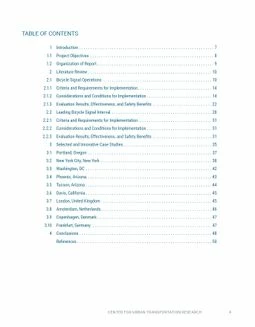
Maybe you can help with this problem. I'm using a khaki color (PMS 614) in InDesign in a few places throughout a document. It renders (i.e., is visable) in all places except one -- the footer. Why would a color export correctly on one page and not show up at all on another? Here's an example of what I'm seeing.
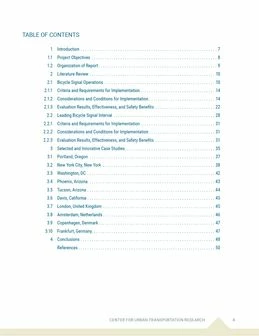


The first image (jpg) is the page in InDesign with the khaki colored footer in place and visible at the bottom.

The second image (exported to a PDF from InDesign) is the same page and the colored footer is not showing up. When I check Edit PDF in Acrobat, the shapes that make up this color border (a rectangle and turned square) are there in the PDF. Why aren't these shapes filled with PMS 614?


The only thing I know is different within the InDesign file is that this border is on master pages, not the individual pages of the document. There are pages with this color on actual pages (not masters) and they are visible in the PDF (see the cover & title page). But I've never had a color disappear because it's location in InDesign is on a master page. Any idea why this is happening? It's a first for me. I've exported to a PDF for print and interactive and neither will render the PMS color.


I'm using the most recent version (19.3) of InDesign. The exported PDF and InDesign files are attached for your review. Thanks for your thoughts.


Wendy
This topic has been closed for replies.
Correct answer rob day

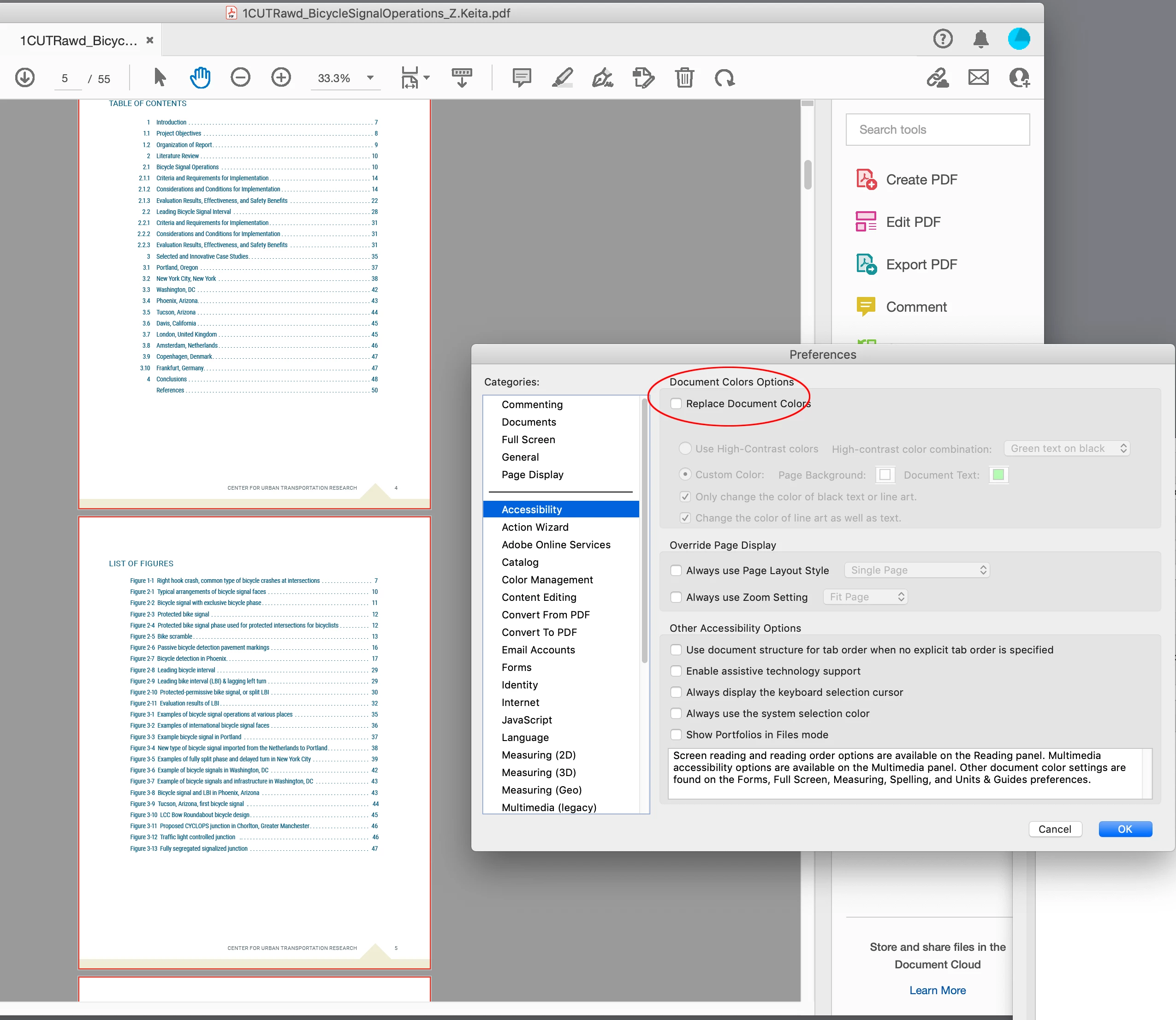
Hi @defaultzs73aqvyigab , If you are viewing the PDF in AcrobatPro check your Accessibility Preferences and make sure Replace Document Colors is not checked


2 replies

rob day
Community Expert
rob dayCommunity ExpertCorrect answer
Community Expert
April 11, 2024

Hi @defaultzs73aqvyigab , If you are viewing the PDF in AcrobatPro check your Accessibility Preferences and make sure Replace Document Colors is not checked


Participating Frequently
April 11, 2024

Yes! This fixed the issue! Thank you so much for answering my question. I was considering reinstalling InDesign to clear any presets for exporting but wasn't sure if it was an InDesign issue. I'm using a Mac I did not set up myself, so this just stumped me. Thanks for helping me move forward!

jmlevy
Community Expert
Community Expert
April 10, 2024

I exported your file without any problem

But did you see that you are using 6 spot colors? And among these 6, 2 are named “menu 1” and “menu 2”. And your PMS 614 has been converted to CMYK.

Brad @ Roaring Mouse
Community Expert
Community Expert
April 11, 2024

If you don't intend to output spot colors (which I don't think you do) I hvae no qualms about the various PMS being defined as CMYK, However, you might just change all your spot colors to process via the Ink Manager (in your Swatch panels), to keep them from showing up in your PDF.


The bigger concern for me is: If you are intending to actually print this document, you do not have proper bleeds in your file, so any object that goes to edge of the page has to be extended accordingly. e.g. your bottom footer bar needs to extend 1/8" (typically) past the edge of the page.

Turn on bleed in your Document Setup.

Participating Frequently
April 11, 2024

I appreciate your input, but please know I understand how to set proper bleeds, etc. As you suspected this is not being printed. It's simply a mock up. So my biggest concern is why any color would drop out upon export. Any ideas? I'm considering reinstalling InDesign to clear any presets for exporting that may be causing the issue. I'm using a Mac that I did not set up myself.