
Known Participant
October 10, 2021
Answered

color live preview

  • October 10, 2021
  • 1 reply
  • 1340 views

Hi, is it possible to have the color preview in InDesign, like in photoshop.


When I want to select a color for my text, I can only choose a color in the color wheel, and then click apply to see the result and estimate whether I like it in context or not.


In photoshop, I can see the result in the screen while I'm moving the mouse around the color wheel, which is way more efficient because I can see all variations and stop on something I like instantly.


I've seen this option in some color wheels in InDesign but most of the time this is not an option, is that normal ?

Is there a way to have instant live preview for all color wheels ?


Cheers.
 

This topic has been closed for replies.
Correct answer rob day

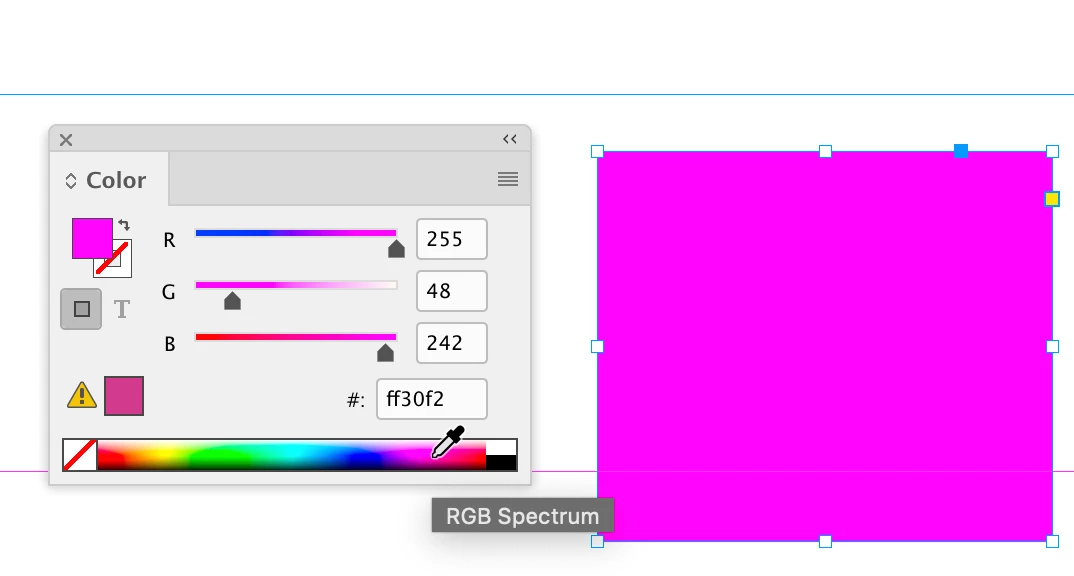
You can’t do it with the Color Picker, but the Color Panel set to RGB, Lab, or CMYK mode will show live changes to a selection’s fill or stroke. You can also use Swatch Options to make a live global color change with color sliders when Preview is checked.


1 reply

Geоrge
Legend
October 10, 2021

You can use a trick with split window


https://creativepro.com/parts-document/


Remember, never say you can't do something in InDesign, it's always just a question of finding the right workaround to get the job done. © David Blatner
Known Participant
October 10, 2021

Thanks, but I don't see how the split window feature is related to my problem. I probably didn't explain correctly my problem.


Here is a screenshot:


where we can see a text in green on the page. To change the color I open the color picker, but as I'm dragging the mouse inside the color picker I don't see the text color change, and that's my problem.

This means I'm forced to click ok to see the color change.


In photoshop, I would be able to see those color changes while dragging the mouse inside the color picker, which is a much more efficient workflow.


Hopefully I did a better job at describing my problem.

Cheers.


rob day
Community Expert
rob dayCommunity ExpertCorrect answer
Community Expert
October 10, 2021

You can’t do it with the Color Picker, but the Color Panel set to RGB, Lab, or CMYK mode will show live changes to a selection’s fill or stroke. You can also use Swatch Options to make a live global color change with color sliders when Preview is checked.