
Known Participant
July 26, 2021
Answered

Color OTF font changing color on printer's proofs

  • July 26, 2021
  • 14 replies
  • 10856 views

I created an icon font with colors (OTF) using Fontself for Illustrator so I could easily apply colored bullets to a book I was working on. Everything looks great in InDesign, Acrobat, and printed on our color printers, but when I sent the books off for printing, the proofs came back with all the icons in different colors than they appear in my files. The printer said they are different CMYK values after running them through their prepress. I can't figure out how to fix it short of finding each and every one of them in the six books and converting them to outlines manually.

I'm open to suggestions on how to quickly fix this problem so that these books can be printed. Maybe a specific color preset when I make the PDFs? We are currently converting to US Web Coated SWOP V2 on export.  Is there a way to force InDesign to convert graphic fonts to outlines when exported to PDF?
This topic has been closed for replies.
Correct answer Brad @ Roaring Mouse

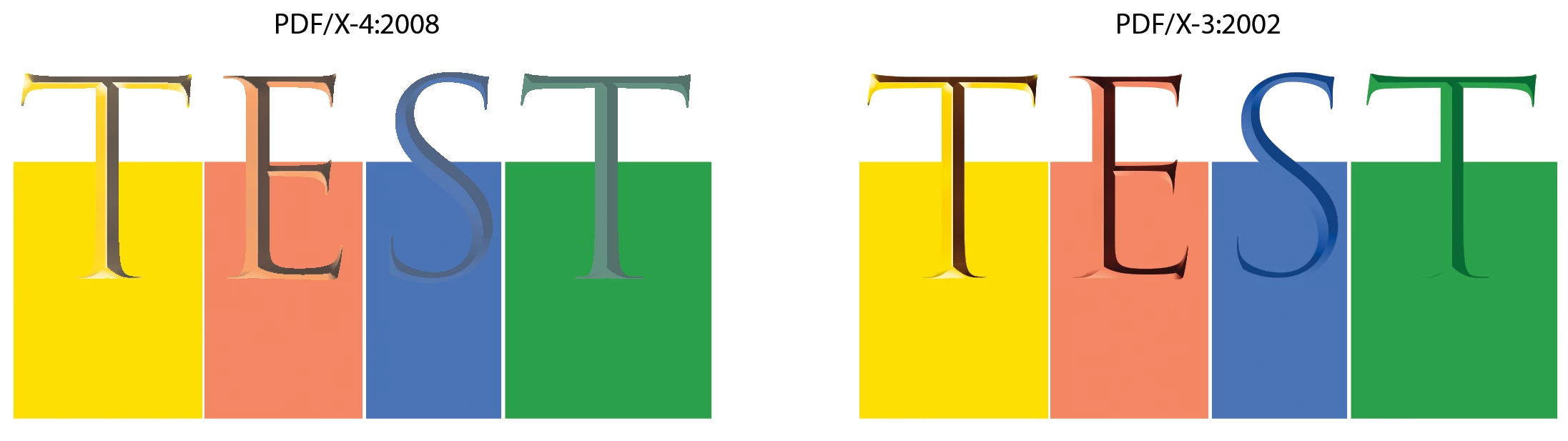
So, I've narrowed it down to an issue around the Inclusion of a Destination Profile in the PDF export.

I discovered that saving to PDF/X-4:2008 (2010), does not seem include the desination profile when Output is set to Convert to Destination, despite it actually saying so in the greyed out menu. This indeed might be a bug.

Downgrading to any of the standards below that one seem to work fine, including having "None" set as a Standard, as long as the Include Destination Profile is selected.


So, you should be able to save yourself some work/time by exported a PDF using a different standard.


14 replies

Known Participant
July 26, 2021

Thanks for all the replies. I want to reiterate that while I am interested in understanding why the colors are coming back wrong in the proof, I'm more interested in finding out a quick way to repair my print files so that they output correctly. These books are overdue by more than a month, and I really need to get them printed. This color issue is a massive headache that I need to fix ASAP! Believe me, if using a color SVG OTF is the problem, I will never do it again, but I need to find a way to fix six books as quickly as possible. Manually changing every single one of the icons into a graphic with an assign CMYK value in InDesign is going to be a very costly repair in time that I don't currently have at my disposal. I'm hoping someone knows a way I can fix the color values in the PDFs (possibly in Acrobat) to save me that time. Thanks again!

rob day
Community Expert
July 26, 2021

One clue might be the icons in your provided PDF inspect in AcrobatPro as  Filled Text Type 3, with the fill as 100% black 0|0|0|100


The Separation Preview shows the PDF/X-4  separation values as 0|85|78|0:


The printer’s proof shows the icons as Filled Paths not text, and both the Object Inspector and the Separation preview have the fill color as 0|56|60|14 which considerably diffferent than your intended color. It looks like they converted the font to outlines. When I do that in AcrobatPro the CMYK values change to the onwanted CMYK values. No idea why that happens.


Also the printer‘s proof is not  PDF/X compliant—it has no Output Intent profile. 


Known Participant
July 26, 2021

Thanks for the analysis!


Can you see if this page will run through your fixes without changing colors? This would be a work-around for me, but slightly less time-consuming. I applied the appropriate colors to the glyphs in InDesign. I can do the rest with six find/changes with the six books all open if this fixes the prepress issue. 

Community Expert
July 26, 2021

Hi DKingDesigner,

the colors in a color font are in RGB, SVG technology does not provide CMYK colors, and must be converted to CMYK for printing purposes. That's exactly what you see in your exported PDF.


Regards,
Uwe Laubender

( ACP )

Known Participant
July 26, 2021

Yes, but the CMYK is correct in MY exported print-ready PDF. But then the proof coming back from the printer has the colors wrong, so that's why I'm confused. How can it be right in every way I can test it on my files, but the printer is somehow processing the file and coming up with the wrong colors. 

Brad @ Roaring Mouse
Community Expert
July 26, 2021

Can you supply a PDF of a sample set?

rob day
Community Expert
July 26, 2021

and maybe the printer’s returned "proof" PDF as well as your supplied PDF.

Known Participant
July 26, 2021

Sample pages attached as requested. The drabber one is the proof. The icons are an SVG Open Type font. 

Eric Dumas
Community Expert
July 26, 2021

Hi,

Can you include a screenshot of the swatches palette?

Have you tried Window > Separations preview panel? turn on separations from the drop down and place your cursor on your bullet points. If the colour values are correct, you know it is how you processed your pdf, otherwise you can apply the correct colour from your swatch panel.


You can also check what's happening to your colours in Acrobat, using the colour seperation. It will tell you what 'inks' are used to cvreate the colour your cursor is hovering.


Known Participant
July 26, 2021

The color swatches in ID will not help as the fonts are color fonts (fonts made with color) rather than having color applied to them in ID. I have checked the color separation in Acrobat, and on my PDF files the color values are correct, but in the proof PDFs they are completely different (per the screen shot I provided). That's why I'm so puzzled. It looks absolutely correct on everything on my end, but the printer says they aren't processing as the color I'm sending them. The only thing I can think of is that their prepress doesn't support colored fonts and maybe the SVG info on the font glyphs is being converted to RGB and back to CMYK as a different value. I need to find a way to prevent that from being an issue so the output on their end is the correct CMYK.