markm7717170
Participating Frequently
December 12, 2018
Answered

Color settings for commercial printer for newbies with ICC

  • December 12, 2018
  • 5 replies
  • 2509 views

Hi, I use Indesign to create documents (brochures, cards, posters) that a local company prints for me. The printed proofs often look quite different from the PDF. For example, a number of photos were too yellow or red. I realize that I can never get what I see on the screen to predict perfectly what comes from that printer, but I must be able to get closer.

I use the Adobe Creative Cloud and a very new iMac. The ICC profile for the commercial printer is GRACoL2013?CRPC6.icc.icc. What do I need to change in Indesign (or Bridge, Photoshop, Lightroom) and what display profile should I choose on my iMac to ensure that what the commercial printer produces is as close as possible to what I see on the screen? There are so many items on the Color Settings page for these apps, and I just don't know what should be set to what. I am not well-versed in this at all, and I can't seem to find a clear, comprehensive explanation of what I need to do (and how that might implicate other settings in other Adobe apps).
This topic has been closed for replies.
Correct answer rob day

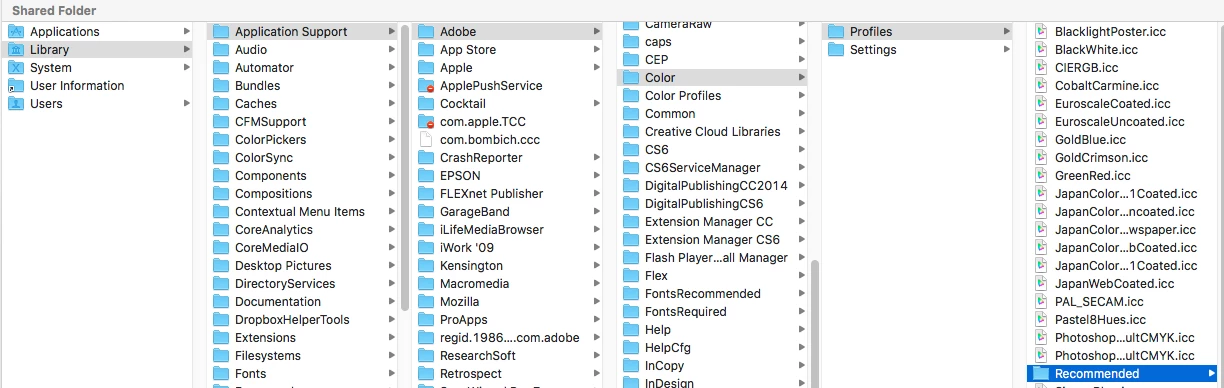
Messer/Library/Application Support/Adobe/Color/Settings doesn't exist, or I can't find it on my Mac,

Do I need to "load" it from Indesign color settings? I tried that, but it said that some values were outside the parameters and default values would be substituted.


Here are detailed instructions on revealing the hidden Library

https://www.google.com/search?source=hp&ei=0ccSXLKAHM61ggehkIXoCg&q=os+x+user+library+folder+hidden&oq=OSX+user+library&…

There is a difference between saved Color Settings—a .csf file that remembers all of the settings in your Color Settings dialog—and the CMYK color profile you received from your printer.

You can, but don't have to, create the Color Settings file when you click the Save button in Color Settings—it is similar to saving a Document, Printer, or PDF preset.

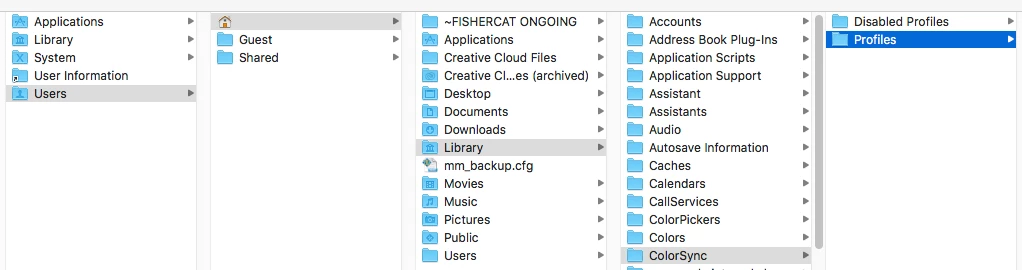
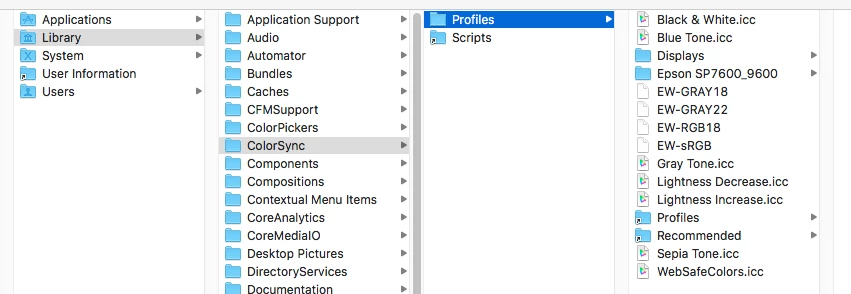
To use you printer's .icc CMYK profile you have to move it into one of the system's profile folders, which is similar to installing a type font.

Any of these should work:

This Recommended folder makes the profile only available to Adobe apps:

5 replies

Legend
December 13, 2018

/Library/Application Support is a hidden folder, but an important one. Use Go > Go to folder  in Finder.

rob day
Community Expert
Community Expert
December 12, 2018

The ICC profile for the commercial printer is GRACoL2013?CRPC6.icc.icc. What do I need to change in Indesign (or Bridge, Photoshop, Lightroom) and what display profile should I choose on my iMac to ensure that what the commercial printer produces is as close as possible to what I see on the screen?

Your Color Settings should look like this:

You can save these settings and also use them in PS and AI, but keep in mind Color Settings are your color preferences for future documents and don't usually have an affect on existing documents. You can check an existing document's assigned .icc profiles via Edit>Assign profiles...

The monitor profile is equally important. For CMYK colors and images, both the assigned CMYK profile and the monitor profile you select in the OS have an affect on the displayed color. For RGB colors and images the assigned RGB profile is used.

If you don't have access to a hardware display calibrator, OSX has a software calibrator that runs through an subjective screen test and generates a monitor profile. Go to System Preferences>Displays>Claibrate. If you hold down the Option key when you click Calibrate. You will get advanced options, which will allow you to select the display gamma as well as the temperature.

The fact that you are getting a yellow cast might be from the out-of-the-box default monitor calibration being too blue—I would consider setting the white point to 5500K in the calibration process. GRACol 2013 also has a slightly warmer gray balance than the default US SWOP Coated. I don't think it would hurt to try a custom calibration/monitor profile, and then open a file that's been printed, assign GRACol 2013 see if you get a better match.

Do you deliver CMYK PDFs?

markm7717170
Participating Frequently
December 12, 2018

CoatedGRACoL2013 isn't an option in the dropdown menu. Thank you for these suggestions. I'll take another look in the morning.

rob day
Community Expert
Community Expert
December 15, 2018

Yay. Lots of help from good people, especially you. Thank you. I dropped the extra .icc, used the instructions to find and add it to the Recommended folder. I went into Indesign and selected Adobe RGB 98 and the new printer profile in working spaces, saved it with the name of the commercial printer, then that option was available to select in Bridge, which should "control" these settings for the whole creative cloud, right?

Another newbie question: I now have iMac Calibrated to white point 5500 as my monitor Color Profile. What is the relationship between this setting and the settings in Adobe? I suppose I'm asking if I get a proof back from the printer and the color all leans blue, should I then adjust the white point of my display so that what I see in the digital PDF looks closer to what I see on the proof (ex., both too blue)? It makes sense to me to do this because then what I see on screen would more closely match the proof, and from then on, any adjustment I make to color to make a file look correct on the screen would more likely make the final printed product look correct.

Or should I choose a different display color profile?

Ultimately, I want to be as confident as possible that what looks right on the screen will look right on the printed product.

And if I want to print something on my office printer after I've packaged the ID, what should I do to get a good printout? Right now, Adobe Color Management and Adobe RGB 98 are selected in the advanced section of the Acrobat print box. Are there settings for my IBM Versacolor printer that I can load somewhere to select when I print?

Thanks so much for the help. I don't know if I ever would have found what I needed by wading through Adobe and other online resources.


Another newbie question: I now have iMac Calibrated to white point 5500 as my monitor Color Profile. What is the relationship between this setting and the settings in Adobe?

The Adobe print apps use your System generated monitor profile to convert color for a soft proof preview. So a CMYK color has to be converted into your monitor’s RGB space in order to be displayed. The accuracy of the display depends on both the source CMYK profile and the destination monitor profile. If your printer provides you with a GRACol profile, but the press is not really running the profile’s standard, that would affect the CMYK color’s preview accuracy.

The monitor profile can also affect the accuracy of the CMYK preview, iI you choose a profile that has a 6500k white point and a 1.5 gamma but the display is really calibrated to 5000k and 2.2 gamma, that would also make the CMYK preview less accurate.

You can get hardware calibrator that measures the display response and generates a monitor profile Based on that measurement.

The CMYK profile also affects the CMYK numbers on a color conversion from RGB to CMYK

Derek Cross
Community Expert
Community Expert
December 12, 2018

This is a useful online video tutorial on Color Management (you can get a 30-day free trial):

InDesign: Color Management

Legend
December 12, 2018

Don’t ask the printer what display profile to use. Calibrate your monitor and use that profile. The monitor profile is what allows your computer to show you correct colour; without it, everything else is pointless. 

BobLevine
Community Expert
Community Expert
December 12, 2018

Ask the printer.

markm7717170
Participating Frequently
December 12, 2018

They gave me the ICC profile but had no other recommendations.