
Known Participant
December 31, 2024
Question

Color setup error

  • December 31, 2024
  • 2 replies
  • 1634 views

Hi, 

I was informed by the print company that I should use PSO Uncoated v3 (FOGRA52). I went through all of the steps to download it, but when I select it in InDesign I get this error. Why is this happening and is there a way to fix it or a workaround. 
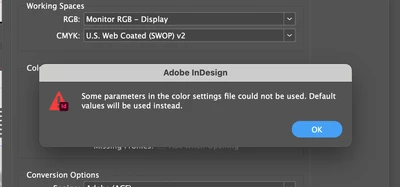
Thank you very much!

2 replies

Community Expert
January 2, 2025

Hi @Mateomono ,

the printer wants a PSO Coated V3 profile.

And NOT an uncoated one.


Did the printer provide a *.csf file?

That should contain everything you need to get this job done correctly.

Make the *.csf file available here in the forum; provide a download link from a dropbox account or a similar service and we can see into the issue.


Thanks,
Uwe Laubender
( Adobe Community Expert )


MateomonoAuthor
Known Participant
January 2, 2025

@Laubender 
Thank you for your response! For my project I need uncoated. The image is just an exmple on their website. They dint provide a .csf file. What is that and how is it different to Icc?

Community Expert
January 2, 2025

Hi @Mateomono ,

a csf file contains everything. An ICC color profile file PLUS all other options you can save with e.g. PhotoShop when you set up a new condition how color should be managed. So I would ask for a *.csf file from the printers.


Regards,
Uwe Laubender
( Adobe Community Expert )

Srishti Bali
Community Manager
Community Manager
December 31, 2024

Hi @Mateomono 


Thank you for reaching out! You might find this similar thread helpful: InDesign CC 2017 Color Management Issue. It includes quick tips on color management in InDesign and steps to resolve related issues.

I hope this helps! Let me know if you need further assistance.


Regards,

Srishti

MateomonoAuthor
Known Participant
December 31, 2024

@Srishti Bali Thank you for your respone, but its still not very clear how to solve this issue.

MateomonoAuthor
Known Participant
January 2, 2025

@Abhishek Rao 

Thank you for your response! I was able to get it to look like this; however, in the "settings" dropdown, I can't change it. In the example provided by the printer, they have a different value there. Does this even matter? The PSO Uncoated v3 (FOGRA52) is not selectable (doesnt appare) from the dropdown.

Thank you for your help!


@Abhishek Rao  
This is the example from the printer.
P.S. In this example, a different color profile is being used.