
Known Participant
December 31, 2024
Question

Color setup error

  • December 31, 2024
  • 2 replies
  • 1675 views

Hi, 

I was informed by the print company that I should use PSO Uncoated v3 (FOGRA52). I went through all of the steps to download it, but when I select it in InDesign I get this error. Why is this happening and is there a way to fix it or a workaround. 
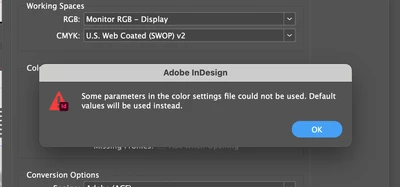
Thank you very much!

2 replies

Community Expert
January 2, 2025

Hi @Mateomono ,

the printer wants a PSO Coated V3 profile.

And NOT an uncoated one.


Did the printer provide a *.csf file?

That should contain everything you need to get this job done correctly.

Make the *.csf file available here in the forum; provide a download link from a dropbox account or a similar service and we can see into the issue.


Thanks,
Uwe Laubender
( Adobe Community Expert )


MateomonoAuthor
Known Participant
January 2, 2025

@Laubender 
Thank you for your response! For my project I need uncoated. The image is just an exmple on their website. They dint provide a .csf file. What is that and how is it different to Icc?

Community Expert
January 2, 2025

Hi @Mateomono ,

a csf file contains everything. An ICC color profile file PLUS all other options you can save with e.g. PhotoShop when you set up a new condition how color should be managed. So I would ask for a *.csf file from the printers.


Regards,
Uwe Laubender
( Adobe Community Expert )

Srishti Bali
Legend
December 31, 2024

Hi @Mateomono 


Thank you for reaching out! You might find this similar thread helpful: InDesign CC 2017 Color Management Issue. It includes quick tips on color management in InDesign and steps to resolve related issues.

I hope this helps! Let me know if you need further assistance.


Regards,

Srishti

MateomonoAuthor
Known Participant
December 31, 2024

@Srishti Bali Thank you for your respone, but its still not very clear how to solve this issue.

Abhishek Rao
Community Manager
Community Manager
January 2, 2025

@Abhishek Rao I followed all of the steps.  Still no success. 

On thing that came to mind: it seems like the color profile that i need to download is pretty old. Might this be the issue?


Hi doubleM116,


Thanks for the update!


It’s possible the older profile might have compatibility issues. Please try this:

1. Paste the Profile
Place the unzipped .icc or .csf file into these directories:

- /Library/Application Support/Adobe/Color/Settings/Recommended

- /Library/Application Support/Adobe/Color/Profiles/Recommended

2. Restart
Restart your system and InDesign after making these changes.

3. Retest
Try loading the profile again and check if it resolves the issue.

Let me know how it works!


Best,
Abhishek Rao