

Answered
Colors not matching between Photoshop and InDesign
Hello, would anyone please provide some insight into a problem I'm having?
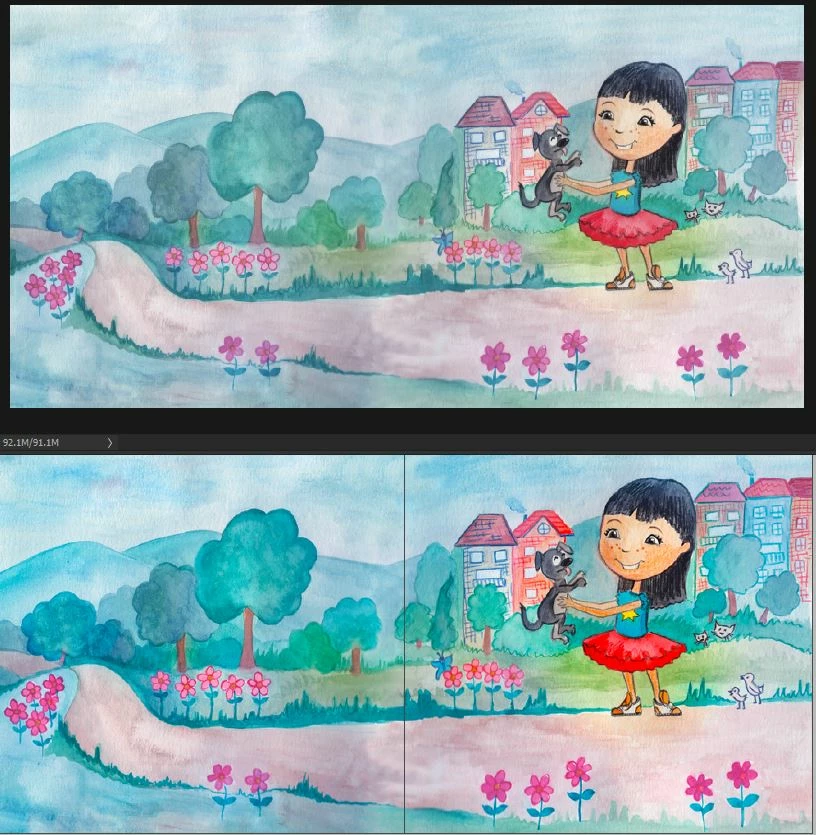
I have Photoshop and InDesign CC both synced in color settings. Both are set to North America General Purpose 2. Opening an illustration in Photoshop, the colors look dull. Placing the same illustration into InDesign, the colors look too saturated. Here's a screenshot. Same illustration--top is in photoshop, bottom is in InDesign. I've tried importing both RBG and CMYK versions, and same thing happens. I don't recall this much of difference happening before, so not sure what's happened.
The monitor is calibrated with Xrite Color Munky.
Which colors do I trust will print correctly...the ones from photoshop, or the ones from InDesign? Thank you for any help....
 AdChoices