
Colors synced but InDesign colors not matching Photoshop files
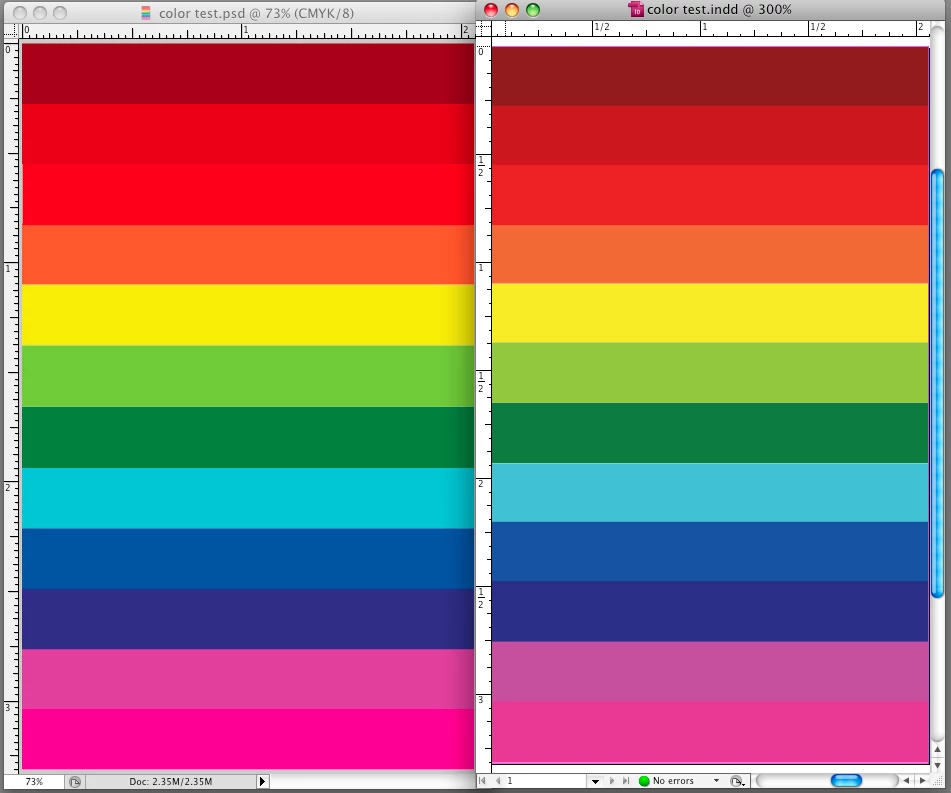
I'm hoping someone can please help me get my InDesign/Photoshop colors to match. I am on Adobe CS5 and am noticing a big color change (especially with red hues) on my computer monitor between my Photoshop and InDesign files.
My colors are all synced to North America General Purpose 2 through Bridge but the color in my Indesign files never match my Photoshop files on my computer screen. (I'm honestly not sure how they compare in print.) The color profiles match in both Photoshop and InDesign and I've also tried changing my color profiles on both programs but that doesn't fix the issue either. I've noticed my red/pink/purple hues seem to be off quite a bit - much more than the other colors. Any ideas on how I can fix it so my colors match from Photoshop to InDesign? I'd really like to get the issue fixed because when I produce a PDF from the InDesign file the PDF matches InDesign but I want it to match the original Photoshop file. If it helps, I'm on Mac OS 10.5.8 and running Creative Suite 5 (InDesign CS5 Version 7.0.4, Photoshop CS5 Version 12.0.4 x64, Adobe Acrobat 9 Pro version 9.4.5, and Adobe Bridge CS5 Version 4.0.4.2).
Also, I probably should mention I have 2 computer monitors hooked up (one mac, one pc). When I compare the two files on the mac screen, the colors (especially the reds) are way off. When I compare them on the PC/Dell monitor the colors are off, but not nearly as much. (However, the color of the Dell monitor in general isn't good.. or true to print). I'm assuming the Mac monitor probably produces a greater range of color and that could be the reason for seeing a greater contrast in color on the Mac monitor vs. the Dell monitor but I'm not sure.
I've attached a screen shot that compares the same file in Photoshop vs. InDesign on a Mac monitor. Anyone have any ideas? I use reds a lot in print so I'd really like them to match!
 AdChoices