Inspiring
March 25, 2014
Answered

Column for heading, column for body text?

  • March 25, 2014
  • 2 replies
  • 4109 views

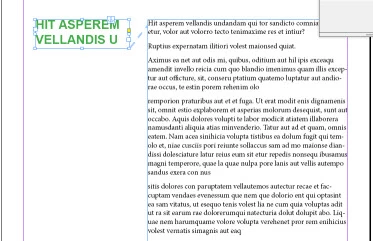
Hiya, I am wanting to have the headings in one column and the body text in the other, like in the image below, the text will need to flow in case there are edits later. Does anyone know how to go about doing this? I am using Indesign CC

Many thanks

Mel

Hie

This topic has been closed for replies.
Correct answer Salah Fadlabi

Do it with anchor object, and make object style from this anchor object.

2 replies

Inspiring
March 25, 2014

Thanks so much, that sorted it nicely.

Obi-wan Kenobi
Legend
March 25, 2014

Hi,

There is often another way to do it differently ... No anchored block, no script... only ID and styles! 

Legend
March 26, 2014

I think this was done by uing a single column frame and adding a large left indent to the main body text style, then adding a similar larg right indent to the heading style, along with a negative baseline shift equal to the leading, but Obi-wan will need to confirm.

If that's correct, though, there is a problem if the heaing falls at the top of a column. It will leave a one-line gap.


I was able to work out that much, but when I apply the blue style, it doesn't move down to be beside the black text. It's not baseline shift, because in the video, single and multi-line paragraphs all line up with the black text with a single style.

Salah Fadlabi
Salah FadlabiCorrect answer
Inspiring
March 25, 2014

Do it with anchor object, and make object style from this anchor object.