Known Participant
July 28, 2025
Answered

Compressing high-res PDF, max.

  • July 28, 2025
  • 8 replies
  • 926 views

Hello there 😊


I am having some troubles compressing PDF files:

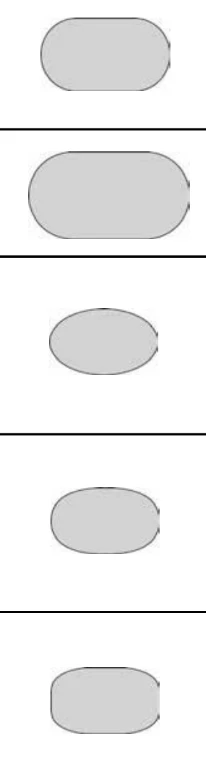
  • I have  to export file from InDesign as high-res, else it cuts some graphic so it will not show correct. See attached.
  • After that files is about 65 MB, but client wants it to be below 10 MB.
  • I have tried in Acrobat, to compress file. Also online on adobe.com, and pdfcompressor


Any suggestions how to do this?

Best from Jeppe
 

Correct answer rob day

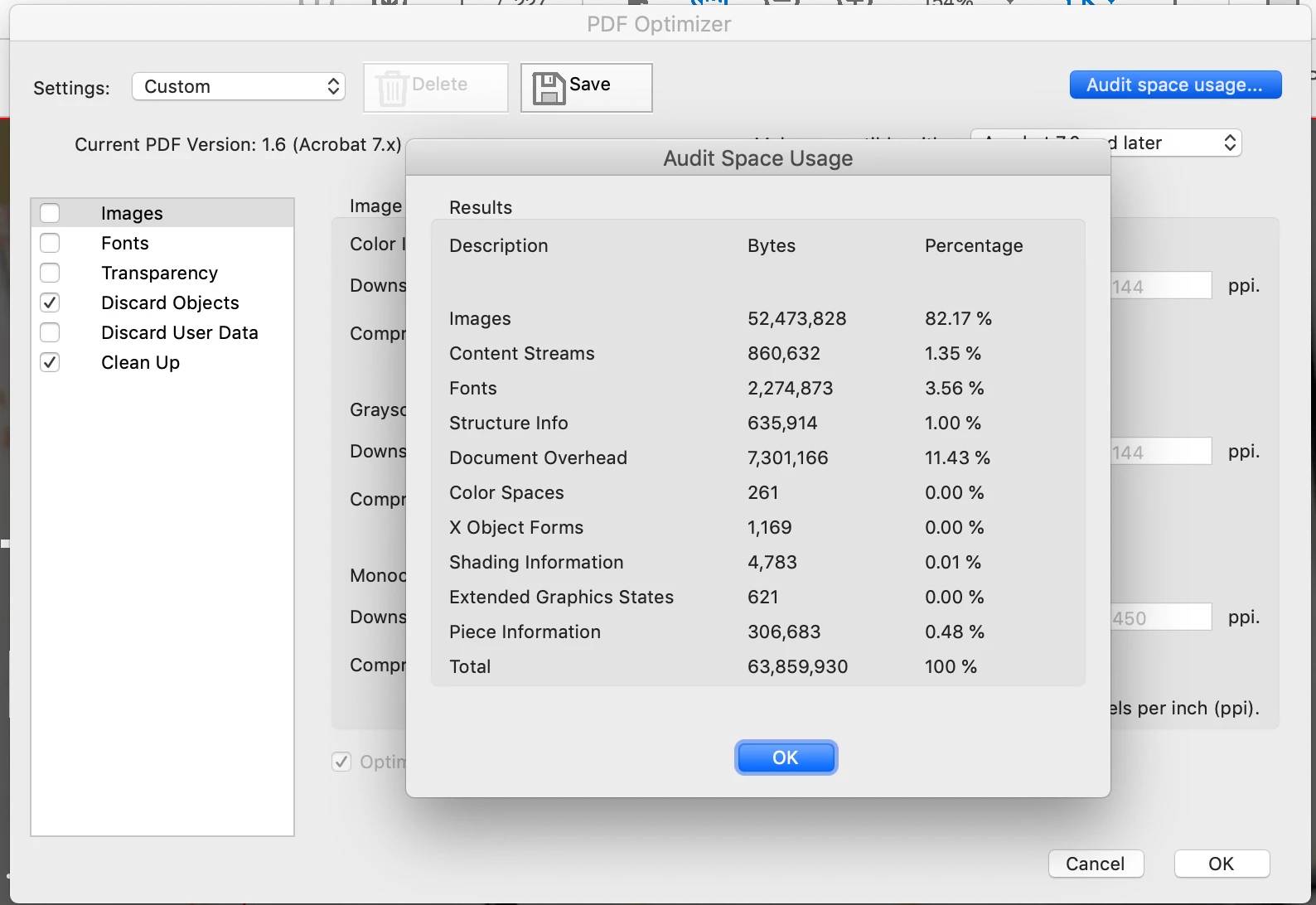
If this is for print 10MB would be an unreasonable request for a 228 page document—85% of the usage is images:


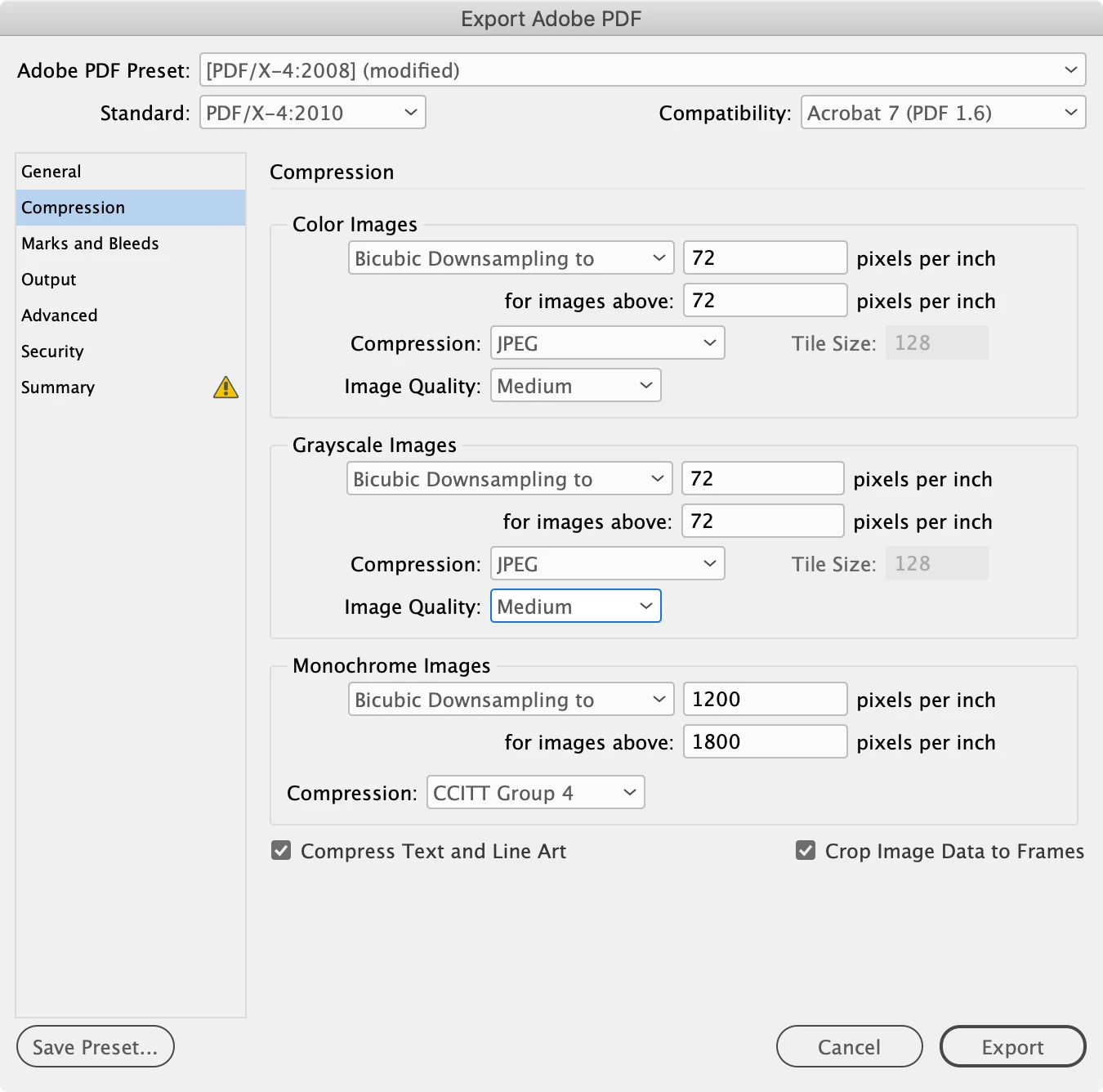
If it is for screen display the best you can do is downsample and compress the images on Export. Something like this


8 replies

BobLevine
Community Expert
Community Expert
July 31, 2025

I admire everyone's efforts here, but honestly, getting this thing down to 10 MB is an exercise in futility. There's no way to do this without destroying the quality.


The OP, AFAICT, still hasn't explained why it has to be 10MB. 

Brad @ Roaring Mouse
Community Expert
Community Expert
July 31, 2025

Indeed.... the client asking for a high-res PDF under 10MB is ludicrous. In my world (prepress) we want MORE, not less. I'd rather get a non-downsampled, no compression 4GB file than have a compromised version just to get it "smaller".

Brad @ Roaring Mouse
Community Expert
Community Expert
July 30, 2025

Two things that might help:

1. Change your compression settings from Bicubic Downsampling to Average Downsampling. This might help on the "clipping" you're seeing because of the different technical ways each routine works.

2. the "for images above" should not be the same as your desired. This can cause unnecessary downsampling on images that are slightly above 150ppi will make things blurrier. Normally, this would be 50% more than the desired *e.g. 225ppi".

Inspiring
July 31, 2025
quote

1. Change your compression settings from Bicubic Downsampling to Average Downsampling. This might help on the "clipping" you're seeing because of the different technical ways each routine works.


You're bang on with that advice: out of curiosity, I just tried all three options on various scaled bitmaps that a client of mine had flagged as seeming 'cropped' in proofs. Bicubic might be great for some images - excellent compression vs apparent distortion in a photograph - but it's awful for linework and solid colour.

Average did far better, but still slightly fudges the righthand edge of smaller bitmaps. Subsampling turned out the best for linework and solid colour, albeit with more apparent jaggies and a larger file size.

Brad @ Roaring Mouse
Community Expert
Community Expert
July 31, 2025

"but still slightly fudges the righthand edge of smaller bitmaps"

It's the anti-aliasing. Since your small button has a fixed dimension, it can't create proper anti-aliased objects past the right/bottom edge of the graphic so it appears to have a harder edge there. Bicubic is even worse, because it requires a grid of pixels as a sample (e.g. a 4x4) then it creates a new value in the downsampled image... however, when it gets to the right or bottom edge, if it doesn't have that full 4x4 grid to sample, it duplicates the last available data (i.e te last column/row of pixels) to make up the sample size so you can see that it actually looks ike it's repeating a copy of the last row/colum of pixels... Most noticebale on small objects.

If your buttons were vector, this wouldn't happen, of course. 🙂

rob day
Community Expert
rob dayCommunity ExpertCorrect answer
Community Expert
July 29, 2025

If this is for print 10MB would be an unreasonable request for a 228 page document—85% of the usage is images:


If it is for screen display the best you can do is downsample and compress the images on Export. Something like this


BobLevine
Community Expert
Community Expert
July 29, 2025

Getting back to the original analogy, that'll create mashed potatoes. 🙂

Inspiring
July 28, 2025

Make your pictures with "potatoes" higher and wider. Keep some empty pixels around "potatoes" (in picture file, not only in InDesign frame), so they are not to the edges. So InDesign when downsampling, has info about empty pixels around "potatoes" - and won't invent meaningless pixels damaging your design.

Joel Cherney
Community Expert
Community Expert
July 28, 2025

Just a guess, here, but: is your screenshot showing .png or .jpg placed in InDesign, that could be recreated as a vector object?

Known Participant
July 29, 2025

Hi @Joel Cherney 

Yes, it would work. But it is about 200 files to go through ...

Inspiring
July 30, 2025

That's as maybe, but it's very much a case of using the right tool for the job. A set of vector objects - which could even be created within InDesign rather than Illustrator, if you wish - would dramatically reduce the file size, and will look essentially the same at any size/resolution.


Bitmap files, particularly high-resolution bitmap files, will tend to have a more significant impact on the final PDF file size. Compression will always impact on the quality of their appearance to a greater or lesser degree. For simple outline/fill shapes, they're a waste of resources.

rob day
Community Expert
Community Expert
July 28, 2025

Hi @jeppe_klausen , Can you share the PDF?

Known Participant
July 29, 2025
Dave Creamer of IDEAS
Community Expert
Community Expert
July 29, 2025

I was able to get the PDF down to 30 MBs. It didn't look like it had much quality loss. 

At 200+ pages with lots of graphics, I wouldn't expect much more than that. 

Is your client trying to email this catalog? The 10 MB limit for emails is an artificial limit and actually outdated by today's standards.


David Creamer: Community Expert (ACI and ACE 1995-2023)
Dave Creamer of IDEAS
Community Expert
Community Expert
July 28, 2025

What settings did you use to make the PDF from InDesign?

What settings did you use to compress it in Acrobat?


David Creamer: Community Expert (ACI and ACE 1995-2023)
Known Participant
July 29, 2025

Hi @dAvE

Settings in InDesign is screenbased.

Settings in Acrobat, was using the compress file, under Convert – Compress a PDF – Advanced Optimization.

BobLevine
Community Expert
Community Expert
July 28, 2025

You can't stuff 5 pounds of potatoes into a one pound sack. At some point, you have to give up quality for size.