
rossd69494681
Participant
July 16, 2019
Answered

Convert old CS4 script to newer InDesign version?

  • July 16, 2019
  • 3 replies
  • 989 views

I have a yearly job for a client. Its a huge index that has a script that was created when we were still using InDesign CS4 years ago. I've tried using the script in SC5 and above and it doesn't work. Is there any way of converting the script to work in newer versions?

Thanks!
This topic has been closed for replies.
Correct answer Kasyan Servetsky

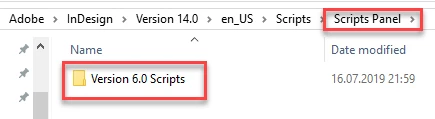
Try to create the Version 6.0 Scripts folder in the Scripts Panel folder (CS4 is version 6).

Place your script into this folder and run it from there. This should force a newer version of InDesign to use older (CS4) scripting terms.

You say: "it doesn't work", but this means nothing to us.

How exactly it doesn't work?

  • You run the script and nothing happens.
  • You run the script and get an error. (Then posting a screenshot may give us a hint)

Ideally, post the script and a file for testing.

— Kas

3 replies

Kasyan Servetsky
Kasyan ServetskyCorrect answer
Legend
July 16, 2019

Try to create the Version 6.0 Scripts folder in the Scripts Panel folder (CS4 is version 6).

Place your script into this folder and run it from there. This should force a newer version of InDesign to use older (CS4) scripting terms.

You say: "it doesn't work", but this means nothing to us.

How exactly it doesn't work?

  • You run the script and nothing happens.
  • You run the script and get an error. (Then posting a screenshot may give us a hint)

Ideally, post the script and a file for testing.

— Kas

rossd69494681
Participant
July 16, 2019

You are a life-saver!! Thank you so much. I put a new folder in the script folder named Version 6.0 Scripts and that DID indeed fix the problem.

Can't thank you enough!!!

Peter Kahrel
Community Expert
Community Expert
July 16, 2019

You can tell any version of InDesign that it should interpret a script in a user definable version. In this PDF:

https://www.adobe.com/content/dam/acom/en/devnet/indesign/pdfs/InDesignCS4_ScriptingGuide_JS.pdf

look for 'Script versioning'.

Legend
July 16, 2019

Hello rossd69494681,

Whats the error you're getting?........Can you post the code you're trying to get to work?

Regards,

Mike

rossd69494681
Participant
July 16, 2019

Sure! It's basically a script that places headings within the text at the top of columns. The job would be near impossible without it. But when I try using it in CS5 and above all the heads created from running the script get messed up with boxes stacked on to of each other.

Here is the text I copied out of the script itself. Thanks so much.

if (app.documents.length > 0) {

addColumnHeaders(app.documents[0]);

}

function addColumnHeaders(aDoc) {

var reqStyles = ["First-NoKeepWL", "First-KeepWL", "First-NoKeepWR", "HEADs-NoKeepWith", "First-KeepWR", "LetterBox"];

if (checkForIndexStyles(aDoc, reqStyles)) {

alert("Active document lacks styles needed by script"); return;

}

var indexStory = getIndex(aDoc);

if (indexStory == null) {

alert("Unable to locate index story in active document"); return;

}

deleteExistingIndexHeads(aDoc);

var myFrames = indexStory.textContainers;

var preHead = null;

for (var j = 1; myFrames.length > j; j++) {

// work from front because each new head moves contents of later frames

// first column is assumed to start with a letter box so is ignored

if (myFrames.contents == "") continue; // frame is empty

if (arrayContains(reqStyles, myFrames.paragraphs[0].appliedParagraphStyle.name)) continue;

var paraStyles = myFrames[j-1].paragraphs.everyItem().appliedParagraphStyle;

for (var k = paraStyles.length - 1; k >= 0; k--) {

if (arrayContains(reqStyles, paraStyles.name)) {

prevHead = myFrames[j-1].paragraphs.characters.itemByRange(0,-2).texts[0];

break;

}

}

if (prevHead == null) continue; // should never happen

var headFrame = myFrames.parent.textFrames.add({geometricBounds:myFrames.geometricBounds});

headFrame.textFramePreferences.firstBaselineOffset = myFrames.textFramePreferences.firstBaselineOffset;

headFrame.contents = "";

prevHead.duplicate(LocationOptions.atEnd, headFrame.parentStory);

headFrame.textFramePreferences.ignoreWrap = true;

headFrame.fit(FitOptions.frameToContent);

headFrame.label = "IndexHead";

headFrame.locked = true;

}

function deleteExistingIndexHeads(doc) {

var myFrames = doc.textFrames.item("IndexHead");

if (myFrames == null) return;

myFrames.locked = false;

myFrames.remove();

} // end deleteExistingIndexHeads

function getIndex(doc) {

setupFindText("^?");

app.findTextPreferences.appliedParagraphStyle = "LetterBox";

var myFinds = doc.findText();

if (myFinds.length > 0) {

return myFinds[0].parentStory; // index story

} else {

return null;

}

}

function checkForIndexStyles(doc, reqStyles) {

var actStyles = doc.paragraphStyles.everyItem.name;

for (var j = reqStyles.length - 1; j >= 0; j--) {

if (!arrayContains(actStyles, reqStyles)) return false;

}

return true

}

function setupFindText(find, change, wholeWds, caseSense, foots, hidLayers, lockedLayers, lockedStories, masters) {

app.findTextPreferences = null;

app.changeTextPreferences = null;

try { app.findTextPreferences.findWhat = find } catch(e) {};

try {app.changeTextPreferences.changeTo = change } catch(e) {};

app.findChangeTextOptions.properties = {

caseSensitive:(caseSense == null ? false : caseSense),

wholeWords:(wholeWds == null ? false : wholeWds),

includeFootnotes:(foots == null ? false : foots),

includeHiddenLayers:(hidLayers == null ? false : hidLayers),

includeLockedLayersForFind:(lockedLayers == null ? false : lockedLayers),

includeLockedStoriesForFind:(lockedStories == null ? false : lockedStories),

includeMasterPages:(masters == null ? false : masters)

}

} // end setupFindText

function arrayContains(anArray, anItem) {

for (var i = 0; anArray.length > i; i++) {

if (anItem == anArray) return true;

}

return false;

} // end arrayContains

} // end addColumnHeaders

Legend
July 16, 2019

Hello rossd69494681,

Start with the Indesign preferences between the version the script is working in and the newer version and make sure they match along with the style settings.

Regards,

Mike