
Copy link to clipboard
Copied
In 2022 I was able to open my InDesign file with InCopy, then I would export to Adobe PDF Print in order include notes as annotations. This allowed me to see my InDesign notes in the PDF comments. I'm now utilizing the InDesign 2023 and InCopy 2022 and it will not open. Error message received. Anyone know of another route to saving an InDesign file as a PDF with the Notes/Comments intact?
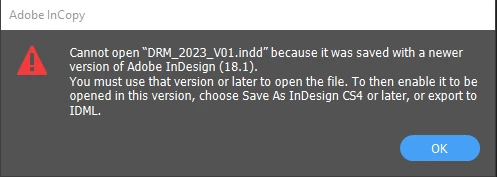
I'm unfaniliar with that InCopy feature. However, the error you're getting is because you need to update to InCopy 18.1. You're running InCopy 17.x, and it can't read a newer version.
Copy link to clipboard
Copied
I'm unfaniliar with that InCopy feature. However, the error you're getting is because you need to update to InCopy 18.1. You're running InCopy 17.x, and it can't read a newer version.
Copy link to clipboard
Copied
Thank you for your reply. InCopy v18.1 was not available for me until today (apparently I had to post an issue for it to become available to me - just kidding). Once I used IC 18.1 it did function properly. Thank you. As far as the InCopy feature to show notes in PDF here are the steps I found online: Open the InDesign file with InCopy > Go to File - Export - export as Adobe PDF Print > In the new window that appears check box to "include notes as annotations" > export.
- This is the only way I have been successful at showing my notes from InDesign to PDF for my non-tech savvy document reviewers at work.
Copy link to clipboard
Copied
I agree with @Steve Werner
As far as I know, importing annotations must be done with the same versions.
Copy link to clipboard
Copied
That's not the issue here. InCopy allows you to export the PDF and include notes as annotations. Why this hasn't been added to InDesign through all these years is a bit of mystery but it does work nicely from InCopy:
InCopy export to PDF dialog box.
Copy link to clipboard
Copied
BTW, I wrote about this a long, long time ago.
Got Creative Cloud? Use InCopy to Convert Notes to Acrobat Comments | CreativePro Network
Get ready! An upgraded Adobe Community experience is coming in January.
Learn more