
Participating Frequently
July 11, 2023
Answered

Converting logos and white colour for spot colour in Indesign document

  • July 11, 2023
  • 2 replies
  • 1714 views

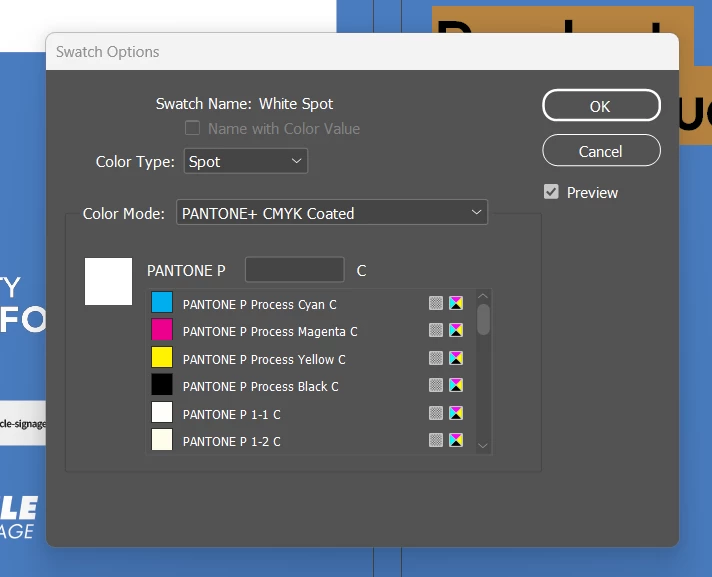
Hi, so I've created a catalogue, sent to print but they've said we need to provide the spot colours. Please dumb it down for me, how do I do this? Is this right? 

And I have a logo that needs to be spot, please help me out! And once I've figured this out do I export as normal?
 

Correct answer Derek Cross

Yes, this is not embossing, it's the application of a UV varnish to certain parts of your artwork.

(Check that your printer offers this service.)

This video will help you set up your InDesign document for the spot varnish: 

https://www.youtube.com/watch?v=Lo6087ejqIg

2 replies

Participating Frequently
July 11, 2023

Update, so the correct term i should be using is spot gloss colours.

" Spot Gloss is a flat, high gloss, clear coating which is applied to a selected area of your printed artwork. Spot UV is often used as a design technique to draw attention to a particular element such as a logo or as a creative background to give the appearance of texture." 

How do i set up my cover page so the printer knows which parts I want spot gloss applied to?

Derek Cross
Community Expert
Derek CrossCommunity ExpertCorrect answer
Community Expert
July 11, 2023

Yes, this is not embossing, it's the application of a UV varnish to certain parts of your artwork.

(Check that your printer offers this service.)

This video will help you set up your InDesign document for the spot varnish: 

https://www.youtube.com/watch?v=Lo6087ejqIg

Participating Frequently
July 14, 2023

Can you share the ID file and logo?


I'd be happy to, but it's massive. I've attached the logo, in colour and white. But here's some screenshots of the setup, the spot UV is showing as an extra plate. Then when I click off the artwork later, in the last image you can see what shows. So am I correct in assuming the text is set up correctly but it's the logo I need to fix?


Derek Cross
Community Expert
Community Expert
July 11, 2023

Are you sure the logo needs to include additional spot colours? That would be unusual because, apart from the additional cost of printing, the logo wouldn't be able to be reproduced accurately in use in media that's printed in CMYK such as the company's advertisements in magazines and so on. 

(By the way, opaque white can't be printed by most printing processes.)

Participating Frequently
July 11, 2023

We're wanting the logo and the white text on the cover to be raised - if that makes sense. So what's the best way to achieve this?

Derek Cross
Community Expert
Community Expert
July 11, 2023

You can create raised text/logo embossed effect in Photoshop or have it physically embossed, which you will need to discuss with your printer or finisher which methods they offer and how they'd like the artwork supplied (and check the extra cost with your customer!).