
adamc60674033
Participant
August 17, 2023
Question

Cope Paste issue from .txt to InDesign

  • August 17, 2023
  • 2 replies
  • 331 views

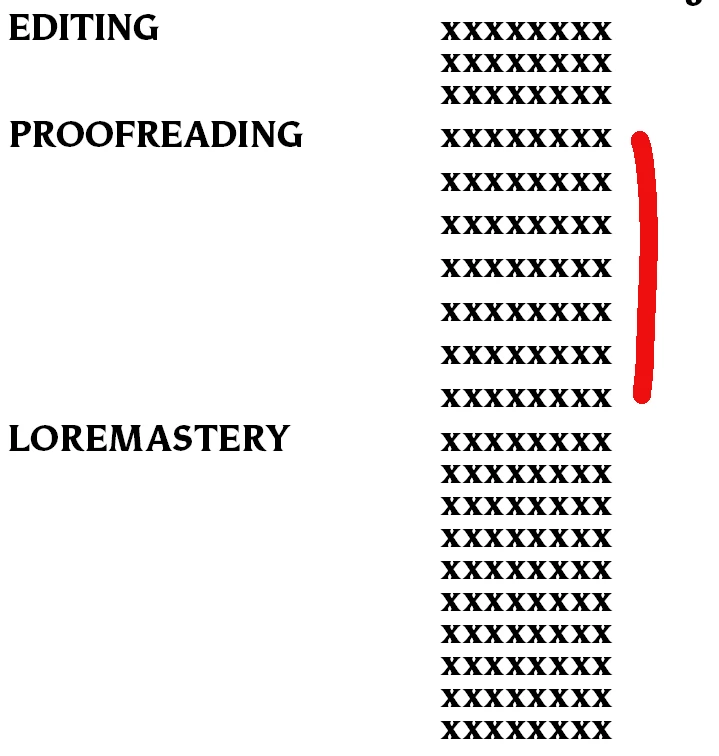
I am not sure what is causing this but when I copy text from a .txt file and paste it into InDesign the line spacing looks way off despite the Text Style showing that the pasted text is the same as the text below and above it. How do I keep this from happening?
This topic has been closed for replies.

2 replies

adamc60674033
Participant
August 17, 2023

I just need to sort out how to stop this from happening back to google then NM


Robert at ID-Tasker
Legend
August 17, 2023

From the link:


View hidden (nonprinting) characters

Choose Type > Show Hidden Characters.

If hidden characters still do not appear, turn off preview mode.

Choose View > Screen Mode > Normal and choose View >Overprint Preview to deselect it.


Robert at ID-Tasker
Legend
August 17, 2023

Do you have "+" after the name of the Para / Char style - local override - for any part of the text? 


Can you post a screenshot WITH Hidden characters displayed? 

I suspect you've soft line breakers for the paragraphs before and after PROOFREADING - but normal line breaks for it - so each line in this block is treated as a separate Paragraph? 

And  you use TABs to align 2nd "column". 


adamc60674033
Participant
August 17, 2023

Ok very much a novie with InDesign can you tell me where to find the information asked for?

Robert at ID-Tasker
Legend
August 17, 2023

https://helpx.adobe.com/uk/indesign/using/editing-text.html


We are happy to help - but please, try to use Google first - you should get some answers much quicker than waiting for someone to answer.