
Participant
November 26, 2019
Question

Copy / Paste in

  • November 26, 2019
  • 8 replies
  • 937 views

Hello,
I have an image block, on page 1. I try to paste in place the same image into an identical block on page 2. But the image is never with the same coordinates x y.

With older version ok, but not with new version InDesign 2020.

How to make the image copy exactly to the same position in the block?

thank you
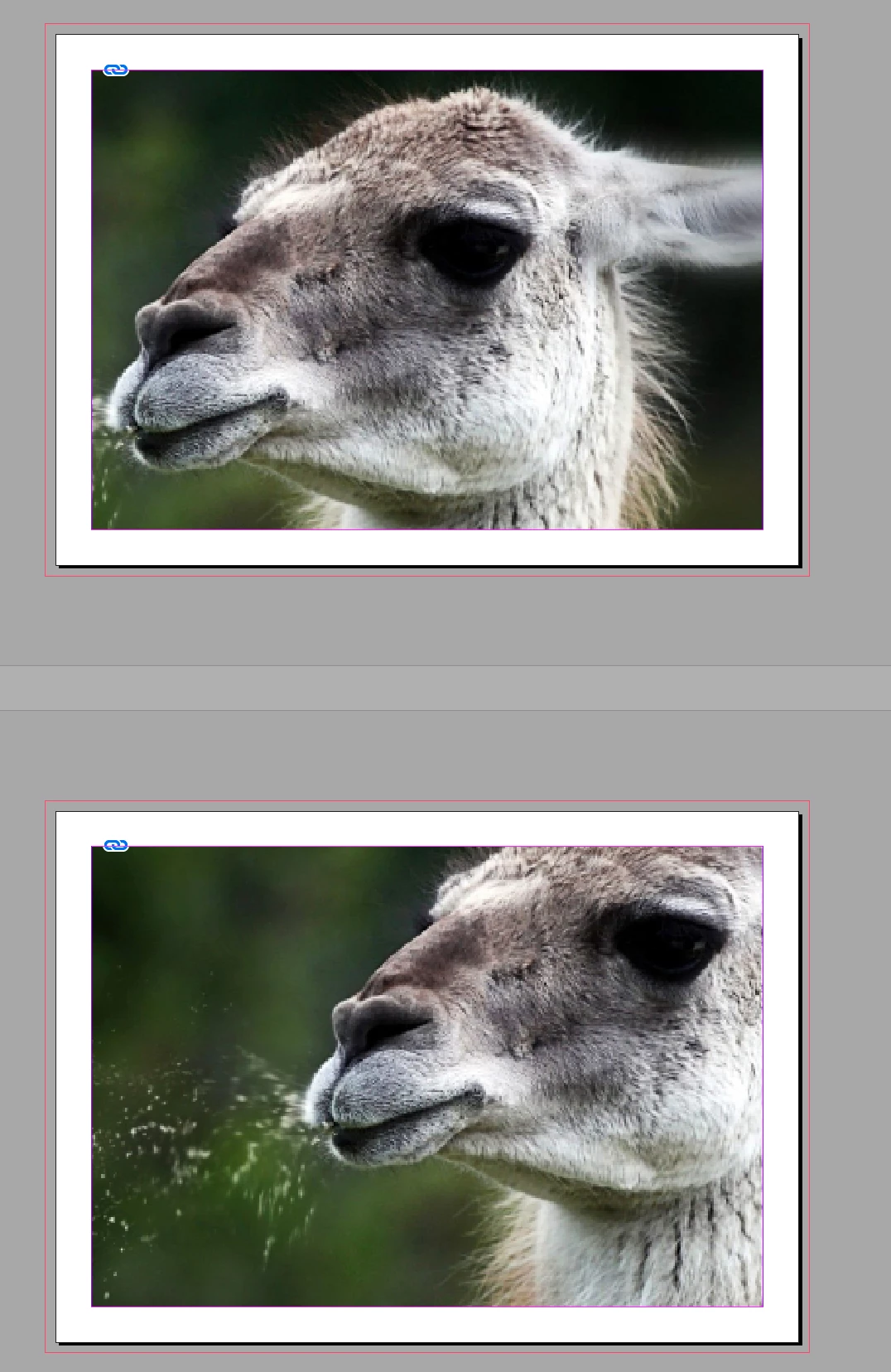
InDesign 2020, OS High Sierra 10.13.6


Hello,
J'ai un bloc image, en page 1. Je veux coller la même image dans un bloc identique en page 2. Mais l'image n'est jamais avec les même coordonnées x y.

Avec ancienne version ok, mais plus nouvelle version InDesign.

Comment faire pour que l'image se copie exactement à la même position dans le bloc?

merci

This topic has been closed for replies.

8 replies

Community Expert
November 26, 2019

I have a workaround for you:


1. Copy the frame with the image from page 1 to the clipboard.

2. Go to page 2

3. Paste In Place the frame with the image from the clipboard.

4. Select the image inside the frame you just pasted.

5. Cut or Copy the selected image to the clipboard.

6. Select the empty frame on page 2

7. Remove all frame fitting options.

8. Paste Inside the image from the clipboard.


This is needed because you switched spreads.

Paste In Place is working this way…


Just tested this with InDesign CS6 and InDesign 2020.


Regards,
Uwe Laubender

( ACP )


Community Expert
November 26, 2019

You could repeat this with different sized frames. Ones that are positioned exactly like the one on page 1, even with the same width and height. The result will be always the same: The image will not change its size but will be positioned always centered inside the frame. Of course provided you deleted all frame fitting options.


Regards,
Uwe Laubender

( ACP )

Community Expert
November 26, 2019

Hi laurentb97100606,

even with InDesign CS6 and all other versions I think, Paste Inside is very special.

And as some tests from my side are showing the behavior in this case did not change.


Placed an image at page 1, rescaled the image a bit to get a special position of the upper left corner:

The upper left corner of the page.


I selected the image inside its frame and copied it to the clipboard.

Then I turned to page two of this non-facing-pages document, drew out a new frame on the page and set the frame fitting options like that, where I removed all frame fitting options:


Next thing I did was: Paste Inside

Here the result that may not fit your expectations.


I don't think that this behavior changed during development of InDesign CC to InDesign 2020.


The frame fitting options after Paste Inside:


Size of the image did not change.

Position changed.


Regards,
Uwe Laubender

( ACP )

Community Expert
November 26, 2019

Hi laurentb97100606,

what's the older version of InDesign you can do this without problems?

I can see no way to accomplish what you want. Not in one step.

Tested with InDesign CC 2019 and 2020 on Windows 10.


Regards,
Uwe Laubender

( ACP )


Participant
November 26, 2019

I have do that with InDesign CS6, no problem.

After updated to CC2020, trying again with CS6 and don't work. I think it's when i have upadated to CC2020.

but many thanks for you're help

Community Expert
November 26, 2019

Hi laurentb97100606,

best we go back to "square one" … now that you added the screenshot and we have more information.


So you say:

You selected the graphic frame holding the image on page 1.

You copied the frame.

You moved to page 2 and did:

Paste In Place


And the image inside the graphic frame pasted is in a different position?

Please correct me where I am wrong. Better: Give us the exact steps what you did.


Regards,
Uwe Laubender

( ACP )


Participant
November 26, 2019

Exemple:

I have 4 pages with same image in sampe place. i move the image (content) on page 1 and now i will copy into the existing frame on page 2, 3 and 4 with copy inside. Now the picture on page 2, 3 and 4 is not at the same place.


Known Participant
November 26, 2019

1. I made a document with one page and a single frame on it, then loaded a picture.

2. I duplicated this page to have similar frame, then deleted the picture from the frame on page 2 (the frame is just for visibility).

3. I copied the picture from the frame on page 1 and pasted it into the frame on page 2. As I stated before, the picture is centered.

4. I loaded the same picture in the empty frame on page 2. The picture is similar to page 1.

Maybe you should better load pictures instead of copy them?

Known Participant
November 26, 2019

As I don't understand what exactly do you copy, I tested several approaches with 2 non-faced pages document.

If the size of the source picture frame was adjusted to the size of the loaded/scaled image, the copy was always identical.


Therefore I tried the same with the frame a bit bigger then the placed image.

1. Select the picture frame with loaded picture -> Copy -> go to 2nd page -> Paste in place.

Result: as expected, both frames are identical and have same coordinates.

2. Select the picture frame with loaded picture -> Copy -> go to 2nd page -> Paste in place -> replace the image with the same picture.

Result: as Uwe Laubender already mentioned, frame fitting options work with the newly loaded picture. Both frames are identical.

3. Copy only the image (content) from the 1st frame -> go to page 2 -> draw new frame with same size and position -> paste in selection.

Result: image in the 2nd frame has same size but is centered in the frame.


I hope, it could help you.

Participant
November 26, 2019

And this is exactly the problem, the image (content) has not the same coordonate like the page 1, it's only centered and not with same x and y information as page 1.

thanks


Known Participant
November 26, 2019

Why don't you copy the whole frame?

Community Expert
November 26, 2019

Hi,

to make that work in any version of InDesign after CS4 your document must not be a facing pages document.

And you did not move position of pages with the Page Tool.


I have no issues to copy an object on page 1 and Paste in Place the object on page 2 with the same position.

Not in InDesign 2020, not in versions before if the said conditions apply.


It could be something else if you paste inside a graphic frame.

Then the frame fitting options of that graphic frame could dictate where the pasted object will be positioned.

And if it will be scaled.


Regards,
Uwe Laubender

( ACP )

Eric Dumas
Community Expert
Community Expert
November 26, 2019

Hi,

Can you confirm the exact version of your software and operating system? A screenshot would help us understand your issue better.

In this case, I think you need to use 'Paste in Place' from the Edit menu. You can even adjust your shortcuts to use this more easily if the current shortcut doesn't suit you.

Bonne Chance