


Copy & Paste problems

Copy link to clipboard
Copied
I have a huge problem with a ID CC 2018 (newest version, MacOS 10.13.4) document. When I copy and paste text frames or duplicate layers, text formats (colors, hyphenation ...) that differ from paragraph formats are reset to the formats defaults. E.g. a line of text, that is defined as black in its paragraph format and changed to red before copying (directly, not by changing the paragraph format), is reset to black after pasting. Why? There should be no changes in formatting by copy and paste! Same problem appears, when I duplicate layers with this text. I have checked all ID settings, didn't find anything that changes this behaviour. Is this a problem of a specific version? What can I do? Thanks for a quick help ...


 16
Replies
16
16
Replies
16


Copy link to clipboard
Copied
Hi,
Can you check and tell if cleaning both cache and preferences help you out.Troubleshooting 101: Replace, or "trash" your InDesign preferences
-Aman


Copy link to clipboard
Copied
If there are identical style names the styles from the document you pasted to will override those from the styles coming in.
This applies to based on styles as well.

Copy link to clipboard
Copied
Hi Marius,
If you copy/paste from one document to a different one see the answer Bob is giving in reply #2.
You could prevent this if you import styles to the target document and manage the styles.
Import Styles ( Formate laden ) from my German InDesign:

Look up some details:
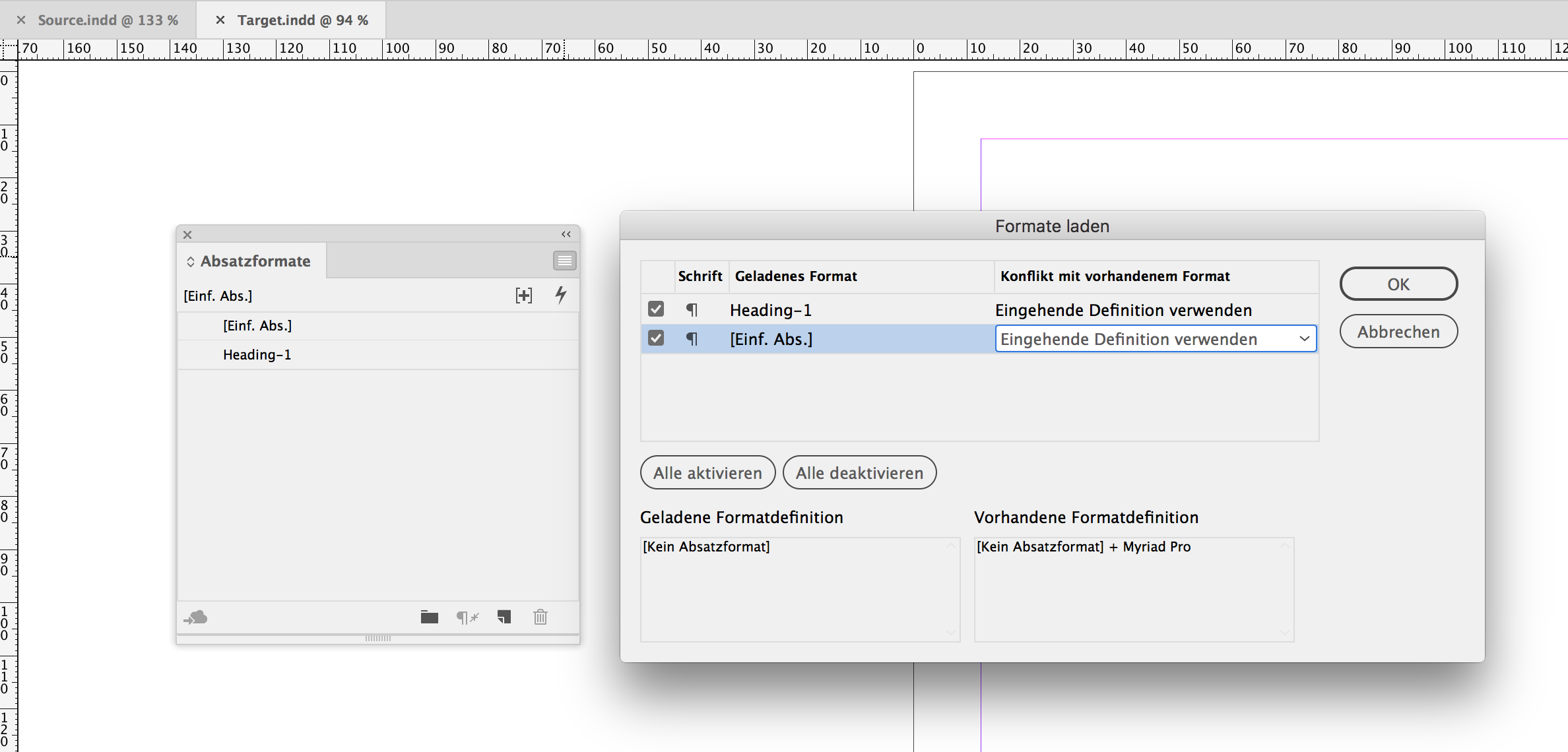
You have the chance to use the incoming definitions of a particular style.
Regards,
Uwe
Copy link to clipboard
Copied
Hi and thanks for your quick replies. I couldn't check all proposals until now, because yesterday I had my 60th birthday and all my friends surprised me with a great bicycle tour ...
Now I restarted InDesign with trashing the prefs and cache as described by Aman. Nothing changed. To the other proposals: I did not copy from one and paste to another document, I copied and pasted inside the same doc. The problem also appears when I duplicate the items and when I duplicate the layers. I really don't know why. I also tried to work with earlier versions of ID since CS6 (by converting to IDML), with Win10-based versions of ID and on another Mac. Ever the same. Here you can see what happens, when I just duplicate a text frame ("edit > duplicate"):

All subheads are converted from orange text color to the default black color of the paragraph style.
Additional information: As I know, the doc is created in the US, translated in Germany and shall now be translated to French and Italian. I ever made this with translation layers in the same document (collect all text frames to one front layer and then simply duplicate this layer ...) – a procedure that worked well until now.
Any suggestions? Maybe the document is defctive? Many thanks in advance ...
Marius
Copy link to clipboard
Copied
Same problem with styles but in the opposite manner. The incoming style will be dominant.
Use the paste without formatting command, instead of just paste.
Copy link to clipboard
Copied
Sorry, I can't use the paste without formatting command, because I do not copy and paste text CONTENTS, but text FRAMES.
Copy link to clipboard
Copied
Hi Marius,
had the chance to have a quick look into the document.
Really amazing:
1. Duplicating the layer will change formatting of the text of the text frame.
2. Duplicating the text frame will change formatting ( by alt+dragging the text frame or by alt+dragging the text to a new frame )
3. Copy/Paste of the text frame in the same document will change the formatting.
4. Copy/Paste of the text to a new text frame in the same document will change the formatting.
Exporting to IDML and working with the IDML version will change nothing in issues 1 to 4 above.
The only thing I found where you can prevent changing the formatting and having a duplicate of the formatted contents is to export a selected text frame to IDMS and placing the IDMS file in the same document or in a different one.
Regards,
Uwe
Copy link to clipboard
Copied
On my systems the placed IDMS is also not identical to the original. Not all differences to the paragraph styles are resetted, but some. Could be so simple if it would work like it should ...
Copy link to clipboard
Copied
In my humble opinion, the document seems to be defective in a way I don't understand and I can't reproduce. I don't believe I can go on working on this file in my normal manner. I think, I must take a not so smart way: Three documents, one for one language, not all three languages as layers in one file.
Copy link to clipboard
Copied
https://forums.adobe.com/people/Marius+K%C3%B6nig wrote
On my systems the placed IDMS is also not identical to the original. Not all differences to the paragraph styles are resetted, but some. …
Hi Marius,
hm, well, maybe I did not look close enough. I'll inspect the placed IDMS frame again and let you know.
Regards,
Uwe
Copy link to clipboard
Copied
Well, you are right. There are differences I did not see earlier with the big text frame I exported to IDMS and placed again.
The original has 264 text style ranges—means: 264 changes in formatting—wheras the placed IDMS frame has only 250 changes in formatting. Sigh…
Regards,
Uwe
Copy link to clipboard
Copied
And another thing:
Duplicating the page in the same document will yield a different formatting of text on the duplicated page.
A hopeless case.
Hm…
I've seen into the history of the document.
Hold down the cmd-key when on Mac OS X and click "About InDesign…" ( "Über InDesign…" in your German version ). Impressive:
A document that started in 2009 with CS3 5.0.4.682 on Mac OSX 10.5.7, went to CS4 6.0.0.352 ( not a bug fixed version! ) for Windows, over to CS6 8.0.0.370 ( also not a bug fixed version! ) still on Windows, then took a leap to InDesign CC2015.4.1 on Windows and finally to CC2018.0.1 also on Windows. The most recent edits were done with CC2018.1 13.1.0.76 on Mac OS X 10.13.4
Time to do this thing from scratch.
Regards,
Uwe
Copy link to clipboard
Copied
Turn on Style Override Highlighting and you are looking at a deep blue sea.
Literally all text is full of character style and paragraph style overrides.
Regards,
Uwe

Copy link to clipboard
Copied
Looks like a file defect or override ussie, I tried to make the same and all worked well. Is it possible for you (by existing workflow) to clear all stiles and mark them again or to redefine the title style with orange color (or create and apply the new one)? Are there any manually applied character styles in these paragraphs? this also might cause some strange problems.

Copy link to clipboard
Copied
https://forums.adobe.com/people/Marius+K%C3%B6nig wrote
I couldn't check all proposals until now, because yesterday I had my 60th birthday and all my friends surprised me with a great bicycle tour ...
Sixty miles? One for each year?
Is it just the styles that have orange that are changing to black? If so, can we see a screen shot of the style definition?
No overrides, right?
And you are not basing the style on "basic"?
Copy link to clipboard
Copied
Hi Marius,
that's really a strange one. Duplicating a frame should not change the formatted contents of the text. Not at all.
Currently I'm out of suggestions… Think, we have to see the document or parts of it.
Could you do a duplicate and make it available through Dropbox or a similar service?
Just one page would be enough, I think. If its contents is confidential just send the download link by personal message: Hover over my name with the mouse pointer, wait a moment and then click the "Message" button to do so. I like to have a look…
Regards,
Uwe


Get ready! An upgraded Adobe Community experience is coming in January.
Learn more
 AdChoices