

kdwpilgrim1
Inspiring
February 7, 2025
Answered

Copy/paste the options for anchored objects

  • February 7, 2025
  • 2 replies
  • 360 views

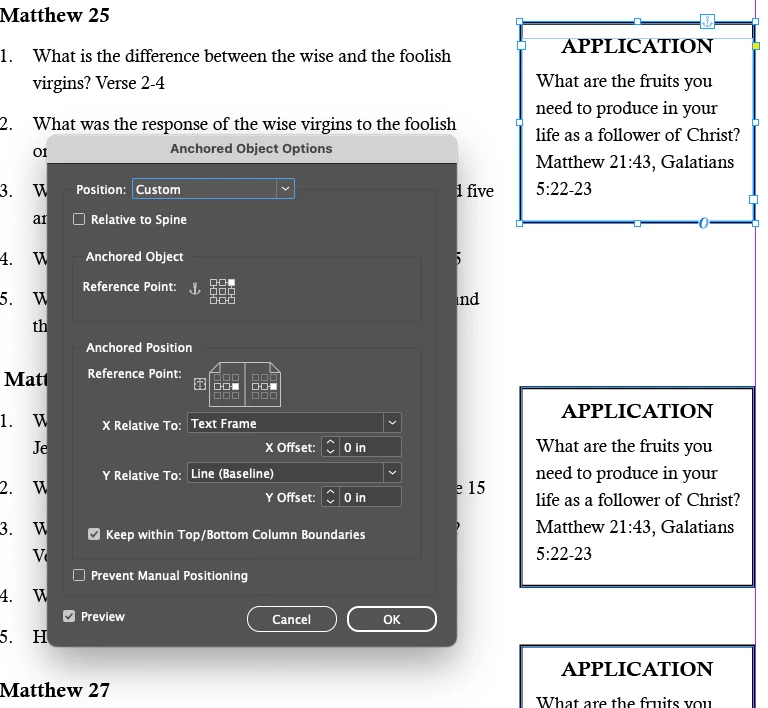
I am making a study guide and each question has an text box with discussion points which is an anchored object. I have to place the object and then go through all the steps to modify the options for the anchored objects... there are dozens and dozens of these objects. It would be nice if the options could be copied with the object or if a "style" of options could be made and then applied to the objects.
Correct answer Robert at ID-Tasker

1) why are you doing it as Anchored / InLined object? 

Righ, there was no image when I was replying. 


2) you can apply ObjectStyle to your copied object - before you copy it - you can make it as a "template" object.


https://helpx.adobe.com/uk/indesign/using/object-styles.html


2 replies

Mike Witherell
Community Expert
Community Expert
February 7, 2025

Agreed. Make one selected example frame into a new object style. Then, apply that object style to the other anchored objects. All the many attributes and paragraph styles will be applied all at once.

Mike Witherell
Robert at ID-Tasker
Robert at ID-TaskerCorrect answer
Legend
February 7, 2025

1) why are you doing it as Anchored / InLined object? 

Righ, there was no image when I was replying. 


2) you can apply ObjectStyle to your copied object - before you copy it - you can make it as a "template" object.


https://helpx.adobe.com/uk/indesign/using/object-styles.html


kdwpilgrim1
Inspiring
February 15, 2025

That is just what I needed! Thank you!

Robert at ID-Tasker
Legend
February 17, 2025
quote

That is just what I needed! Thank you!


By @kdwpilgrim1


You're welcome.