Gundel Gaukeley
Participant
September 8, 2022
Answered

Copying arabic characters from Word to Indesign does not work correctly

  • September 8, 2022
  • 4 replies
  • 2010 views

Hi community,

i have already read a lot of advice about how to use arabic letters in indesign, but my specific problem has not been discussed so far.
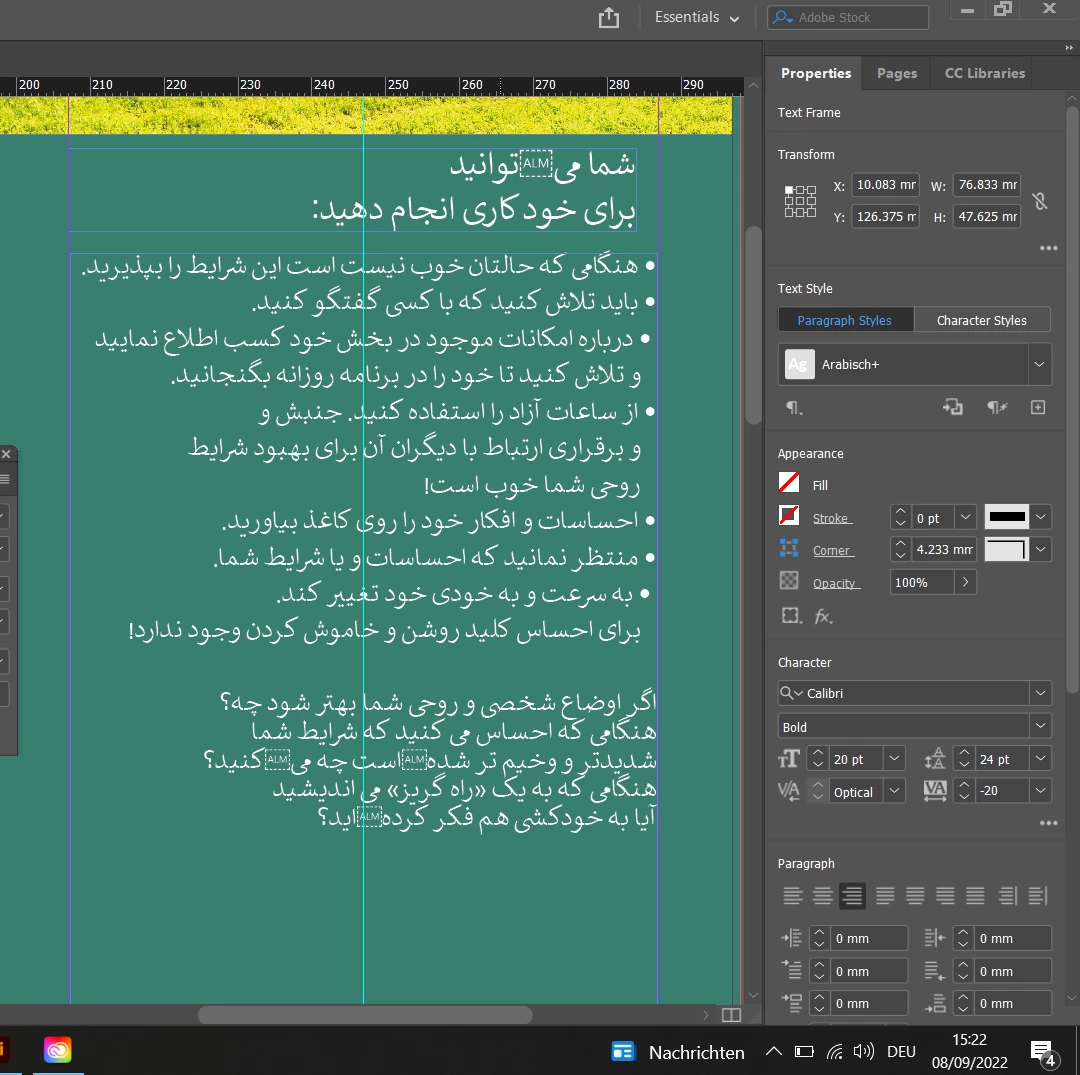
I have to copy arabic and dari text from word to indesign, wich so far works, but there are a few characters in every paragraph that are not displayed correctly. Instead I get those "ALM" placeholders. I already tried different fonts, but it stays the same. I also installed the "English with Arabic" Version of Indesign, but it didnt help either.  Any ideas how i can fix it?
:
This topic has been closed for replies.
Correct answer Laubender

Hi Gundel Gaukeley,

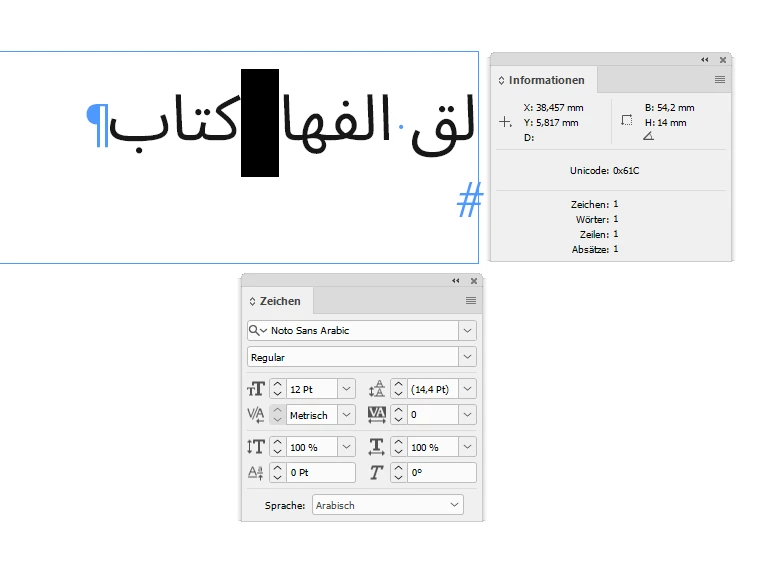
looked up a font that does support the glyph and also its function.

Calibri does not do it for example, also Adobe Arabic does not do it.


Finally found Noto Sans Arabic on Google Fonts:


However, whether the glyph is properly used in your text is a different discussion.

Try Noto Sans Arabic and work your text cursor through the text using the arrow key. Character by character. You'll see that the glyph is changing direction of typing for a moment.


Regards,
Uwe Laubender
( Adobe Community Professional )

4 replies

LaubenderCommunity ExpertCorrect answer
Community Expert
September 10, 2022

Hi Gundel Gaukeley,

looked up a font that does support the glyph and also its function.

Calibri does not do it for example, also Adobe Arabic does not do it.


Finally found Noto Sans Arabic on Google Fonts:


However, whether the glyph is properly used in your text is a different discussion.

Try Noto Sans Arabic and work your text cursor through the text using the arrow key. Character by character. You'll see that the glyph is changing direction of typing for a moment.


Regards,
Uwe Laubender
( Adobe Community Professional )

Gundel Gaukeley
Participant
September 14, 2022

Thanks Uwe, that really helped, no ALMs visible anymore! I will also talk to the translator next week, and maybe then I will get some advice how to work around those lettermarks in the future (or maybe I get a new translation without the ALMs).

Thanks again, and donaldistische Grüße!

Community Expert
September 10, 2022

Hi Gundel Gaukeley,

you discovered the ARABIC LETTER MARC special character, short form ALM:

https://unicode-explorer.com/c/061C


Quoting:

Codepoint U+061C

ARABIC LETTER MARK

The Arabic letter mark (ALM) is a non-printing character used in the computerized typesetting of bi-directional text containing mixed left-to-right scripts (such as Latin and Cyrillic) and right-to-left scripts (such as Arabic, Syriac and Hebrew). Similar to Right-to-left mark (RLM), it is used to change the way adjacent characters are grouped with respect to text direction, with some difference on how it affects the bidirectional level resolutions for nearby characters.


Related
U+200F RIGHT-TO-LEFT MARK


@Joel Cherney provided a link to more detailed information about the use case.


Well, you'll see that [ALM] glyph, because the font you are currently using does not support it. Instead the font designer provided a substitution glyph. And because of that, I think the width of the substituted glyph is of no further importance.


Regards,
Uwe Laubender
( Adobe Community Professional )


BTW: Nice nick name. Know it very well from my German comic books when I was a child:

https://www.duckipedia.de/Gundel_Gaukeley

( For all English readers, the original name of that character is Magica de Spell by the great Carl Barks.)


Community Expert
September 9, 2022

Hi Gundel Gaukeley,

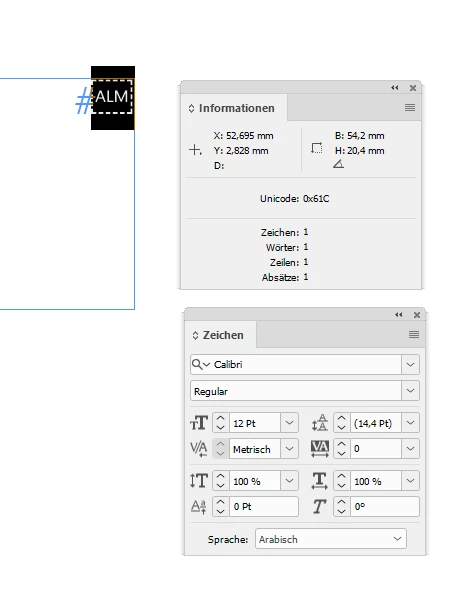
there is a missing glyph at some distinct Unicode code point.

Select that character and look up its code point value in the Info panel of InDesign.

Let us know what you see there. Best take a screenshot.


Could be that Word is automatically substituting it (without letting you know) with a different font.

Speculation: Could be perhaps a direction special character for RTL or LTR character direction ??!!


Thanks,
Uwe Laubender
( Adobe Community Professional )

Gundel Gaukeley
Participant
September 10, 2022

Hi Uwe,
I think we are getting closer to the issue, thanks for the advice! I looked up the character in the info panel, and it shows me that its 0x61C in unicode.


Looking it up it says (if i got it correctly) that this is a special space in arabic languages! And indeed, looking again at the word document with tab marks, it is not showing the normal symbol for spaces (i have to correct myself there), it is not showing anything at all:

Sooo.... i guess there is a special arabic space that cannot be displayed correctly? Just using the spacebar is making a
bigger space than it should be, looking like this:


Joel Cherney
Community Expert
Community Expert
September 11, 2022

Well, it's time for me again to refer to the Dari reviewer who is going to review your work when you are done. You'd said that the mystery ALM glyph rendered as a space in Word, then backtracked in your conversation with Uwe and said that it didn't render as a space in Word. This is actually really important, and it's the kind of detail that the Dari reviewer THAT YOU REALLY REALLY NEED would pick up. 


See, if you've done any Arabic layout at all, you know that the letters usually need to be connected via ligature. Right? They're supposed to all connect, like Latin-script cursive handwriting, except when they don't. Because in some languages that use Arabic script, like Persian and Dari, there are plenty of characters that are supposed to sit right next to one another and not connect via ligature. There's actually a special Unicode control character for this, called a "non-joiner." You can insert non-joiners yourself in the Middle Eastern version of InDesign; they're one of the special characters you can insert at the bottom of the Type menu. 


So, your Dari provider inserted ALMs instead of non-joiners. It says, right in the PDF I linked to, that the ALM functions as a non-joiner. It's also rendering correctly in the Word screenshot, as a zero-width non-joining space. So, you could switch your layout to a font that supports the ALM, as Uwe suggests; that would be the best way forward. However, in the context of the screenshot you posted, I bet that you could just replace it with a non-joiner in the font you're already using, and it should be fine. That is, assuming that you have someone who reads Dari to review your work when you are done. Because none of the people who are helping you on this forum can actually read Dari! Nor can you, right? So there is no way for any of us to know for certain what is correct and what is wrong, unless either 

a)  you have a Dari reader to review your work, or 

b) you have a PDF of that Word file that a Dari reviewer has already approved, and you're doing a glyph-by-glyph proof of a language you don't understand based off of that PDF, and your level attention to detail is so amazing that you could be trusted to ensure the proper layout of your Dari work based off of that Word file. 


Joel Cherney
Community Expert
Community Expert
September 8, 2022

Have you read any suggestions that you should be using File -> Place, instead of copying and pasting from Word?


I'm not sure what that control character is supposed to do in this context, and it looks a little to me like that they are unnecessary. But I don't read Dari, so don't take my word for it. You could compare against the source Word file to see what they're doing there; not rendering at all? Looking like spaces?  You can check to see if they still render visibly when placed into InDesign instead of copied & pasted. Also, assuming you don't actually read Dari, you can show this to your Dari translator and ask if you can safely remove them. (Because, if you don't read Dari, you do plan to have an in-language review done after you finish formatting, right?)


Gundel Gaukeley
Participant
September 9, 2022

Hi Joel, thanks for the response!
yes, i have tried both placing and copying the text, but it makes no difference in the outcome. You are totally right that those placeholders dont mark any charakter and could just be removed. However: when i remove them, it changes the whole sentence. In the screenshot i added, you can see the problem in the headline.

In the original Word document, those placeholders are simple spaces, nothing special as far i can see.
Maybe the problem could be solved by just writing the text in dari by hand - which would be not possible for me, since I cannot read it.