
Participant
March 26, 2022
Answered

Create a Photo book from folder

  • March 26, 2022
  • 3 replies
  • 1714 views

hello,


I need to create a series of Photobooks, each a couple hundred pages. Mostly one image per page at 100%. Is there a fast way to import a folder of images, one per page into an Indesign document? - Thanks in advance.
This topic has been closed for replies.
Correct answer jmlevy

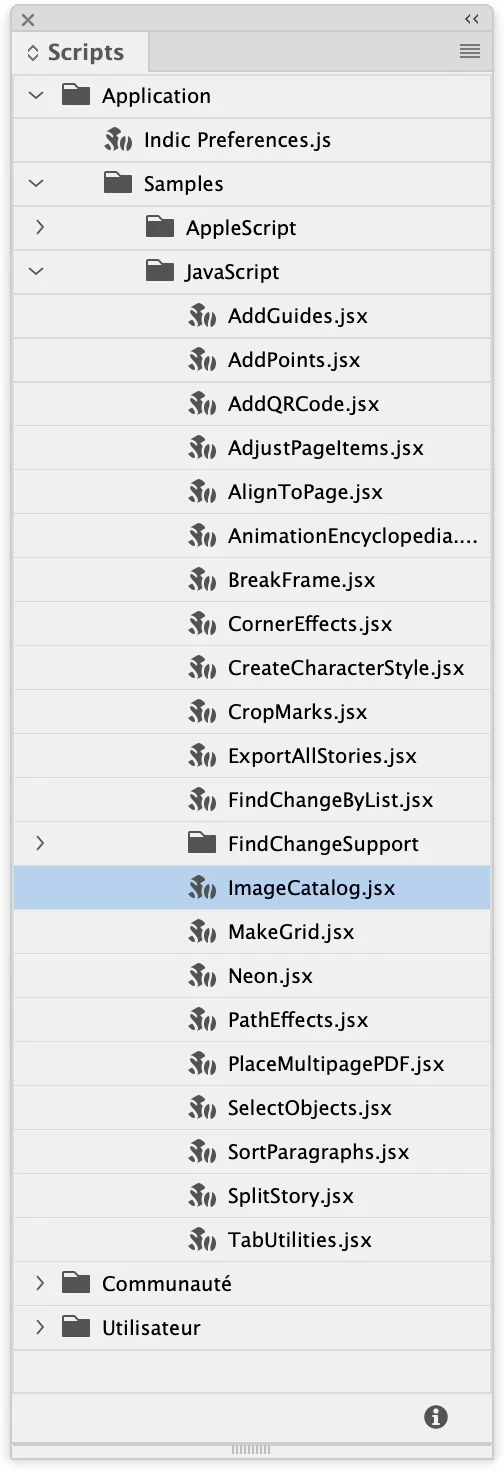
There is a script for this: ImageCatalog

Menu Window > Utilities > Scripts. 

Double click on it and follow instructions…


3 replies

jmlevy
Community Expert
jmlevyCommunity ExpertCorrect answer
Community Expert
March 26, 2022

There is a script for this: ImageCatalog

Menu Window > Utilities > Scripts. 

Double click on it and follow instructions…


Participant
March 28, 2022

fantastic, Thank you

Luke Jennings3
Community Expert
Community Expert
March 26, 2022

Another option is to use Acrobat to combine the images into a multi-page pdf (File> Create> Combine files into single pdf), then either use the Place multipage pdf script to create a multipage InDesign file (Window> Utilities> Scripts> Application> Samples> Applescript or Javascript> PlacemultipagePDF), or place each pdf page individually*. Also, you can create a shape for the image on the master page and apply frame fitting options, so as each image is placed, it can be automatically sized to the frame. You might also look into captions, where metadata, such as the file name, can be added to each image, although I don't think captions will work with a multipage pdf.

*You can select multiple images when placing into InDesign (AKA loading the place gun) and if you view your pages at a small size, say 10%, you can place many images before needing to change the page view.

Participating Frequently
November 16, 2022
quote

 Another option is to use Acrobat to combine the images into a multi-page pdf (File> Create> Combine files into single pdf), then either use the Place multipage pdf script to create a multipage InDesign file (Window> Utilities> Scripts> Application> Samples> Applescript or Javascript> PlacemultipagePDF), or place each pdf page individually*. Also, you can create a shape for the image on the master page and apply frame fitting options, so as each image is placed, it can be automatically sized to the frame. You might also look into captions, where metadata, such as the file name, can be added to each image, although I don't think captions will work with a multipage pdf.

*You can select multiple images when placing into InDesign (AKA loading the place gun) and if you view your pages at a small size, say 10%, you can place many images before needing to change the page view.


By @Luke Jennings3

Hello Luke, I'm having trouble automatically placing (18) images into (18) frames. Is this an option on inDesign or would I have to create a script?

Luke Jennings3
Community Expert
Community Expert
November 16, 2022

Can you give more details about what you are trying to do? Full automation would probably require a script, there are many good suggestions here and existing scripts you can use. You can load your cursor with many images (File> Place> select multiple files) and quickly place them into existing frames. The frames can be pre-formatted with fitting options. 

Community Expert
March 26, 2022

You could use DataMerge feature

It might take some setup - so try with a folder of 10 or so images before settling to do the rest


https://creativepro.com/import-folder-full-pictures-page/


Willi Adelberger
Community Expert
Community Expert
March 28, 2022

With the CC subscription you have also Lightroom Classic. There is a bunch of automatism to export to Photo book PDFs and presentations. Also with Bridge.