



Copy link to clipboard
Copied
Hi All,
I need to create a new folio for my document.
Note: Folio text frame label as "FOLIO"
1. Take folio from the Numbering and Sections
2. Update to the first(recto) page
3. Same folio comes to the verso page
4. Again add +1 number to the recto page
5. same like as for all pages
Screenshot helps you for better clarifications,
Input:
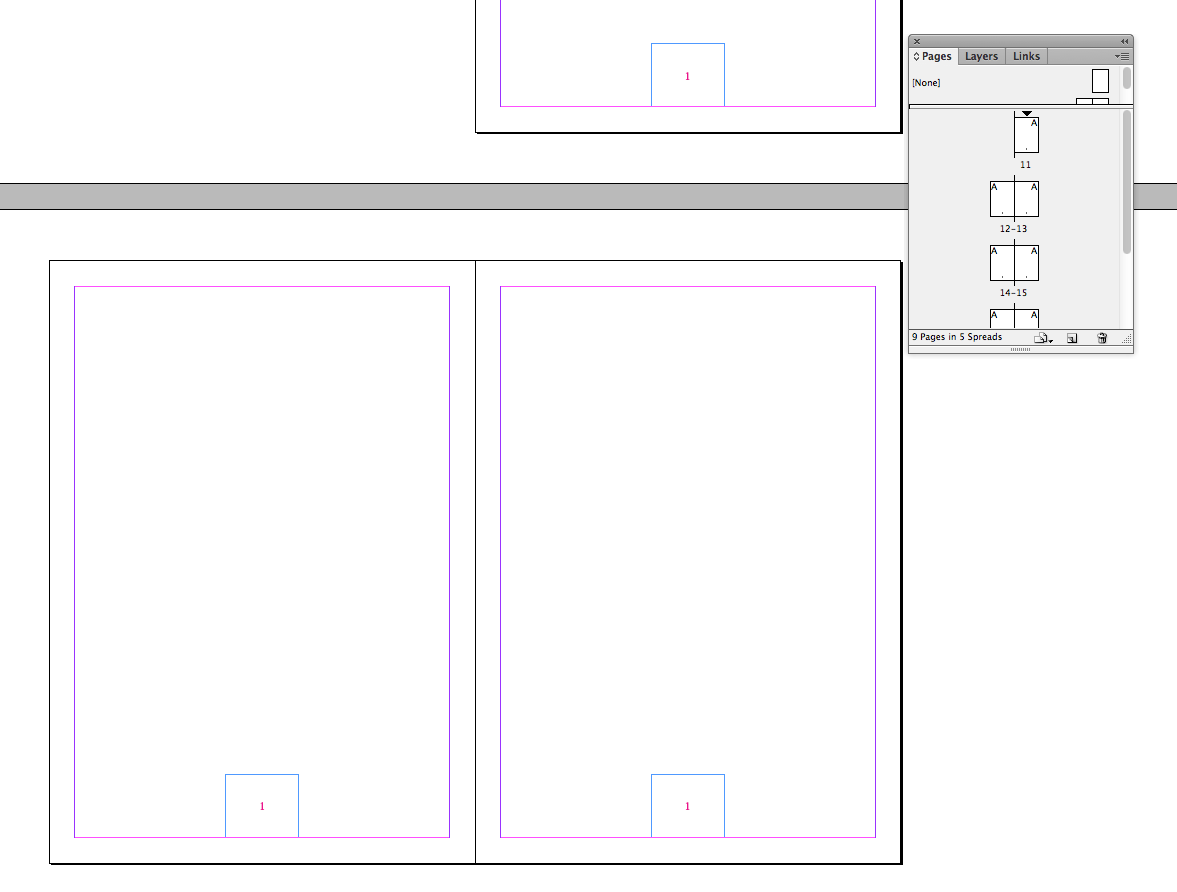
Output:

Trying Code:
var myDoc = app.activeDocument;
var myPages = app.activeDocument.pages;
alert(myPages.length);
myCounter = 0;
for(p=0; p<myPages.length; p++)
{
myCounter++
if(myPages
.documentOffset % 2 == 1)
{
var myTF = myPages
.textFrames.everyItem().getElements();
for(t=0; t<myTF.length; t++)
{
if(myTF
.label == "FOLIO") {
myTF
.contents = String(myCounter) }
}
} //if condition closing
else
{
var myTF = myPages
.textFrames.everyItem().getElements();
for(t=0; t<myTF.length; t++)
{
if(myTF
.label == "FOLIO") {
myTF
.contents = String(myCounter) }
}
} //else closing
} //for loop closing
Kindly help for my request.
Regards
Siraj


 1 Correct answer

Hi,
Are you looking for page.appliedSection.pageNumberStart ?
...var
mDoc= app.activeDocument,
mFrames = mDoc.pages.everyItem().textFrames.everyItem(),
mCounter = mDoc.pages[0].appliedSection.pageNumberStart,
k, cID, nID, cCount;
for (k = 0; k < mFrames.label.length; k = k+2)
if (mFrames.label
== "FOLIO") { cID = mFrames.id
; cCount = String(mCounter++);
mDoc.textFrames.itemByID(cID).contents = cCount;
try {
nID = mFrames.id[k+1];

 5
Replies
5
5
Replies
5

Copy link to clipboard
Copied
Hi,
using similar "everyItem()" structure you could assume modifying a proper object:
var
mDoc= app.activeDocument,
counter = 0, k, cID,
labels = mDoc.pages.everyItem().textFrames.everyItem().label;
for (k = 0; k < labels.length; k++)
if (labels
== "FOLIO") { cID = mDoc.pages.everyItem().textFrames.everyItem().id
; mDoc.textFrames.itemByID(cID).contents = String(++counter);
}
Jarek
Copy link to clipboard
Copied
Hi Jump_Over,
Thanks for your valuable coding...
My request is different, Could you please look at my output screenshot.
Write now, I am struggle for to get the "Numbering & Section" number. //need help here,
(need to change the myCounter as predefined in the "Numbering & Section" in the first page)
Almost I got my output, any other better coding is appreciable...
var myDoc = app.activeDocument;
var myPages = app.activeDocument.pages;
myCounter = 11;
for(p=0; p<myPages.length; p=p+2)
{
var myTF = myPages
.textFrames.everyItem().getElements();
for(t=0; t<myTF.length; t++)
{
if(myTF
.label == "FOLIO") {
myTF
.contents = String(myCounter) }
}
myCounter++
}
myCounter = 11;
for(p=1; p<myPages.length; p=p+2)
{
var myTF = myPages
.textFrames.everyItem().getElements();
for(t=0; t<myTF.length; t++)
{
if(myTF
.label == "FOLIO") {
myTF
.contents = String(myCounter) }
}
myCounter++
}
Regards
Siraj
Copy link to clipboard
Copied
Thank You All,
I got my output....
Any other better way or coding is appreciable..
Warm Regards
Siraj
Copy link to clipboard
Copied
Hi,
Are you looking for page.appliedSection.pageNumberStart ?
var
mDoc= app.activeDocument,
mFrames = mDoc.pages.everyItem().textFrames.everyItem(),
mCounter = mDoc.pages[0].appliedSection.pageNumberStart,
k, cID, nID, cCount;
for (k = 0; k < mFrames.label.length; k = k+2)
if (mFrames.label
== "FOLIO") { cID = mFrames.id
; cCount = String(mCounter++);
mDoc.textFrames.itemByID(cID).contents = cCount;
try {
nID = mFrames.id[k+1];
mDoc.textFrames.itemByID(nID).contents = cCount;
}
catch (_) { break; }
}
Jarek
Copy link to clipboard
Copied
Hi Jump,
Thank you for your wonderful coding & valuable timing spending for me....
Warm Thanks
Siraj


Get ready! An upgraded Adobe Community experience is coming in January.
Learn more
 AdChoices