



Copy link to clipboard
Copied
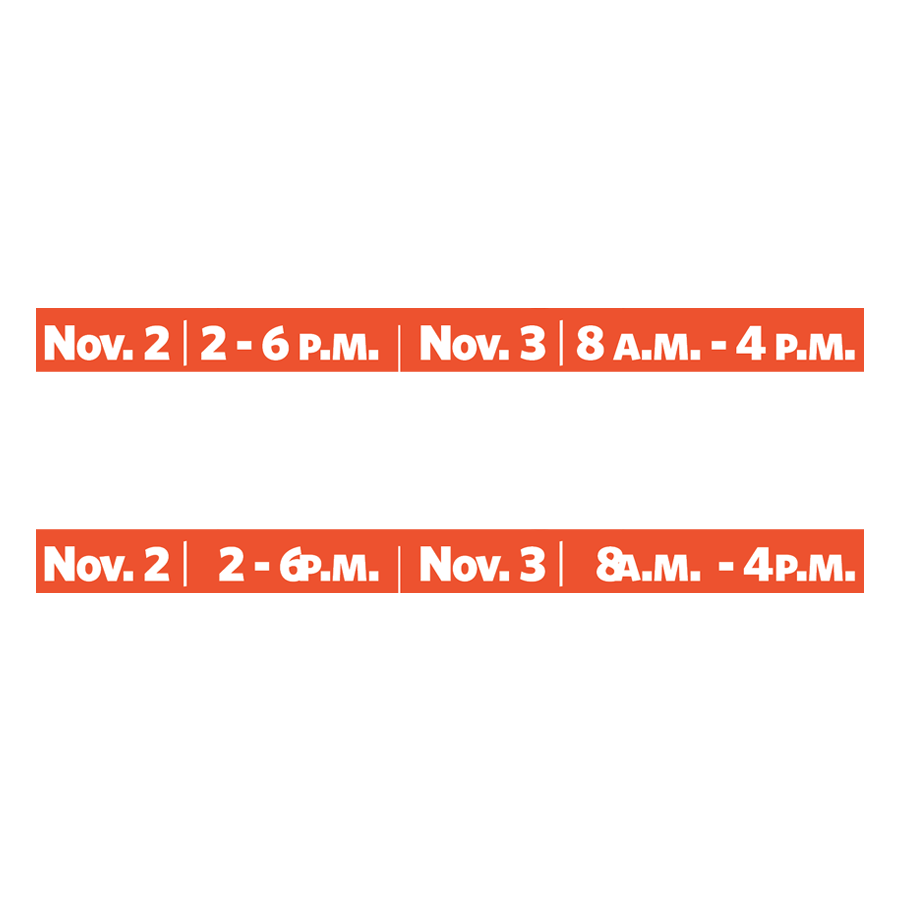
I'm probably in the wrong place but ever since I updated to 2019 I'm getting an odd bug where numbers and hyphens are being shifted right when converted to outlines. i.e. 8 a.m. - 6 p.m. becomes 8a.m. - 6p.m. The a.m. and p.m. stay put but the outlined numbers and hyphen are shifted right to the point where the numbers begin to overlap the a.m. and p.m. a little.


 1 Correct answer

Hi all,
The update (14.0.1) is now officially available. Please use the Creative Cloud app to update InDesign. Please refer to this help article if you face any difficulty in updating. : Update apps to the latest release of Adobe Creative Cloud
Regards,
Om

 28
Replies
28
28
Replies
28


Copy link to clipboard
Copied
Hi davem71858608 ,
I would export to IDML and test the document in a previous version, e.g. CC 2018, to verify if something changed with "Create Outline".
Could be a composition thing. Could be document specific.
Regards,
Uwe

Copy link to clipboard
Copied
You should never outline any text in InDesign. It is only for design purposes.
Copy link to clipboard
Copied
That’s not actually true, depending on the fonts used and the printer you are using there are certain times where it’s just safer to do so. In this case it Is necessary I assure you. All that being said, the point of my post was to try and inform someone at adobe of the bug, not get help with my production process. Thanks though.

Copy link to clipboard
Copied
Hi Dave:
This is a user-to-user community forum where we help each other figure out how to deal with workflow issues. To report a bug, please use this link: Adobe InDesign Feedback.
~Barb
Copy link to clipboard
Copied
Thanks Barb, that’s just what I needed. And it’s a great community, I hope there wasn’t anything in my reply to imply otherwise. Have a grand day everyone!
Copy link to clipboard
Copied
No, not at all. 
And we are always happy to help in any way we can.
~Barb
Copy link to clipboard
Copied
Hi Dave,
can you show a screenshot of the problem?
The better way to outline all text would be in an exported PDF.
If you absolutely have to do this do it on an exported PDF using Acrobat Pro DC's Preflight feature under category Print Production.
From Acrobat Pro DC:

PDF fixups > Convert fonts to outlines
Regards,
Uwe
Copy link to clipboard
Copied
Thanks, I'll look into doing it that way. I've honestly never had problem before now and I've been doing this stuff for over 10 years.
Here's the cap for your curiosity. I have already fixed it and have moved on to other pieces at this point it really was just meant to be a bug report.
Copy link to clipboard
Copied
Ok I tried it your way and now I feel dumb, that was a great tip, way quicker than doing them in InDesign. Have an amazing day my friend.

Copy link to clipboard
Copied
It's still a bug though, so indeed reporting it is the right thing to do.
Apart from the often (loudly) lamented "bad" reason to outline fonts (printers who ask this simply need upgrade their software to 21st century standards...), there are lots of legitimate reasons to outline type. And it definitely should work as described in the online Help: Compound paths and shapes in InDesign ...
Copy link to clipboard
Copied
Outlining font is never secure, because you will loose automatic numbers, bullets, strikethrough, underline, paragraph rules, etc and will run into problems with automatic page numbers. Therefor is my recommendation never outline text in InDesign as you can do it better in Acrobat Pro.


Copy link to clipboard
Copied
Hi All,
This has already been reported to concern team. Kindly upvote this issue here : InDesign CC 2019 (v14.0) is adding spaces between words when outlining type – Adobe InDesign Feedbac...
This is the best way of communicating with the Engineering and Product Management teams regarding issues and suggestions so they can be implemented in future releases.
Regards,
Srishti

Copy link to clipboard
Copied
I have never had an issue outlining fonts in the 28 years I've been a designer.... until now. it's every document, not specific to one - or to one font... please HELP! I do not want to use TWO different versions of InDesign, as I have HUNDREDS (yes HUNDREDS) of projects I work on that would be affected.

Copy link to clipboard
Copied
@Lisa,
You never use automatic numbers, bullets, strikethrough, underline, or paragraph rules? Those are ALWAYS lost when converting to outlines using the InDesign menu command!
But you can outline using Acrobat without losing those features:
https://indesignsecrets.com/outlining-fonts-the-2016-edition.php
Copy link to clipboard
Copied
NOT TRUE Steve Werner... I've NEVER had an issue with bullets, underlines, paragraphs or spacing when converting to outlines.
Copy link to clipboard
Copied
Here's the example I use to teach this in my classes:
Before outlining:

After Outlining (Type > Create Outlines):

Copy link to clipboard
Copied
Bullets ALWAYS fall off when they are outlined in amongst text. They have to be converted to text prior to creating outlines 

Copy link to clipboard
Copied
If your text box has color applied to it, you will lose that, too, because the frame itself is deleted.
And if you happen to have accidentally converted a graphic or undefined box that has color to a text box, it will also disappear entirely if it has even one space typed into it.

Copy link to clipboard
Copied
Hi All,
We have fixed this issue in our latest release InDesign CC2019.0.1. I would recommend you to upgrade to the latest version as it is more robust.
Let me know if you still face this issue.
Regards,
Srishti

Copy link to clipboard
Copied
srishtib8795206 schreef
Hi All,
We have fixed this issue in our latest release InDesign CC2019.0.1. I would recommend you to upgrade to the latest version as it is more robust.
Let me know if you still face this issue.
Regards,
Srishti
Well, the install version is still 0.130 and not the new 1.209 (or later).
When you tell people it is fixed in the update you better make sure it is already out there on line... 😞
Copy link to clipboard
Copied
Hi all,
Sorry about the miscommunication, this patch update is on Prerelease at the moment. I believe it will officially available soon. Please find more details here: Adobe Prerelease
Regards,
Srishti
Copy link to clipboard
Copied
Hi Dave,
if for design purposes you could try to do a duplicate of the text as outlines by adding the Alt key while executing the keyboard shortcut of the menu command.
Regards,
Uwe

Copy link to clipboard
Copied
Thanks all, it's a bug in 2019CC! I just tried it in 2018CC and creating outlines went perfectly. I hope Indesign wil fix this bug soon.

Copy link to clipboard
Copied
I am trying to replicate the problem, but when I convert a text line to outlines with a.m. and |-symbol nothing strange happens.
Could it be that the font used is doing something? Or the dictionary used?

-
- 1
- 2

Get ready! An upgraded Adobe Community experience is coming in January.
Learn more
 AdChoices