
Participant
April 19, 2022
Question

Creating a book. How to equalize columns with front pages?

  • April 19, 2022
  • 2 replies
  • 426 views

Hi there!

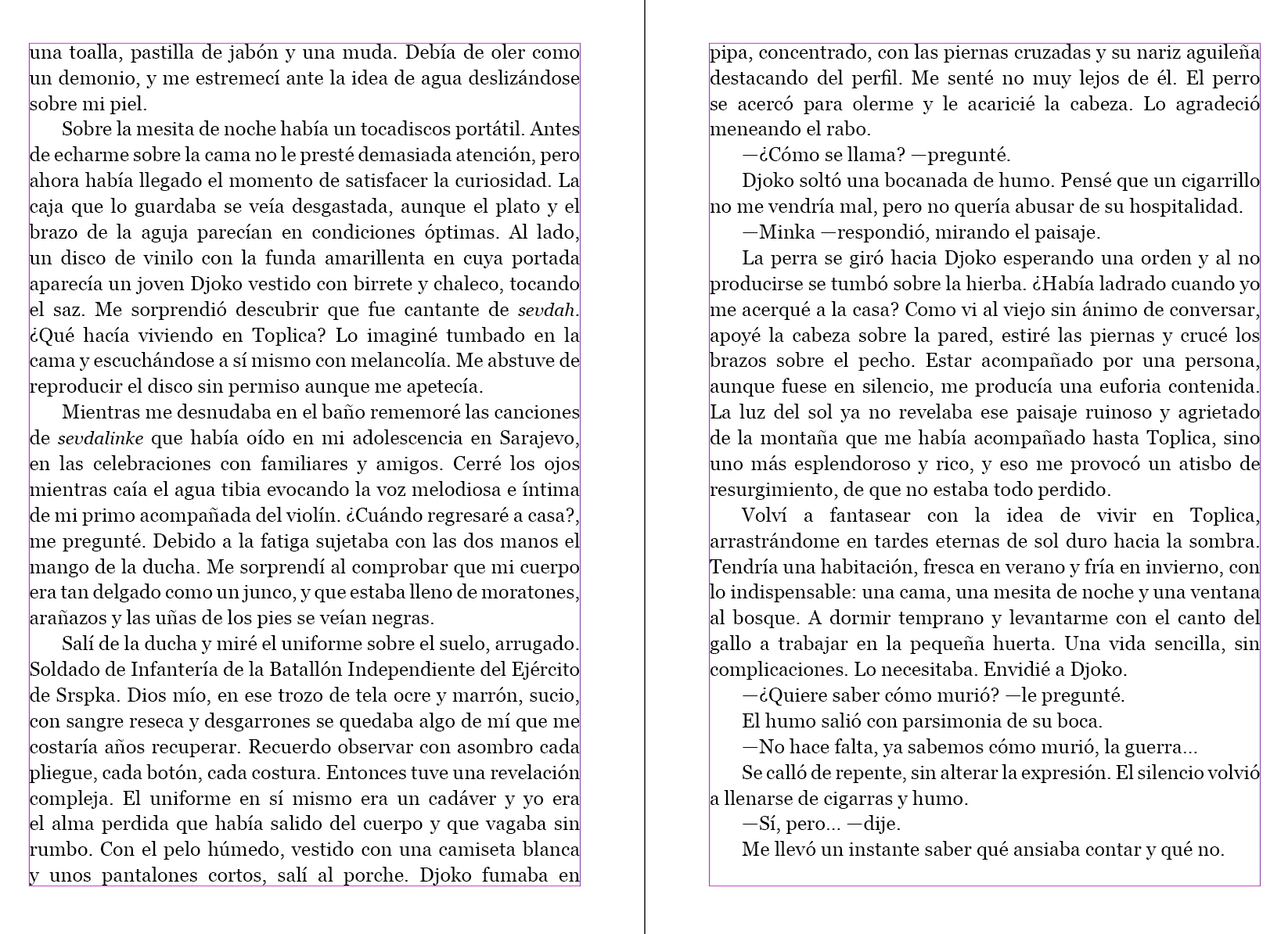
Hope you can help me. I am creating a book and I would like to find a way to equalize the last lines of each column. How can I do that for all the pages of the book? 

Big thanks in advance
This topic has been closed for replies.

2 replies

Randy Hagan
Community Expert
Community Expert
April 19, 2022

My subtle cheat is to change the percentage width of characters in the paragraph as much as 3% to get better copyfit.


For example, Let's take the paragraph that begins with "Sali" and ends with "rabo." If you highlight the entire paragraph with your Text tool, then go to the Character Width edit box in your Control Panel, as shown above and reduce it to 99%. I'll bet that it reduces that paragraph at least one line in length. Since there are 14 lines in that paragraph, and a number of the lines are set "loose" with a lot of space between words because of justified text, it may even reduce the paragraph by two. Then try to reduce it more, first to 98%, then to 97%. If the paragraph didn't shrink by two lines when you first tried 99%, I'll offer it likely did by the time you reduced the character width to 97%.


The trick is to do this sparingly, starting with your longest paragraphs and the ones with the shortest last line. Those are the areas where the finest adjustments will have the largest impact. Let me offer a couple of caveats, though:


  • Caveat One — Don't go too far in reducing (or increasing — this works both ways) the character width, or your trick will be evident to the trained eye. If you do this judiciously, even the tightest type snob with a specimen book won't be able to determine the scene of the minor copyfitting crime.
  • Caveat Two — Don't do this until the last pass through the book, after all the editing and proofing is done and you're preparing to ship the book for final printing. If you do this trick repeatedly through book revisions, it'll make your job infinitely more difficult. Wait until everything is done and only do this once.


I used to do this work for a publishing client for nearly a decade, and the designers there marveled at how I could get better copyfit than they did. They never figured out my secret and I didn't tell them. Keep this trick under your hat and nobody will know how you did it either.


Hope this helps,


Randy

James Gifford—NitroPress
Legend
April 19, 2022

Outstanding exposition. Count me among those with this hat on my rack, and the same amusement at how otherwise skilled designers can't figure it out the trick. Between actual type stretching and very small use of tracking, you can fix many spacing problems like this.


An expanded trick I've learned is to create a few character styles with base "spread" and "squeeze," and give them a color highlight such as a pale yellow outline on the text. Apply one or the other and tweak it a percent or two as needed, rather than applying each fix as a spot override. Then you know where you've tweaked, and can do it a little earlier than "very last step," and can remove it or tweak it again as needed. Then change the two character styles to no-outline, and you're ready for press. And the secret remains, well, secret. 🙂


Peter Spier
Community Expert
Community Expert
April 19, 2022

The situation in your screen shot generally occurs because of Keep Options set in the paragraph styles.

I've always handled this by adjusting the height of the frames by one line, or some judicious editing to add or lose a line in a paragraph (you can often do this by tracking just the spaces in a long paragraph), but there is no automatic method I know to do it. If someone else has one, please, I'd love to know, too.

The other alternative, which is automatic, but to my mind a mortal sin and extremely ugly, is to set the vertical justification to "Justified" but that will result in differnt line spacings ascross a spread.

Participant
April 20, 2022

Thank you so much, Peter. Justified is an ugly solution, as you said, but it works! 

Cheers!