
Inspiring
July 4, 2018
Answered

Creating a Paragraph Style for numbering figures. What does "^H" the chapter symbol actually refer to?

  • July 4, 2018
  • 6 replies
  • 5295 views

I have three levels of section heading paragraph styles.

1 Introduction

     1.1 Something Big

          1.1.1 Something more detailed
          1.1.2 Something else more detailed

2 The End

     2.1 How it Ends

     2.2 Where it ends

I want to make Figure lists paragraph style that begin with the level 1 Section heading number… then is followed by the figure number which increments like an paragraph list style. Referring here to the Bullets and Numbering sheet of the Para styles. e.g.. in contents above:

1 Introduction

     Figure 1.1

     Figure 1.2

1.1 Something Big
1.1.1 Something more detailed

     Figure 1.3

1.1.2 Something else more detailed

     Figure 1.4

2 The End
2.1 How it Ends

     Figure 2.1

     Figure 2.2

2.2 Where it ends

     Figure 2.3

     Figure 2.4

Can I combine the two numerical list counts, one form section level 1 heading and the other from a Section based figure list starting at 1 for each new section?

The only clue I see is the Chapter Symbol "^H" but I gather that refers to Chapter files of an Indesign Book and this document is small so I didn't want to run seperate files for each chapter (or level 1 section). Is there a way to do this with making a new style for each chapter or making aa style with two levels of numbering and adding my own level one entry for Figures at start of each chapter (off the page Soi it isn't seen I guess) and then counting at level two for the unique figure number with each style instance?

Hope that makes sense.
This topic has been closed for replies.
Correct answer Steve Werner

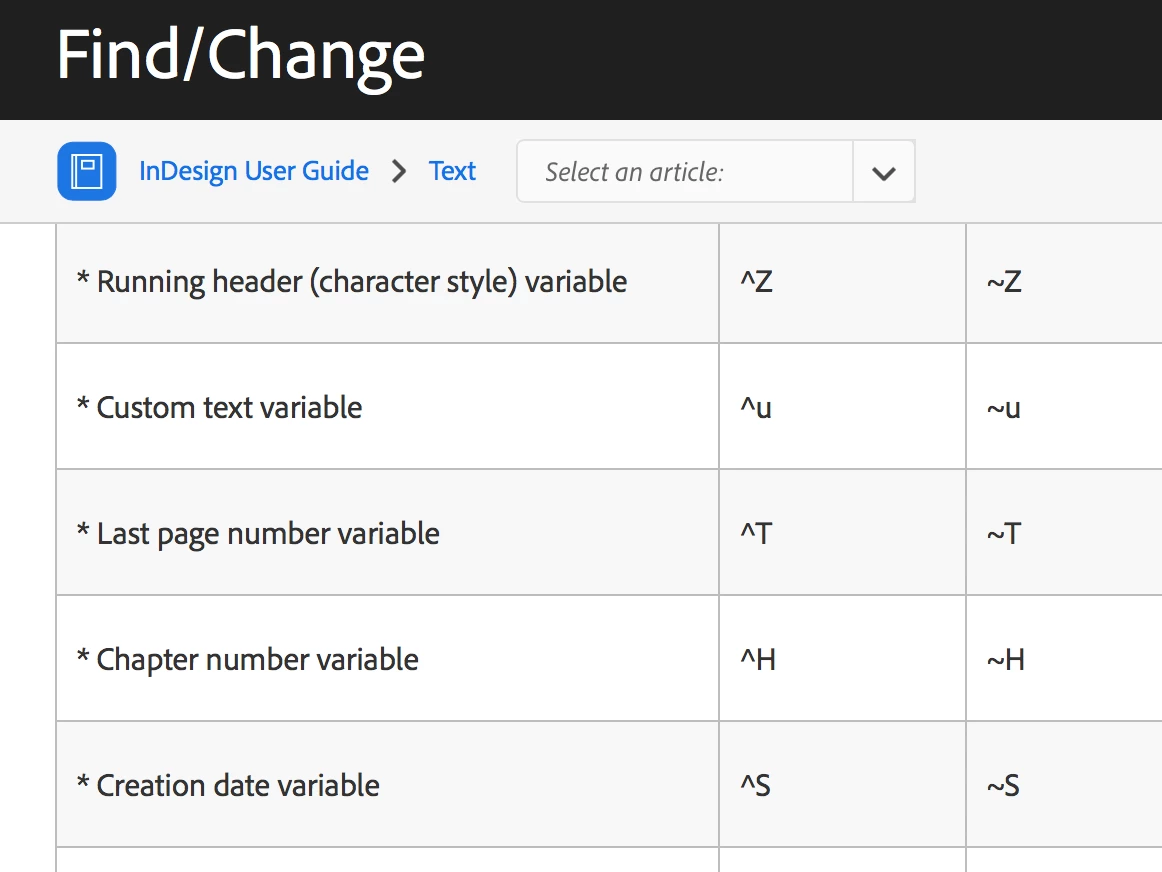
Actually ^H is a metacharacter for a Chapter Number which you can see in this table from InDesign Help:

Left column are metachararacters for text, right column are metacharacters for GREP.

But this post explains more about how it is used:

Re: Update Chapter and Paragraph Numbers

6 replies

Inspiring
October 17, 2018

I went on to set this up in a demo document and while the table numbers are behaving just fine, the figure numbers are not reseting for the new chapters, they get the prefix of ^h but not the level two number for the figure (^2) doesn't reset the second digit to 1 each chapter. Weird thing is I set Table number style and list numbering identically to Figures and I've double checked several times.

Thread here:

Para Style Numbering & Lists (for my Figures) not reseting for new chapters in new files


Appreciate any advice on that thread, I included source files.

Inspiring
July 11, 2018

It's not a long document, chapters does slow things down sometimes, syncing style changes etc, especially as I set up the template.

Barb Binder
Community Expert
Community Expert
July 11, 2018

I hear you, but something's got to give to accommodate your workflow. I'm out of ideas, so left to wishing you the best with whatever you decide.

The original question was on the usage of ^H in numbering, and Steve answered your question first, so I'm going to go ahead and mark his answer as correct. You can still come back and comment on the thread if you have additional questions on this topic.

~Barb

~Barb at Rocky Mountain Training
Steve Werner
Community Expert
Community Expert
July 11, 2018

If you have further questions or issues, I'd suggest starting a new thread.

Inspiring
July 4, 2018

Actually, the saga continues, as I have the figures and figure captions in seperate frames to the main body text (and it's a bit hard to anchor them in-line at times) and so the first level numbering for figures is the last level one for sections. I have 12 sections in the main text thread. So first figure in Section one is numbered by the style as figure 12.1 using this methodology. Only because I'm not all inside the same thread of text frames. Hmm.

Think this is why in the past I end up using arbitrarily labeled figure numbers, not a counter. Also needing to sync with client copy has meant that I can't renumber them anyways. I could go back to my separate numbering list method with two levels, top level incremented 'off page' or invisibly 'on page', second level incremented with the figure captions.

FRIdNGE
July 4, 2018

Aha! I think you really could need a true master now! …

Best,

Michel

Inspiring
July 5, 2018

I could write a script to do it but not worth the time investment.

Inspiring
July 4, 2018

I made this example file of what I meant, while these last answers were being posted. But it's a bad solution so hopefully these solutions are an improvement. Michel you didn't link to your file! Yes it looks right but HOW?

LINK to my half-way solution.

FRIdNGE
July 4, 2018

Follow Barb! 

Inspiring
July 4, 2018

Yes, here and everywhere on forums now. Guru.

Barb Binder
Community Expert
Community Expert
July 4, 2018

Hi wideEyedPupil:

I think this is what you are looking for—although I realize now you aren't using a 0 on the titles, so just remove it from the Number definition. Click to enlarge each pic. Note that you need a four level system, each with the same list name.

~Barb

~Barb at Rocky Mountain Training
FRIdNGE
July 4, 2018

Barb, thanks for explanations!

Personally, no time for that!

Best,

Michel

Eric Dumas
Community Expert
Community Expert
July 4, 2018

I would specify in the Table of Content window the sequence to 'find' the Paragraph style you want to list. Regardless of their purpose (heading or figure number). Each heading and figure caption is formatted by styles.

Make sure to expand your Table of Contents window using the 'More Options' button and 'layer' your paragraph styles to create your hierarchy.

The ^H symbol is to use nested styles. I don't think that is what you need

Steve Werner
Community Expert
Steve WernerCommunity ExpertCorrect answer
Community Expert
July 4, 2018

Actually ^H is a metacharacter for a Chapter Number which you can see in this table from InDesign Help:

Left column are metachararacters for text, right column are metacharacters for GREP.

But this post explains more about how it is used:

Re: Update Chapter and Paragraph Numbers

Inspiring
July 4, 2018

Yes sorry maybe I didn't make myself clear enough. I get that it's a chapter symbol but not how I can use it… how to make chapters in a single document etc. I went looking in docs and it's not going to work anyhow because Chapter Symbols cannot be used in prefixes for TOCs which is the secondary use case I want for this automatic Figure numbering.

So I guess that leaves me with the option to use three levels of section numbering and then create a new style for Figures and a list for the Bullets and Numbering automation, one new style instance for each level 1 section I have (boring). Or count the Figures with two levels in parallel with section numbering (i.e. not associated with it in any symbolic way) and have the level 1 increments done in a style at start of every section off the page for purpose of incrementing the first number to be in sync with the section numbering.