
September 30, 2009
Question

Creating a Stepper with ScriptUI?

  • September 30, 2009
  • 2 replies
  • 2067 views

Has anyone created a stepper using ScriptUI? I'm working on a palette that provides an alternative to using the Margins and Columns window that also helps build strong typographic grids (kind of a combination Margins, Columns and Create Guides window). I don't want the palette to be too different than the existing Margins and Columns window, but ScriptUI doesn't seem to provide a simple way to create a stepper widget like is currently used in the Margins and Columns windows:
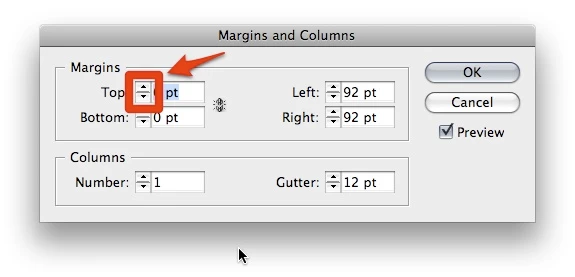
Am I just missing it in the scripting guide books, or does this type of widget require scripting it from scratch?

Thanks for any help you can provide.

This topic has been closed for replies.

2 replies

Marc Autret
Legend
September 30, 2009

I'm working on a similar script and I've created an eXtendedWidget class to encapsulate the component you need

In the rough sample code below, checkout the usage of ScrollEditText.

ScrollEditText can even emulates the behavior of a measurementEditBox, with specified units and min/max :

myStepper: XW.ScrollEditText({title:"Top:",minvalue:0,maxvalue:'8640pt',decimals:3,units:'mm'}),

To see how it works, try this:

var toUIString = function()
     { // <this> : ui object
     var r = this.toSource().
          replace(/\\u([0-9a- f]{4})/gi, function(_,$1){return String.fromCharCode(Number('0x'+$1));} ).
          replace(/(?:\{_([^:]+):)/g,'$1').
          replace(/\}\}/g,'}').
          replace(/(^\()|(\)$ )/g,'');
     return r;
     };

Window.prototype.focus = (function()
{ //Window.prototype.focus
var getControls = function()
     {
     var r = [];
     for ( var i=0, c ; i<this.children.length ; i++ )
          {
          c = this.children;
          if (c.constructor == StaticText) continue;      // exclude StaticText focus
          if (c.constructor == Scrollbar) continue;     // exclude Scrollbar focus
          if ('active' in c) {r.push(c);continue;}
          r = r.concat(arguments.callee.call(c));
          }
     return r;
     };
return function(/*int*/step)
     {
     this.controls = this.controls || getControls.call(this);
     var sz = this.controls.length;
     for (var i=0 ; i<sz ; i++)
          {
          if (this.controls.active == true) break;
          }
     if (!step) return this.controls;
     i = (i+step+sz)%sz;
     step = (step<0)?-1:1;
     while(!this.controls.enabled) i+=step;
     this.controls.active = true;
     return this.controls;
     };
})();


var XW = (function()
// Extended Widgets
//------------------------------------------------
{
var widgets = {}, xWidgets = {};
    
var xWidget = function(/*str*/xType)
     { // constructor
     this.xType = xType;
     this.widget = widgets[this.xType];
     };
xWidget.prototype.ui = function(settings_)
     {
     var ui = this.widget.ui(settings_);
     var ac = this.widget.access;
     ui[ac].settings = settings_;
     ui[ac].xType = this.xType;
     return ui;
     };
xWidget.prototype.connect = function(parent)
     {
     var c = parent.children;
     for (var i = c.length-1 ; i>=0 ; i-- )
          {
          if ( c.xType && (c.xType == this.xType) )
             {
             this.widget.connect.call(c);
             continue;
             }
          if (c.children.length) this.connect(c);
          }
     };


// DropListBox
// --------
widgets.DropListBox =
     {
     access: '_Group',
     ui: function(settings_)
          {return {_Group:{
             margins:0, spacing:0, orientation: 'row', alignChildren: ['left','center'],
             lTit: (settings_.title)?{_StaticText:{characters:12,text:settings_.title,justify:'right'}}:null,
             lSpa: (settings_.title)?{_StaticText:{characters:1}}:null,
             ddList: {_DropDownList: {maximumSize:[100,25]}}
             }};
          },
     connect: function()
          { // <this> UI Group
          (function(items_)
             { // ddList : load items
             for(var i=0, tp ; i<items_.length ; i++)
                  {
                  tp = (items_ == '-') ? 'separator' : 'item';
                  this.add(tp,items_);
                  }
             }).call(this.ddList,this.settings.items);
          }
     };


// ScrollEditText  (this is your 'stepper')
// --------
widgets.ScrollEditText =
     {
     access: '_Group',
     ui: function(settings_)
          {return {_Group:{
             margins:0, spacing:0, orientation: 'row', alignChildren: ['left','center'],
             lTit: (settings_.title)?{_StaticText:{characters:12,text:settings_.title,justify:'right'}}:null,
             lSpa: (settings_.title)?{_StaticText:{characters:1}}:null,
             sBar: {_Scrollbar:{size:[16,24]}},
             eTxt: {_EditText:{characters:settings_.characters||8}}
             }};
          },
     connect: function()
          { // <this> Group
          (function()
             {
             this.units = this.units||'';
             this.decimals = (typeof this.decimals=='undefined')?-1:this.decimals;
             this.characters = this.characters||6;
             this.step = this.step||1;
             this.jump = this.jump||this.step*5;
             }).call(this.settings);

          this.parseUnit = (this.settings.units)?
             function(/*str*/s)
                  {
                  var m = s.match(/^-?(\d+)([cp])([\d\.]+)/i); // #p# ou #c#
                  if (m && m.length) s = ((m[0][0]=='-')?'-':'') + ((m[1]-0)+(m[3]/12)) + ((m[2]=='c')?'ci':'pc');
                  m = s.match(/agt|cm|ci|in|mm|pc|pt/i);
                  return (m && m.length) ?
                       UnitValue (s).as(this.settings.units) :
                       Number(s. replace(/[^0-9\.-]/g,''));
                  }:
             function(/*str*/s) {return Number(s.replace(/[^0-9\.-]/g,''));};

          this.parseStrValue = function(/*str*/s)
             {
             var v = this.parseUnit(s.replace(',','.'));
             return (isNaN(v)) ? null : v;
             };

          this.fixDecimals = (this.settings.decimals >=0 )?
             function(/*num*/v){return v.toFixed(this.settings.decimals)-0;}:
             function(/*num*/v){return v;};

          this.displayValue = (this.settings.units)?
             function(/*num*/v)
                  {
                  var u = this.settings.units;
                  if ( u=='pc' || u=='ci' )
                       { // #,#pc -> $p$  ou  #,#ci -> $c$
                       var sg = (v<0)?-1:1;
                       v = v*sg;
                       var sx = Math.floor(v);
                       var sy = (v-sx)*12;
                       return sx*sg + u[0] + sy.toLocaleString().substr(0,this.settings.characters);
                       }
                  else
                       {
                       var s = v.toLocaleString().substr(0,this.settings.characters);
                       return s + ' ' + u;
                       }
                  } :
             function(/*num*/v)
                  {
                  return v.toLocaleString().substr(0,this.settings.characters);
                  };

          this.settings.minvalue = (this.settings.minvalue)?this.parseStrValue(''+this.settings.minvalue):0;
          this.settings.maxvalue = (this.settings.maxvalue)?this.parseStrValue(''+this.settings.maxvalue):100;
          if (typeof this.settings.value == 'undefined') this.settings.value = this.fixDecimals(this.settings.minvalue);

          this.offsetValue = function(/*num*/delta)
             {
             this.changeValue(this.eTxt.text,'NO_DISPLAY');
             this.changeValue(Math.round(this.settings.value + delta));
             };
         
          this.changeValue = function(/*var*/vs,/*var*/noDisplay,/*var*/noEvent)
             {
             var v = (typeof vs == 'string') ? this.parseStrValue(vs) : vs;
             v = ( typeof v == 'number' ) ? this.fixDecimals(v) : this.settings.value;
             if ( v < this.settings.minvalue ) v = this.settings.minvalue;
             if ( v > this.settings.maxvalue ) v = this.settings.maxvalue;
             var noChange = (this.settings.value == v);
             if (!noChange) this.settings.value = v;
             if (!noDisplay) this.eTxt.text = this.displayValue(this.settings.value);
             if ((!noChange) && (!noEvent)) this.eTxt.notify();
             };

          (function()
             { // scrollbar
             this.minvalue = -1;
             this.maxvalue = 1;
             this.value = 0;
             this.onChanging = function()
                  {
                  this.parent.offsetValue(-this.value*this.parent.settings.step);
                  this.value = 0;
                  };
             }).call(this.sBar);
         
          (function()
             { // edittext
             this.addEventListener('blur', function(ev)
                  { // lost focus
                  this.parent.changeValue(this.text);
                  });
             this.addEventListener('keydown', function(ev)
                  { // up/down keys
                  var delta = 1;
                  switch(ev.keyName)
                       {
                       case 'Down' : delta = -1;
                       case 'Up' :
                        delta *= this.parent.settings.step;
                        if (ev.shiftKey) delta *= this.parent.settings.jump;
                        this.parent.offsetValue(delta);
                        break;
                       default:;
                       }
                  });
             }).call(this.eTxt);
         
          this.changeValue();
          }
     };

// XW interface
// --------
var r = {};
for(var w in widgets)
     {
     r = (function()
          {
          var w_ = w;
          return function(/*obj*/ settings)
             {
             xWidgets[w_] = xWidgets[w_] || new xWidget(w_);
             return xWidgets[w_].ui(settings);
             };
          })();
     };
r.connectAll = function(/*Window*/parent)
     {
     for each(var xw in xWidgets) xw.connect(parent);
     }
return r;
})();


//==================================================
// sample code
//==================================================

// if you need a palette Window, replace _dialog by _palette
// (and use #targetengine)

var ui = toUIString.call({_dialog:{
     text: "Column Rules",
     properties: {closeOnKey: 'OSCmnd+W'},
     orientation: 'row', alignChildren: ['fill','top'],
     gTextFrame: {_Group:{
          margins:0, spacing:10, orientation: 'column',
          pInsetSpacing: {_Panel:{
             margins:10, spacing:2, alignChildren: ['fill','fill'],
             text: "Inset Spacing",
             seTop: XW.ScrollEditText({title:"Top:",minvalue:0,maxvalue:'8640pt',decimals:3,units:'mm'}),
             seBot: XW.ScrollEditText({title:"Bottom:",minvalue:0,maxvalue:'8640pt',decimals:3,units:'mm'}),
             cLinked: {_Checkbox:{text: "Linked"}},
             seLeft: XW.ScrollEditText({title:"Left:",minvalue:0,maxvalue:'8640pt',decimals:3,units:'mm'}),
             seRight: XW.ScrollEditText({title:"Right:",minvalue:0,maxvalue:'8640pt',decimals:3,units:'mm'}),
             }},
          pColumns: {_Panel:{
             margins:10, spacing:2, alignChildren: ['fill','fill'],
             text: "Columns",
             seNumber: XW.ScrollEditText({title:"Number:",minvalue:1,maxvalue:40}),
             seGutter: XW.ScrollEditText({title:"Gutter:",minvalue:0,maxvalue:'8640pt',decimals:3,units:'mm'}),
             }},
          cIgnoreTextWrap: {_Checkbox:{text: "Ignore Text Wrap", alignment:'left'}},
          }},
     gProcess: {_Group:{
          margins:10, spacing:8, alignChildren: ['center','fill'],
          orientation: 'column',
          gValid: {_Group:{
             margins:10, spacing:10, orientation: 'row',
             bOK: {_Button: {text:"OK"}},
             bCancel: {_Button: {text:"Cancel"}},
             }},
          }},
     }});

// create the main window
// ---------------------------
var w = new Window(ui);

// connect XWidgets
// ---------------------------
XW.connectAll(w);

// manage the tab key
// ---------------------------
(function(){
     this.addEventListener('keydown', function(ev)
          { // Tab
          if (ev.keyName == 'Tab')
             {
             ev.preventDefault();
             this.focus( ((ev.shiftKey)?-1:1 ) );
             }
          });
     }).call(w);

// controls event manager
// ...
// here you add the event listeners for w.gTextFrame.pInsetSpacing, etc.
// ...

w.show();

You will notice I use a special format rather than UI string resource. This allows to create compact object declaration, using finally the toUIString helper function. The XW object invokes also that stuff.

The ScrollEditText component encapsulates the stepper+editText association. You don't have to manage the interaction. Each time the value changes, the component notify a change event on the editText target.

Hope it could hep you.

@+

Marc

September 30, 2009

Marc:

Thanks so much for the code. If anything, your approach to building a UI is awesome and will surely be helpful to not only me but others. Great work.

However, on my Mac (running CS4 on Leopard), your code produced this:

Instead of a scrollbar, should it be two buttons?

You've given me a lot to play with, though, so thank you.

I'm surprised this sort of widget, given how prevalent it is throughout the CS interface, is not standard within ScriptUI.

Marc Autret
Legend
September 30, 2009

Well, interesting result

Here is the capture for the same code on Win OS :

As said, my script is still a work-in-progress. Apparently, I'll have to deal with cross-platform issues --always the same old story with scriptUI layout...

Using one scrollbar for each up/down stepper may not be the good solution, but perhaps that's just a "cosmetic" problem and the underlying implementation could stay the same...

I'm surprised this sort of widget, given how prevalent it is throughout the CS interface, is not standard within ScriptUI.


You're so right !

@+

Marc

Bob Stucky
Adobe Employee
Adobe Employee
September 30, 2009

You pretty much have to script it from scratch. Sorry.

I am attaching a script that I wrote for CS4 that makes a ScriptUI edit text act like a measurement edit box. It allows you to use arrow keys to increment/decrement. That should at least help get you started.

Regards

Bob

Bob Stucky
Adobe Employee
Adobe Employee
September 30, 2009

Attempting to attach the file again...

Tried to upload twice, failed twice. Email me for the code...

bostucky@adobe.com

Bob