


- Home
- InDesign
- Discussions
- Re: Creating flowing text in interactive pdf
- Re: Creating flowing text in interactive pdf

Copy link to clipboard
Copied
Hi guys,
I'm wondering how to create flowing text in an interactive pdf. I want to be able to hit return to go to the next box wether that be a check box, radio button or a text field as I am creating a document to fill in online that contains all 3 styles. Can anyone tell me how best to do this? 🙂 thanks in advance.


 2 Correct answers


Tab is the standard keyboard input for this.


Hi AJLangtry,
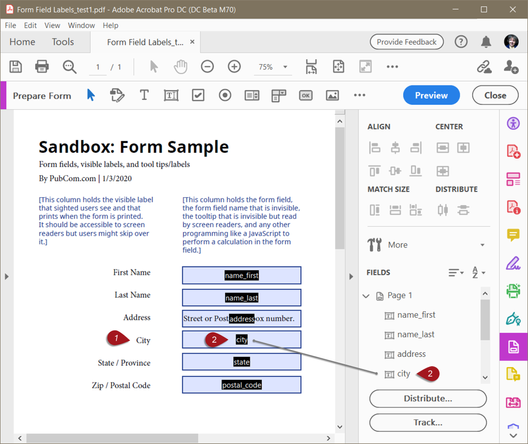
You're describing a PDF form's "Tab Order," where the user can tab from field to field in the correct, logical order.
This is a requirement for accessible PDF forms so that people who use assistive technologies (such as screen reader software by those who are blind) can navigate from field to field, but Tab Order also helps all users.
Control this in Acrobat's Form Editor tool by sequencing the form fields in the correct order in the form tree (the right-hand panel). On the right
... 7
Replies
7
7
Replies
7

Copy link to clipboard
Copied
Can you clarify?
>...how to create flowing text in an interactive pdf. I want to be able to hit return to go to the next box...
To me, flowing text is a self-expanding text box; moving from box to box is an accessibility issue.
Which one are you looking for?
Also, this reads like an Acrobat issue, not InDesign.
Copy link to clipboard
Copied
Hi,
Thank you for replying. Maybe flowing text box isn't the right term. Bascially I want the user to be able to hit return to go to the next input field, is that something I have control over?

Copy link to clipboard
Copied
that does exist, you use tab
Copy link to clipboard
Copied
a floating text as in a popup?
Copy link to clipboard
Copied
Hi Jonathan,
No, not a pop up. Essentially its for the end user to fill in a form with say for example
First Name:
Surname:
Date of birth:
And imagine beside each of these fields there is a text box they can fill in on a pdf. Once they input their first name, I want them to be able to hit enter/return, or whatever you want to call it, and go to the next text field, in this case their Surname and so on.
Copy link to clipboard
Copied
Tab is the standard keyboard input for this.
Copy link to clipboard
Copied
Hi AJLangtry,
You're describing a PDF form's "Tab Order," where the user can tab from field to field in the correct, logical order.
This is a requirement for accessible PDF forms so that people who use assistive technologies (such as screen reader software by those who are blind) can navigate from field to field, but Tab Order also helps all users.
Control this in Acrobat's Form Editor tool by sequencing the form fields in the correct order in the form tree (the right-hand panel). On the right side, drag and drop the form fields into the correct tab order.
Learn more about how to do this while making accessible PDF forms in Adobe's free online seminar series at https://adobe.lookbookhq.com/acrobataccessibility
It's an excellent series hosted by Adobe's Rob Haverty who is part of Adobe's accessibililty team.
| PubCom | Classes & Books for Accessible InDesign, PDFs & MS Office |


Get ready! An upgraded Adobe Community experience is coming in January.
Learn more
 AdChoices