
Participant
November 17, 2022
Answered

Creating hyperlinks to different documents

  • November 17, 2022
  • 1 reply
  • 585 views

Hi all,

I've created a 90 page doc with different documents and created an indesign book. I would like to create hyperlinks to different documents within the book for navigation but can not remember how to do it!! Help!

kind regards

Colin
This topic has been closed for replies.
Correct answer Geоrge

You can create hyperlinks to pages, URLs, text anchors, email addresses, and files. If you create a hyperlink to a page or text anchor in a different document, make sure that the exported files appear in the same folder.

https://helpx.adobe.com/indesign/using/hyperlinks.html#:~:text=Create%20a%20hyperlink%20to%20a%20page,-You%20can%20create&text=of%20the%20hyperlink.-,Choose%20New%20Hyperlink%20in%20the%20Hyperlinks%20panel%20menu,%20or%20click,you%20want%20to%20jump%20to.


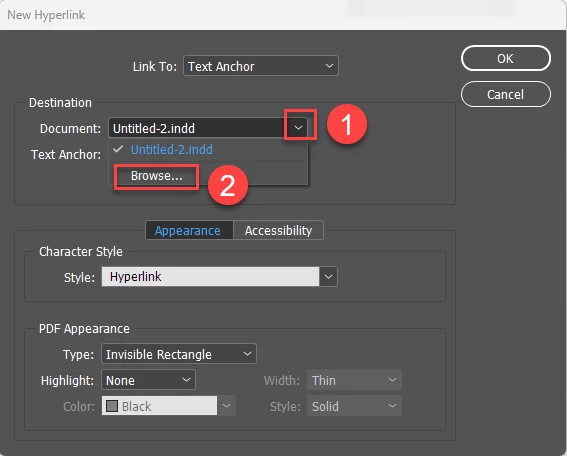
For example, when you are use it link to text anchor you can choose exact name of another document.


1 reply

Geоrge
GeоrgeCorrect answer
Legend
November 17, 2022

You can create hyperlinks to pages, URLs, text anchors, email addresses, and files. If you create a hyperlink to a page or text anchor in a different document, make sure that the exported files appear in the same folder.

https://helpx.adobe.com/indesign/using/hyperlinks.html#:~:text=Create%20a%20hyperlink%20to%20a%20page,-You%20can%20create&text=of%20the%20hyperlink.-,Choose%20New%20Hyperlink%20in%20the%20Hyperlinks%20panel%20menu,%20or%20click,you%20want%20to%20jump%20to.


For example, when you are use it link to text anchor you can choose exact name of another document.


Remember, never say you can't do something in InDesign, it's always just a question of finding the right workaround to get the job done. © David Blatner
Participant
November 17, 2022

GeOrge you are a star!!! Thank you!! c