
alpy
Participant
June 19, 2018
Answered

Creative Cloud File Conflict

  • June 19, 2018
  • 4 replies
  • 6747 views

Hi,

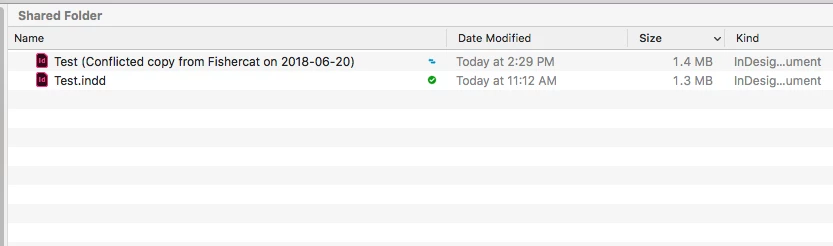
I have been getting an error where InDesign creates a duplicate of the currently worked file, it calls it the same but it adds between brackets ((Conflicted copy ...).

Has anyone experienced anything like this?

Thanks,
This topic has been closed for replies.
Correct answer rob day

I was able to reproduce your conflict file from my CC folder by working on and saving the same sync'd file simultaneously from two different computers:

If you are collaborating with other users, one option might be to drag the file on to your desktop while you work on the file, which would hide it from other users, then return it to the CC folder when you are finished editing.

4 replies

Inspiring
April 10, 2021

I get this all the time with inDesign, at least once a week. No idea why.

I work in the CC folder with one computer.  I store the files in CC. No one else works on the files. I have Dropbox, but do not work in it.

For me, the files are not the same. The conflicted copy will be the most up-to-date version, though sometimes I am unable to open it so will have to resort to the "real" version which may or may not be from a recent save. Sometimes most of a day's work will be lost.

Sometimes I can reopen it, save as with a new name and all seems good.

rob day
Community Expert
Community Expert
April 11, 2021

I work in the CC folder with one computer. 


So you never log into your CC account on a different computer—i.e., home work, or desktop laptop?

shrjyasheng
Participant
March 17, 2021

Yes I get this all the time, and none of the replies so far have been "answers" at all. 


Dave Creamer of IDEAS
Community Expert
Community Expert
March 17, 2021

The answer was there...

If multiple people work on the file as the same time, you will get this result. Technically, it doesn't have to be at the same exact time--upload speed can cause this problem too or the file was left open on someone's computer. 


Solution: make sure files are worked on by one person at a time. Then be sure to give enough time for the file to upload to the cloud servers and to download to the other computers before someone else works on it.


Although not as common, it can also happen if a computer's clock is not in sync. 

David Creamer: Community Expert (ACI and ACE 1995-2023)
BobLevine
Community Expert
Community Expert
June 19, 2018

That looks like the files are in a Dropbox folder and Dropbox doesn't know which version you want so you get both with that note.

This is not an InDesign issue.

alpy
alpyAuthor
Participant
June 19, 2018

No Dropbox in use, Adobe Creative Cloud instead.

Spoke to Adobe support yesterday and couldn't get a clear answer, they said that InDesign is possibly creating a copy as the original could be corrupted (both files are ok).

Besides that, I also got a link to an article that to me works as a disclaimer.

Illustrator support for networks and removable media

Cheers,

rob day
Community Expert
Community Expert
June 20, 2018

No Dropbox in use, Adobe Creative Cloud instead.

Are you storing files in your Creative Cloud Files folder (/Users/username/Creative Cloud Files) to sync the files to your account or collaborate with another user?

The reason I ask is your capture doesn't show the green check marks you would normally get when working in your CC folder and your AI link is about working across a local network, which wouldn't necessarily be related.

A sync'd  Creative Cloud Files folder

kglad
Community Expert
Community Expert
June 19, 2018