
Participant
April 12, 2024
Answered

Crop marks not showing on exported .pdf

  • April 12, 2024
  • 3 replies
  • 3003 views

Hello everyone,


I am adding custom crop-marks to my InDesign file. I select the object, and I apply the CropMarks.sx script. I can see my crop marks on my document.


Now, when I export (yes, all layers, plenty of bleed) I only see my document's main crop marks, and there's is no way I can see the ones that I added with the script.


I even dragged a line from it onto the document, and I can see it. As soon as it goes outside the bleed area, it disappears.

What am I doing wrong?
This topic has been closed for replies.
Correct answer rob day

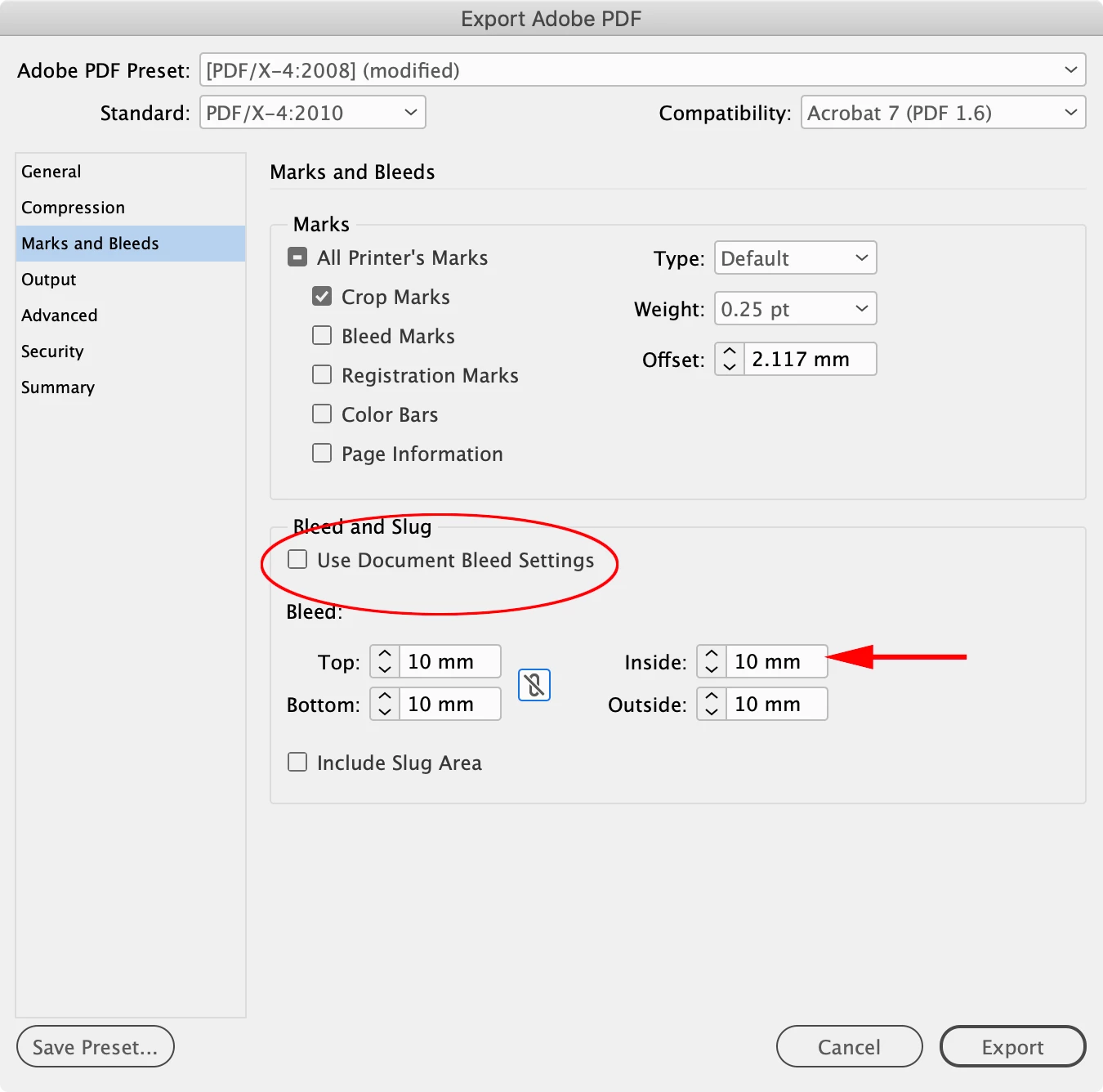
Hi @Elizabeth22827667lv5g , It looks like your custom marks are positioned outside of the document bleed? Does it work if you uncheck Use Document Bleed Settings and set a larger bleed? Something like this:


3 replies

Inspiring
April 12, 2024

As soon as it goes outside the bleed area, it disappears.

Anything outside the bleed area gets cut off. But as a workaround, you can add a slug area as well. The slug area must be big enough to include the crop marks but this should fix your problem.

Participant
April 12, 2024

Thank you. I've applied a big slug area and that didn't solve the issue.

Inspiring
April 12, 2024

You have to turn on the "Include Slug Area" option when you export … 


Tested this and it works. 

rob day
Community Expert
rob dayCommunity ExpertCorrect answer
Community Expert
April 12, 2024

Hi @Elizabeth22827667lv5g , It looks like your custom marks are positioned outside of the document bleed? Does it work if you uncheck Use Document Bleed Settings and set a larger bleed? Something like this:


Participant
April 12, 2024

Ha, this was the issue! Thank you so much!

BobLevine
Community Expert
Community Expert
April 12, 2024

I've never used that script so, a couple of questions:


1. Are those objects on a non-printing layer?

2. Have you used it successfully in the past?


Edit: make sure the offset is larger than the bleed area.

Participant
April 12, 2024

Hello,

the layer is a printing layer indeed. No, it's the first time I use it.


And even setting a big offset doesn't make the layer appear.


Thank you.