


Participant
June 22, 2022
Answered

CS6 Binding option (right-to-left documents)

  • June 22, 2022
  • 2 replies
  • 727 views

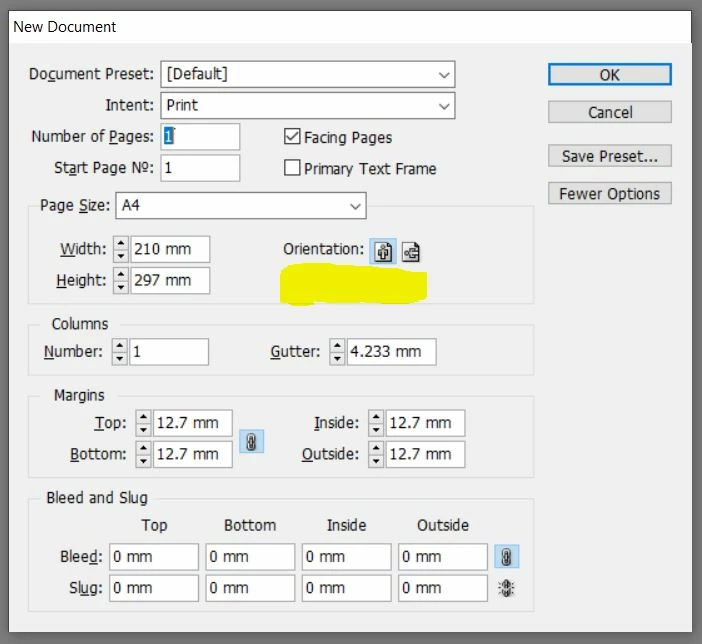
Hi everyone! I have a licensed Adobe CS6 package installed on my computer (not the cloud app). Although I see on all the InDesign guides "Binding" options, I can't see it anyway on the software installed on my computer. Why? How can I fix it?

I'm trying to edit a Hebrew book written right-to-left

As I understand it, I'm supposed to see it under Orientation on the document setup - but it is not there 😞

Please help!
This topic has been closed for replies.
Correct answer Willi Adelberger

With CS6 you are out of luck. In those days, long ago, you had to buy for each language a separate licence. With CC you can install any language version and its supplements (fonts, dictionary, UI, etc.)

Nowadays it is donenthe following way:

  1. You have your language vrsion installed. 
    In my case it is German, which installs a German User Interface and additional the DUDEN dictionaries and hyphenation rules. With other language version DUDEN is not installed.
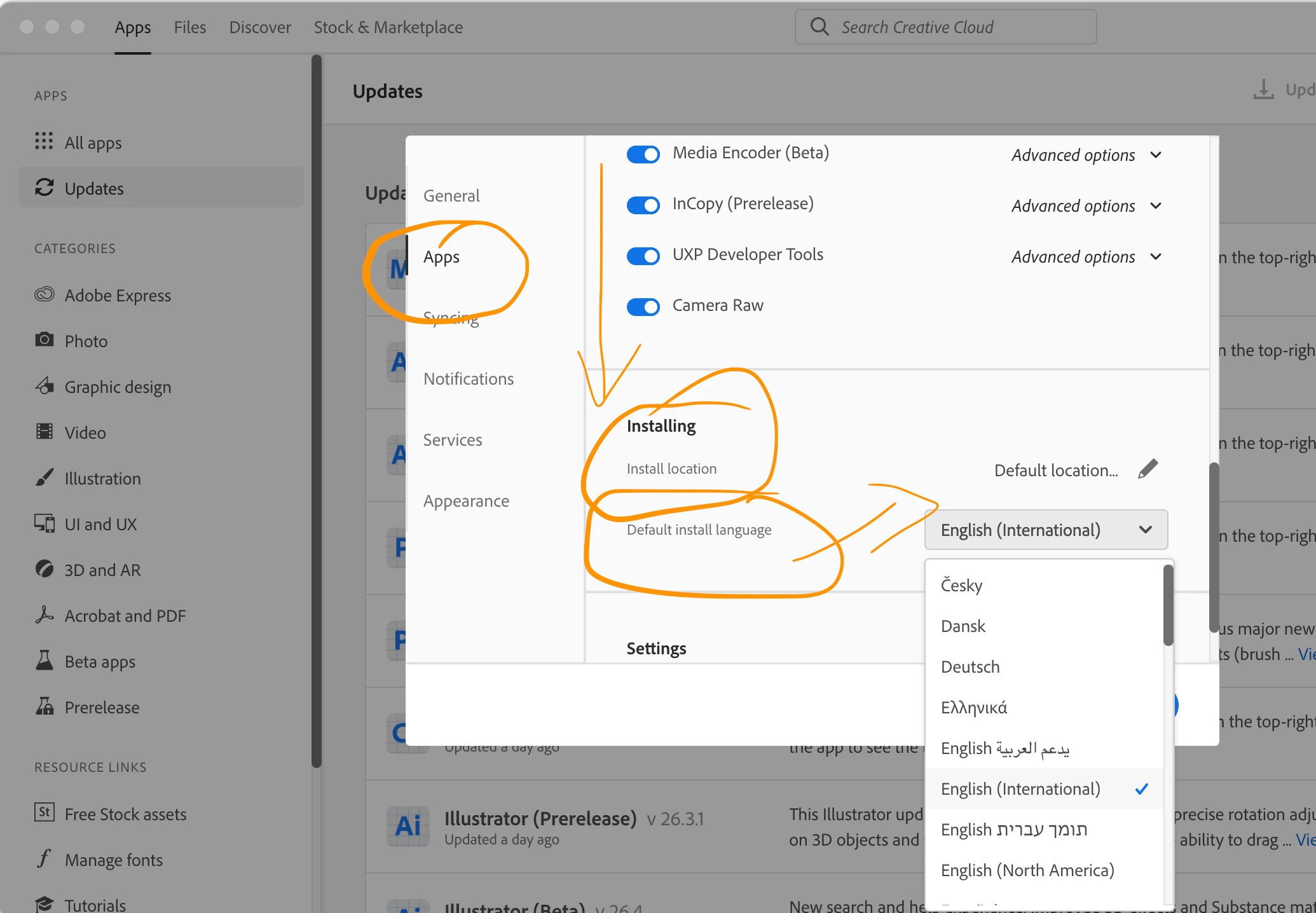
  2. Before installing a RTL version (Hebrew, Arabic, Farsi and others) you have to go to the CC Desktop Application.
  3. Go to Preferences, there select Applications, scroll down where the installation language menu is shown.
  4. After installing the RTL version you can change back to your normal UI language and start InDesign.

2 replies

Willi Adelberger
Community Expert
Willi AdelbergerCommunity ExpertCorrect answer
Community Expert
June 25, 2022

With CS6 you are out of luck. In those days, long ago, you had to buy for each language a separate licence. With CC you can install any language version and its supplements (fonts, dictionary, UI, etc.)

Nowadays it is donenthe following way:

  1. You have your language vrsion installed. 
    In my case it is German, which installs a German User Interface and additional the DUDEN dictionaries and hyphenation rules. With other language version DUDEN is not installed.
  2. Before installing a RTL version (Hebrew, Arabic, Farsi and others) you have to go to the CC Desktop Application.
  3. Go to Preferences, there select Applications, scroll down where the installation language menu is shown.
  4. After installing the RTL version you can change back to your normal UI language and start InDesign.
Joel Cherney
Community Expert
Community Expert
June 25, 2022

I think that maybe the posters above me missed the fact that you're on CS6. You don't have a Creative Cloud license, right? If you're using CS6, that button only exists in InDesign Middle East Edition. You would have had to have bought it. back in the CS era it was actually made by Winsoft. It's essentially unavailable now.


However, if you know any Javascript, then I think that it would be available by writing a script to affect the binding. In the CS6 object model I found 


bindingOptions.LEFT_ALIGN


and


bindingOptions.RIGHT_ALIGN


so we know that binding, like  all of the other RTL text manipulation tools in the ME edition, can be accessed by writing a script. If you're working on a Hebrew book, you're going to need them all. Not just binding, but character-level direction control, paragraph-level control, maybe digits, maybe diacritical marks, all kinds of controls you don't have in the English-language edition you're looking at. All of those controls are available in the ME edition.


I doubt you'd be able to find the actual CS6 Middle East Edition, but I suspect that you might still be able to buy World Tools from in-tools.com or ScribeDOOR for CS6 from winsoft-international.com;

either one would give you the tools you need for making your Hebrew book.


If neither of those is an option for you, consider moving to Creative Cloud, which will give you access to the latest ME editions of InDesign. If spending money isn't an option for you, and you can't write Javascript, I know that I have the old RTL scripts that Thomas Phinney posted years and years ago, and I know they still work because I still use 'em, even though I always have the ME edition installed. Poke me and I'll track 'em down for you. But really, although I haven't used World Tools in many years, it's probably the cheapest, fastest way to work on your Hebrew book without doing some script development.

Willi Adelberger
Community Expert
Community Expert
June 25, 2022

I did not miss it. I explicitely wrote it.

Abambo
Community Expert
Community Expert
June 25, 2022

For sure that's the wrong dialogue. Look here: https://helpx.adobe.com/indesign/using/arabic-hebrew.html


 Arabic and Hebrew supported in a Middle Eastern version with full right-to-left language support, Arabic/Hebrew features, and an English interface; also in a North African French (Français*) version with full right-to-left language support, Arabic/Hebrew features, and a French interface.


ABAMBO | Hard- and Software Engineer | Photographer
Willi Adelberger
Community Expert
Community Expert
June 25, 2022

No this is the right dialog (together with the document setup):

Abambo
Community Expert
Community Expert
June 26, 2022

I missed that. Thanks for the correction.

ABAMBO | Hard- and Software Engineer | Photographer