
Inspiring
January 23, 2016
Answered

Custom Crop Marks in InDesign CC

  • January 23, 2016
  • 2 replies
  • 19713 views

Hi all,

I'm based in Tokyo and most printers here request work be delivered using the crop marks shown on the right:
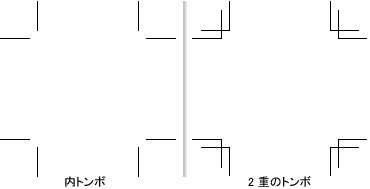
Unfortunately the English version of InDesign only offers the crop marks on the left.
I understand that in older versions one could create custom crop marks and save them as .mrk files in a specific location - however this dosn't appear to be an option any more.
Is there a way to add more crop mark options? There's a dropdown menu supplied but I couldn't find any information online.
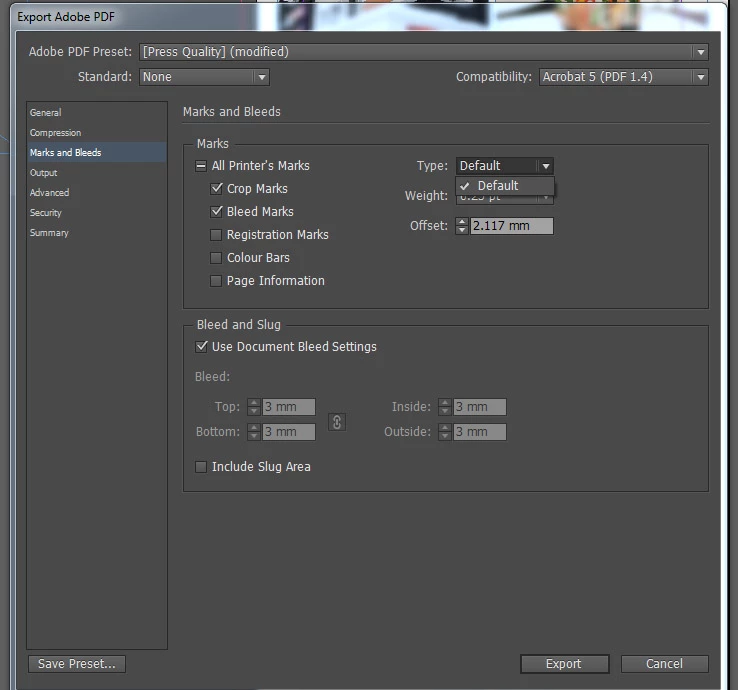
(The "Type" drop down menu doesn't have any extra options)

Thanks in advance.

This topic has been closed for replies.
Correct answer SJDes

**UPDATE**

I contacted Adobe support and they suggested I simply reinstall InDesign with Japanese language settings selected (the JP version of the software).
I can now use the default crop marks as well as the JP crop marks included with this version - plus the interface still displays in English (I assumed it would be in Japanese which is why I didn't try this earlier).

It's not the exact solution we were looking for but it's a suitable work-around...

Thanks all.

2 replies

SJDesAuthorCorrect answer
Inspiring
January 28, 2016

**UPDATE**

I contacted Adobe support and they suggested I simply reinstall InDesign with Japanese language settings selected (the JP version of the software).
I can now use the default crop marks as well as the JP crop marks included with this version - plus the interface still displays in English (I assumed it would be in Japanese which is why I didn't try this earlier).

It's not the exact solution we were looking for but it's a suitable work-around...

Thanks all.

schroef
Inspiring
November 15, 2019

@SJDes,


i got those *.mrk files working again. I dove into the files and did testing removing some of the comments in them. Eventually, the file started working again. There is some issue with some of those comments in that .mrk file.


Ive attached a working version of the Japanese Cropmarks
http://www.filedropper.com/printermarks

In the ZIP there is the Japanese version, i also added a QuarkXpress version. Not sure why, does anyone use that app?

I did add the plate color to the QuarkX verion, this will show on each plate. Now looks a bit messy

Peter Spier
Community Expert
Community Expert
December 5, 2019

I'm not having any luck getting to your file on FileDropper -- it just re -routes me to the home page. Do I need to create an account to get there?

Stephen Marsh
Community Expert
Community Expert
January 23, 2016

One possible work around is a script that creates custom crop marks, in conjunction with a PDF export option that does not use the default marks.

Have a look at the following –

post #4:

Re: Crop mark from CMYK to grayscale

post #11:

Re: Crop mark from CMYK to grayscale

Steve Werner
Community Expert
Community Expert
January 23, 2016

It's worth doing a Google search on "Japanese crop marks InDesign". I think these are the two articles you need from InDesignSecrets.com:

https://indesignsecrets.com/japanese-and-chinese-crop-marks-for-indesign.php

http://indesignsecrets.com/creating-custom-printer-marks-in-indesign.php

The second one describes the general principles of how to create custom printer marks, and includes a PDF  for download from Real World InDesign CS2 which describes the method.

The first one has a link to an .mrk file which creates Japanese marks.

But you also have to read through the comments on each file. You have to find the folder on your operating system to place the .mrk file. The folder is called PrintSpt.

On a Mac, it's here:

/Library/Application Support/Adobe/PrintSpt

In Windows, it's here:

C:\Program Files\Common Files\Adobe\PrintSpt

Once you've place the .mrk file there, it will appear in your print dialog like this:

SJDesAuthor
Inspiring
January 26, 2016

Hi SJDes,

Try my Japanese crop marks settings.

すびの書 Japanese-style Custom Crop Marks for InDesign


Hi Subi Omu,

Thanks for your suggestion, I tried using your provided script however when I select it I receive the same error that I also get with Dorothy Lindman's original .mrk files:

Result:

Thanks for your continued support Steve, I appreciate the time everyone is putting in to assist with this issue.

It seems that as Mike is also having the same error, it could be a Windows specific problem. This is what I get for trying to be a maverick by designing on a PC ><