
Participant
July 8, 2024
Répondu

Darstellung Endnoten im ePub fehlerhaft

Hallo liebe Community,


bei der Erstellung eines eBooks (epub umfließend) habe ich folgendes Problem:

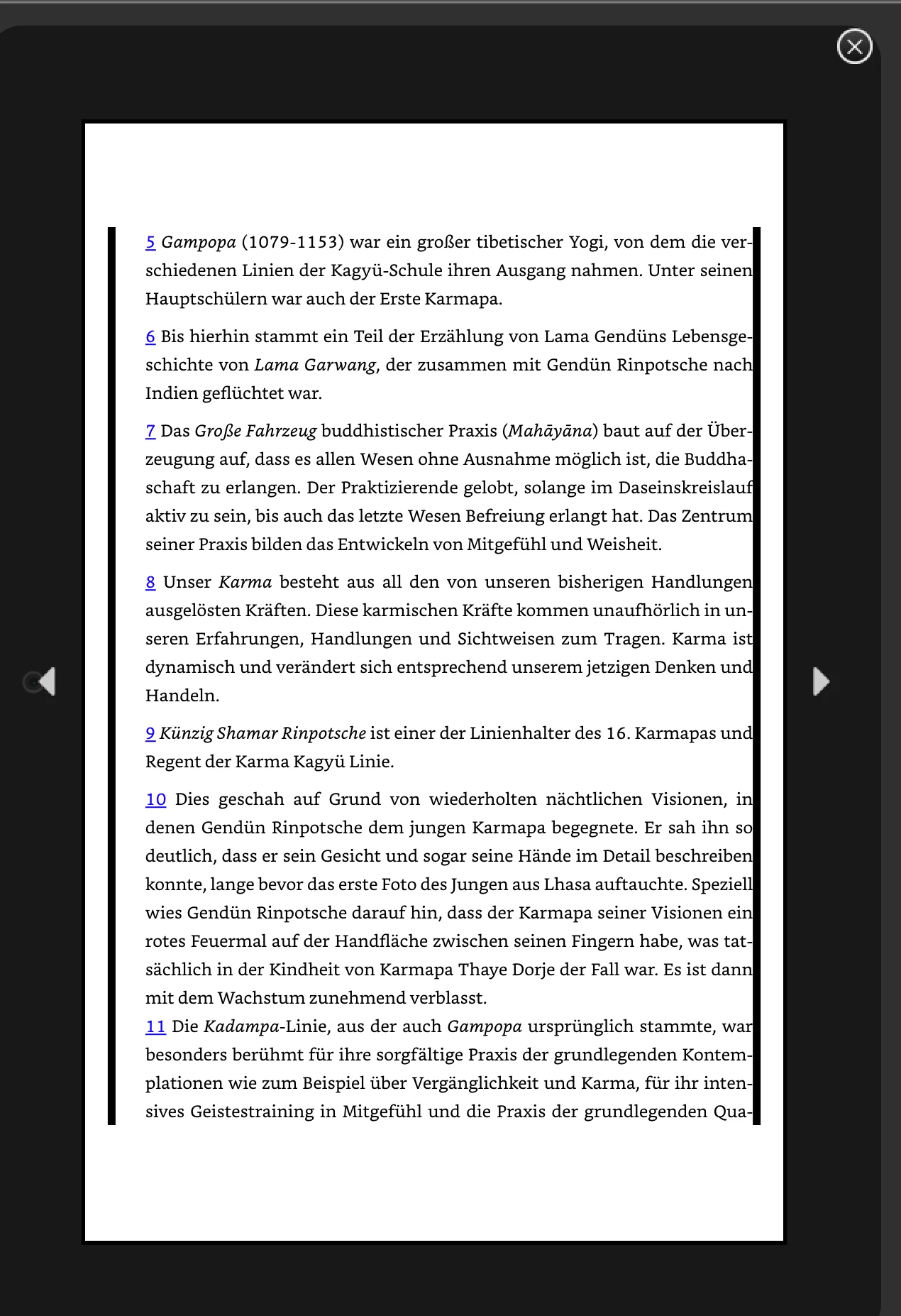
Die Endnoten werden zwar korrekt dargstellt, allerdings wird in der Vorschau um den Textrahmen und sehr unschöner schwarzer Rahmen erstellt. (Ein Bild dazu habe ich angehängt.) Für die Vorschau des eBooks nutze ich den Kindle Previewer 3. Das Buch soll nachher auch über Amazon als Kindle-Download verfügbar sein. 
Hat jemand eine Idee, woran das liegen könnte?
Ich hatte mir schon die Objektexporteinstellungen des Textrahmens angeschaut. Da bin ich leider nicht weiter gekommen. 

Vielleicht hat ja jemand einen Impuls für mich! 

Vielen lieben Dank!
Ce sujet a été fermé aux réponses.
Meilleure réponse par James Gifford—NitroPress

End notes in EPUB export are often troublesome, for a wide range of reasons.


First, check the end note paragraph styles to see if a Paragraph Border has been activated. You don't show the beginning or end of the notes, but this looks like a continuous border. Turn off any border settings if they are set.


If that's not the cause, try purging the source document. Save or export to IDML, then open that file and save it as INDD again under a new name. That often fixes document glitches and structural faults. (You might want to check through it tto make sure no intended formatting has been changed.) Then export to EPUB again to see if the odd borders persist.

1 commentaire

James Gifford—NitroPress
Legend
July 8, 2024

End notes in EPUB export are often troublesome, for a wide range of reasons.


First, check the end note paragraph styles to see if a Paragraph Border has been activated. You don't show the beginning or end of the notes, but this looks like a continuous border. Turn off any border settings if they are set.


If that's not the cause, try purging the source document. Save or export to IDML, then open that file and save it as INDD again under a new name. That often fixes document glitches and structural faults. (You might want to check through it tto make sure no intended formatting has been changed.) Then export to EPUB again to see if the odd borders persist.

Participant
July 9, 2024

Thank you for your answer! That was very helpful. 

The problem was in fact a false setting in the paragraph styles (border setting). It now looks fine!


Thanks for the tip to save a document as IDML and then again as INDD. I'll keep that in mind whenever other problems will occur.