Participating Frequently
October 12, 2021
Question

Data Merge - Chartwell Pie Font - Doughnut Chart

  • October 12, 2021
  • 3 replies
  • 2319 views

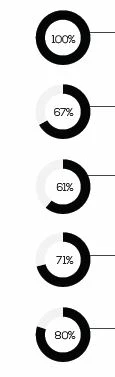
Hi. I am trying to merge data from an excel file to create doughnut charts but I can't seem to find any tutorials on this. Example below:

This topic has been closed for replies.

3 replies

Colin Flashman
Community Expert
Community Expert
October 20, 2021
If the answer wasn't in my post, perhaps it might be on my blog at colecandoo!
Community Expert
October 12, 2021

Did you position the placeholders for the data marge on a master page?

I would recommend doing this on a regular document page…

( Just my intuition… )


Regards,
Uwe Laubender

( ACP )

Community Expert
October 12, 2021

Hi,

what are the steps you already tried?
At what point did you fail?


Regards,
Uwe Laubender

( ACP )

Participating Frequently
October 12, 2021


I can plug-in the data to data merge and change the type to discretionary ligatures but I continue to only get a black triangle and not the whole circle if that makes sense.


This is how far I have gotten;


End goal; (This is taken from a report I am attempting to re-create)


Community Expert
October 12, 2021

Your results are showing that all values of the pie chart are applied black. For this to be automated, you will need to use a paragraph style that is black color for pie chartwell, and includes a grep style that will apply a character style to the first value of pie (tint of black) plus the center value (+G) to make it white/paper.