

DGLPromo
Inspiring
February 21, 2021
Answered

DATA MERGE HEBREW TEXT

  • February 21, 2021
  • 4 replies
  • 4199 views

Hi, I'm trying to do a data merge with Hebrew Text. When saving the excel sheet to csv, the text becomes ???????? , and when coding it for Hebrew, indesign doesn't read the document, and gives me the error message that it is not a supported document, even though it is a .csv. I cannot insert more than 1,000 names manually!!!! Help! How can I do a data merge in Hebrew? I have the English version of indesign, which supports Hebrew. Right to left text isn't a problem etc. But DATA MERGE is importand and urgent. Anyone can help?
This topic has been closed for replies.
Correct answer Colin Flashman

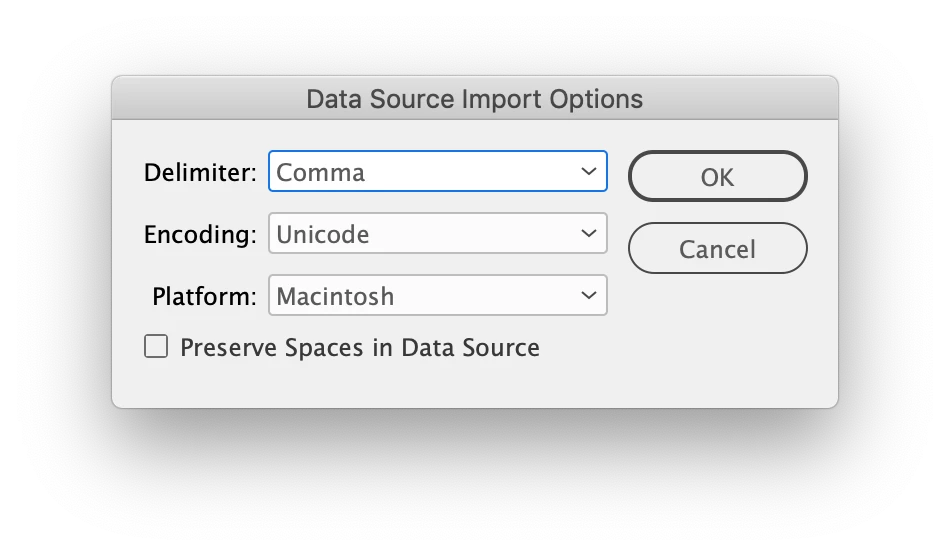
Just tried in my International English version of Adobe InDesign 15.1.3 and was able to data merge a CSV containing hebrew text. Key was that the CSV had to be UTF-16 but windows or unix encoding was fine. Way I did this was to make the data UTF-16 using TextWrangler for mac, and then during the data merge import, make sure the "Show Import Options" checkbox is checked and to confirm the options in the next dialog box like so:

 Admittedly I'm an English speaker only and the text I'm looking at may make no sense in Hebrew, but it is at least worth attempting this technique.

4 replies

Colin Flashman
Community Expert
Colin FlashmanCommunity ExpertCorrect answer
Community Expert
February 22, 2021

Just tried in my International English version of Adobe InDesign 15.1.3 and was able to data merge a CSV containing hebrew text. Key was that the CSV had to be UTF-16 but windows or unix encoding was fine. Way I did this was to make the data UTF-16 using TextWrangler for mac, and then during the data merge import, make sure the "Show Import Options" checkbox is checked and to confirm the options in the next dialog box like so:

 Admittedly I'm an English speaker only and the text I'm looking at may make no sense in Hebrew, but it is at least worth attempting this technique.

If the answer wasn't in my post, perhaps it might be on my blog at colecandoo!
Shlomit Heymann
Inspiring
February 22, 2021

at least you figure it out 🙂

DGLPromo
DGLPromoAuthor
Inspiring
February 22, 2021

Thanks for trying to help. Will have to try text wrangler. Shlomit, I can read Hebrew, but I don't understand it, so although your tips look quite helpful, I couldn't really figure it out. Know of anything like that in English?

Shlomit Heymann
Inspiring
February 22, 2021

Hi, 

Do you read Hebrew?

I wrote a Tip on my site rgarding Data Merge from various apps after I investigate it for many hours...

Here is the link:

http://indesignme.co.il/tips/094-data-merge-indesign/

The tip exlains what is Data Merge and the correct saving options from various applications in mac and windows.

I hope it will help you.

Please let me know 🙂

Shlomit

Community Expert
February 22, 2021

Try using UTF-16 BE encoding, Data Merge works fine with this. See a similar discussion here, albeit for the Swedish language.

-Manan

-Manan
Participant
March 18, 2021

This fixed it for me. Thanks for the recommendation!

Dov Isaacs
Legend
February 21, 2021

How are you saving the Excel worksheet as CSV?


Make sure you use the CSV (UTF-8) option as opposed to the other CSV save options. This is the only way you can save Hebrew with Unicode encoding required for InDesign.


- Dov Isaacs, former Adobe Principal Scientist (April 30, 1990 - May 30, 2021)
DGLPromo
DGLPromoAuthor
Inspiring
February 22, 2021

That is what I am doing. Here's the error message I am receiving when trying to import the .csv to data merge:

"The data source file you selected either has no records or is not a supported file format. Please fix the file, select a file that contains records, or select a supported file type.

Dov Isaacs
Legend
February 22, 2021

OK. That “solution” resolves problems with placing Hebrew in Excel via CSV. But apparently, data merge may be handling CSV differently. You may have stumbled upon a bug. Contact Adobe Customer Support via phone https://helpx.adobe.com/contact/phone.html or submit a bug report at https://indesign.uservoice.com/.


- Dov Isaacs, former Adobe Principal Scientist (April 30, 1990 - May 30, 2021)