
Participant
September 9, 2021
Answered

Data Merge - import files greyed out

  • September 9, 2021
  • 1 reply
  • 801 views

Hi All,


I'm trying to perform a data merge on a business card design but when I go to choose the data file it's greyed out. It was working earlier today but now it's not - even with the same files.
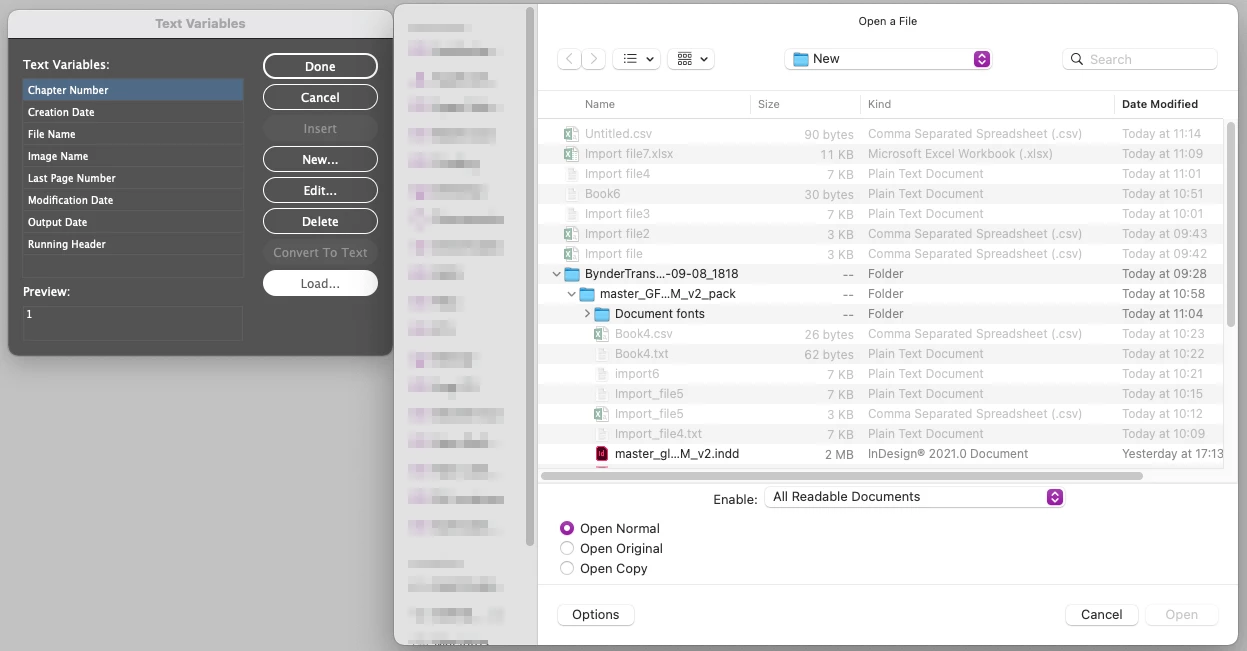


I have created a new blank .indd file and various new data files with very limited basic data, using a wide variety of .csv and .txt formats and saving in both Excel and TextEdit, but none of my data files are recognised for import. If I choose to show all documents rather than just readable, and select any file I get this error message.
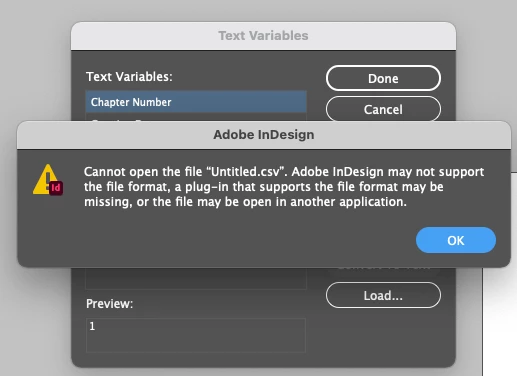


Mac has been rebooted several times.


Having Googled extensively I can't find any mention of this issue 😞


TIA, Mandy


MacBookPro - Big Sur - InDesign 16.1 - Excel for Mac 16.16.2

This topic has been closed for replies.
Correct answer Laubender

Hi Mandy,

you have the Text Variables window open. So the Load command can only see InDesign documents and IDML files where you can load text variables from. Data Merge is something entirely different:


The Data Merge panel is accessible from Window > Utilities.

More details:

https://helpx.adobe.com/indesign/using/data-merge.html


Regards,
Uwe Laubender

( ACP )

1 reply

LaubenderCommunity ExpertCorrect answer
Community Expert
September 9, 2021

Hi Mandy,

you have the Text Variables window open. So the Load command can only see InDesign documents and IDML files where you can load text variables from. Data Merge is something entirely different:


The Data Merge panel is accessible from Window > Utilities.

More details:

https://helpx.adobe.com/indesign/using/data-merge.html


Regards,
Uwe Laubender

( ACP )

Participant
September 9, 2021

Doh!!


Thank you so much, what a schoolgirl error!


You wouldn't believe how long I've been trying to get this to work 😄


Mandy