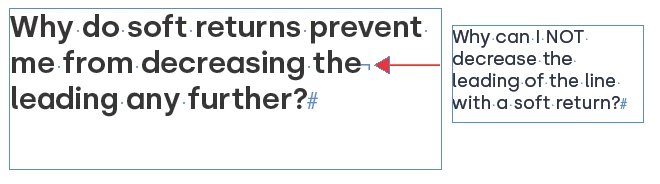
Hi @JR86 , Check your Type>Apply Leading to Entire Paragraphs Preference, which @Peter Spier suggested in his first reply. With it unchecked any character or insertion point can have its own leading—the insertion point with the largest leading sets the leading for the line:
I've struggled to figure out the actual question here since I first read it. I think you might be confusing leading — which is the old term for "spacing between lines of text" and (usually) means "within a paragraph" in modern use — and spacing above/below, which is a different setting that applies only to the top and/or bottom of a paragraph.
With a soft return — something that should be used very little, if at all in modern typeset documents — leading, line spacing, will work on all the lines of that paragraph. However, spacing above or below will not, since a soft return is not an actual paragraph break.
Does that change the way you see what you're looking at?

 AdChoices