John_J_David
Participating Frequently
December 29, 2009
Answered

Delete Layers in PDF

  • December 29, 2009
  • 7 replies
  • 154687 views

The PDF was exported from Adobe InDesign with layer option enabled. We need to delete one of the layer appeared in the PDF. Kindly help me out to delete the layer in PDF.

This topic has been closed for replies.
Correct answer Eugene Tyson

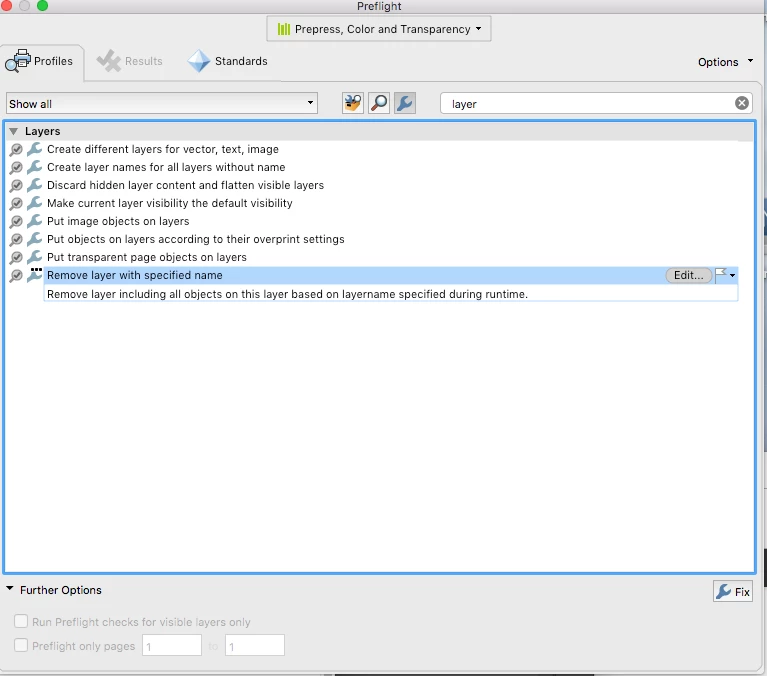
You can do it with the Preflight panel in Acrobat

Click the spanner and then search for Layer
7 replies

runninghead_design
Inspiring
June 1, 2017

jane-e

Thanks but I'm not going to fill in a form as this known issue has been around for so long.

The workaround you suggest, while helpful, is far from ideal and I feel certain that Adobe: Team Acrobat are well aware of it.

If I have to use Acrobat again I'll look in to creating an Action for the task and assign a keyboard shortcut to it, if Acrobat has Actions yet.

Participant
January 29, 2017

I stumbled across this thread while looking for a way to do this.  After a lot of futile searching, I finally found the answer myself. So this is what worked for me [Just posting it here for future reference]:

1: Hide the layer in question

2: Go to Tools > Protection > Remove Hidden Information

Run that command and, in the Results panel you'll see a list of various 'hidden' things Acrobat has found in the document

3: Untick everything apart from "Hidden Layers", then click "Remove"

Job's a good 'un!

runninghead_design
Inspiring
May 28, 2017

OK, this really shows how ridiculous Adobe have become, as per other posters here since 2012 (probably earlier too) it's now 2017 and there's STILL no Delete Layer option!!

runninghead_design
Inspiring
May 28, 2017

btw: Rove Hidden is now under "Redact"

Participant
April 1, 2012

April 2012 and there still is no DELETE function/choice/feature for a layer.  I inadvertantly created one, and now cannot get it deleted without using CJ2161's method.  Utterly ridiculous for a $400.00 piece of software!

Steve Werner
Community Expert
Community Expert
April 2, 2012

You need to make a feature request for the Acrobat team. The link is in message #24. Be sure to provide a "use case" for why this feature is necessary.

It's not an InDesign issue.

July 12, 2012

I am currently experiencing the exact same issue. What a frustrating problem.

Participant
June 24, 2011

I got this problem with Acrobat 9, did they fix it in 10? This is ridiculous!

Steve Werner
Community Expert
Community Expert
June 24, 2011

This is such a rarely requested feature that I doubt there has been any change in Acrobat X.

Participant
July 19, 2011

We are using Acrobat X pro and there seems to be no ability to remove layers from a pdf and save-as with only selected layers. We are working with a large (45 mb) file with many many layers. Tunring the layers off is not an optimum solution. We want to be able to delete layers and save-as, in order to create a smaller file that is more managable. Adobe, you should add this function: delete layer!!

December 30, 2009

If you're looking to delete the layer from the PDF, you'll need Enfocus Pitstop.  Just select the layer and delete.  Not an InDesign solution though. Good luck.

Inspiring
December 30, 2009

There is an InDesign solution.

Place the PDF. With Object Layer options hide the unwanted layer. Export a new PDF.

Peter Spier
Community Expert
Community Expert
December 30, 2009

Read post 3...


BobLevine
Community Expert
Community Expert
December 29, 2009

Open it in Acrobat and delete it there or just turn off the layer and create a new PDF without layers or with hidden layers disabled.

Bob

Peter Spier
Community Expert
Community Expert
December 29, 2009

I don't make layered PDFs very often, but in the past it has been my expereince that it makes no difference whether a layer is visible when you export from ID, regardless of the settings. All layers have always showed up in the PDF.

BobLevine
Community Expert
Community Expert
December 29, 2009

You're right. I had forgotten that that all that did was have the layered turned off in the resulting PDF.

Bob

Harbs.
Legend
December 29, 2009

Is this an InDesign question, or an Acrobat question?

Harbs

Participant
November 2, 2022

idomtfindadobeindesigh