Inspiring
September 24, 2021
Answered

Delete table shortcut

  • September 24, 2021
  • 2 replies
  • 579 views

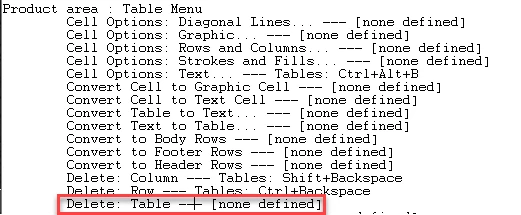
Looking to set a shortcut to delete a table, I just can't do it because the table menu hasn't this option. Beyond this issue, does anybody know if a script can delete all tables of a document? Thank you.

This topic has been closed for replies.
Correct answer Geоrge

2 replies

m1b
Community Expert
Community Expert
September 24, 2021

As for the second part of your question, this script should delete all tables in the active document:


app.activeDocument.stories.everyItem().tables.everyItem().remove();


- Mark 

Geоrge
GeоrgeCorrect answer
Legend
September 24, 2021

Remember, never say you can't do something in InDesign, it's always just a question of finding the right workaround to get the job done. © David Blatner
Geоrge
Legend
September 24, 2021

I do assign SHIFT+CTRL+Backspace and it works. 


Strange task to kill all the tables needs script. 

https://www.id-extras.com/delete-all-empty-rows-or-columns-from-an-indesign-table/ - here the payment version of your task. Or wait here, may be some of forum-users who's know scripting write to you such a script for deleting all the tables in a publication.


Remember, never say you can't do something in InDesign, it's always just a question of finding the right workaround to get the job done. © David Blatner