

Diacritic Positioning and Ligatures in Adobe Naskh Typeface for Arabic Script in InDesign CS6
Hi,
I am using the Adobe Naskh typeface for setting Arabic script in InDesign CS6 (v.8.0). I am getting instances of the dots being positioned incorrectly.
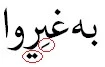
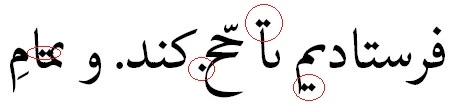
This is how the script should appear...
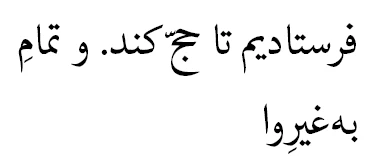
The issue can be resolved with the following: by turning off ligatures but this is NOT an acceptable solution because one of the beauties of Adobe Naskh is its use of ligatures.
The position of the dots can also be changed in the language support plugin i.e. changing diacritc position from OpenType to Normal but the positioning becomes even worse!
I am having problems recreating the issue and so I do not know why it is occuring. Things I have tried:
- retyping the text
- redefining the paragraph style from scratch and removing dependencies on other styles
- removing overrides and character styles
- pasting text into a new document
- removing Latin glyphs
- removing punctuation glyphs (e.g. apostrophe, quotation mark, guillmot)
- removing footnote markers
- changing paragraph and character directions
- changing justification type (left, right, full justify...) (standard, Arabic, Naskh)
- setting language in Advanced Character Format
- increasing leading to give more space on the line
- changing kerning method (metrics, optical, none)
So, my best guess is that for some reason the Arabic script rendering engine is trying to compress the script by shifting Open Type diacritics in order to justify the text but when the justification conditions change the engine cannot be always "shaken" into re-rendering the text. I don't know if this theory at all makes sense. Just a guess!
If anybody can throw any light on this problem I would be grateful. Perhaps it is the plugin? Has anybody come accross this problem with different plugins e.g. World Tools, ScribeDOOR? How about in InDesign CC? How about with different typefaces or different languages?
<Title renamed by MOD>
 AdChoices