
Known Participant
October 22, 2020
Answered

Diacritics for Yoruba Characters

  • October 22, 2020
  • 2 replies
  • 3234 views

Hello good people, 

I need help typing special characters from the Yòruba language in IDD. I have created the text in MSWord using Tahoma and now copy to IDD. However, when I post into IDD, some of the accents are missing. Please see the images below. The first image shows the special characters in Word while the second image shows the characters when I copy to IDD.
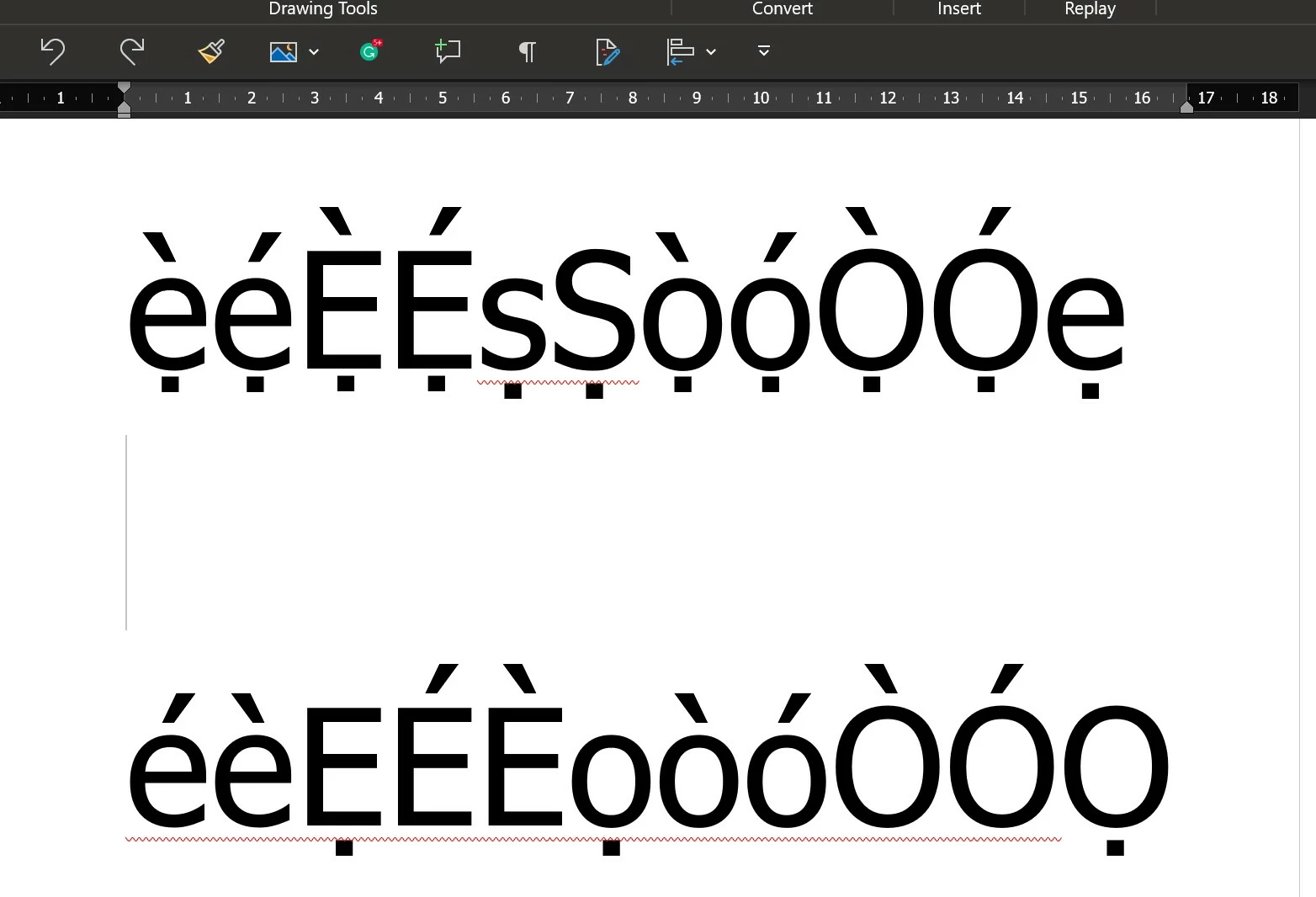
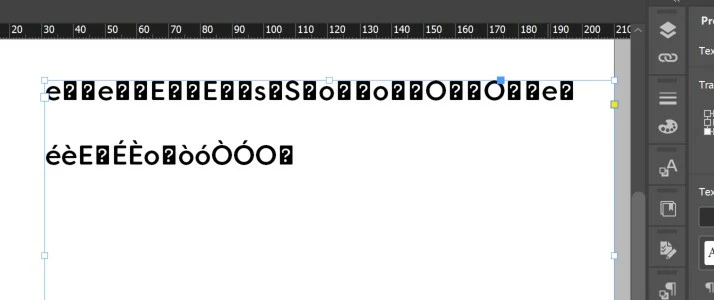
 

The attached video shows how I type the text in Word using Tahoma font.


The problematic fonts in IDD are:

https://fonts.adobe.com/fonts/filson

https://fonts.adobe.com/fonts/goudy-old-style

https://fonts.adobe.com/fonts/le-monde-journal


Please how do I get these fonts to display correctly?


This topic has been closed for replies.
Correct answer Jongware

That means that those characters do not exist in the fonts you are using.

There are no hard rules for which characters a font must support, and that goes double for accented characters – the more rarely used, the smaller the chance they are defined in a font. You can only see this when applying such a font to your text.


If the font does not contain combined accented letters but it does contain the separate accents (as unique glyphs), you can get by with manually kerning them. You can also consider editing the font with a font editor (only if the font maker allows this!), or creating a new font containing just the missing characters (and use InDesign to apply this font where needed).


Easiest, though, is to simply not use a font if it does not contain all you need and find one that does.

2 replies

Legend
October 23, 2020

I looked at this issue but have not enough knowledge on InDesign to help. For others looking at it, from web searches, key features of the Yoruba written language are (I have no expertise so this may be wrong or incomplete):

- it is based on the Latin alphabet with are accented characters

- some accents are common with Western Europe (á, é, ẹ́, í, ó, ọ́ and ú; à, è, ẹ̀, ì, ò, ọ̀ and ù)

- some accents are rare or unique, specifically those with a dot below, which may be used alone (ọ, ṣ) or combined with the other accents (sample text: sọ́dọ̀). 

- Yoruba is used in Nigeria and Benin. The Benin alphabet includes two letters not found in Western Latin-1, Ɛ and Ɔ.

- The Unicode committe looked at making code points for the accented character like ọ́ but rejected it. This means that such letters have to be made by composing accents.

Known Participant
October 23, 2020

Thanks, Could you please explain when you said "The Unicode committee looked at making code points for the accented character like ọ́ but rejected it. This means that such letters have to be made by composing accents." 


Is this a solution I can pursue?

Legend
October 23, 2020

I assumed this is what you are already doing. I cannot tell from your Video how you are making characters. How do you make characters like ọ̀ today, with Tahoma, in InDesign? And in Word?

Joely10623436
Community Expert
Community Expert
October 23, 2020

But with Tahoma inside IDD everything is fine?
Make sure all the fonts are Open-Type-Fonts and have the characters for Yoruba Language. Also check the Glyphes Panel, if everything is selected.
good Luck.

Known Participant
October 23, 2020

Yes, fonts are Open Type. And When I used Tahoma, it renders well in IDD

Jongware
Community Expert
JongwareCommunity ExpertCorrect answer
Community Expert
October 23, 2020

That means that those characters do not exist in the fonts you are using.

There are no hard rules for which characters a font must support, and that goes double for accented characters – the more rarely used, the smaller the chance they are defined in a font. You can only see this when applying such a font to your text.


If the font does not contain combined accented letters but it does contain the separate accents (as unique glyphs), you can get by with manually kerning them. You can also consider editing the font with a font editor (only if the font maker allows this!), or creating a new font containing just the missing characters (and use InDesign to apply this font where needed).


Easiest, though, is to simply not use a font if it does not contain all you need and find one that does.