
Participant
April 9, 2021
Question

Different RVB and hex codes in InDesign compared to Illustrator/Photoshop for the same color ?

  • April 9, 2021
  • 1 reply
  • 4101 views

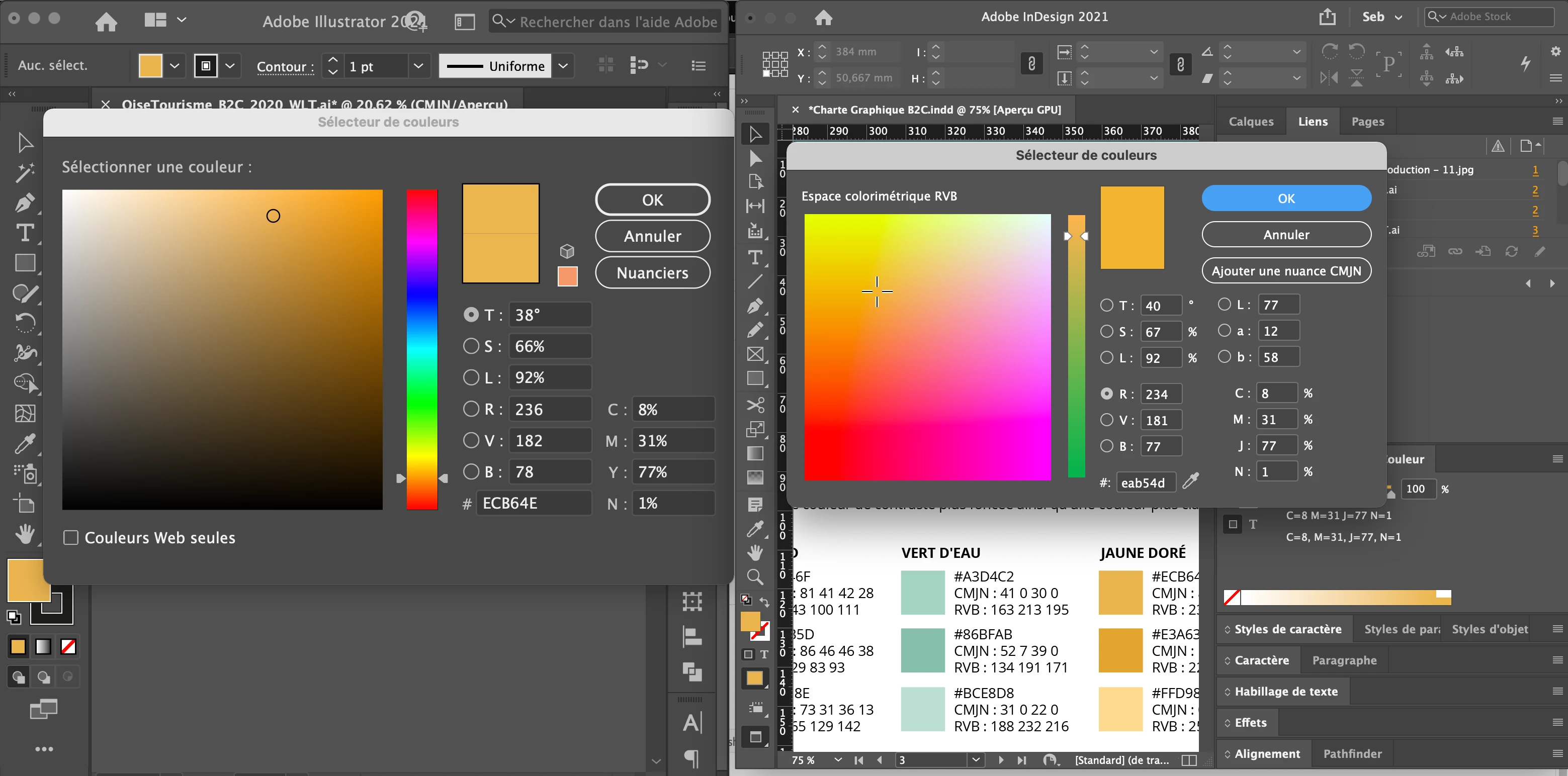
When I open the color picker in InDesign for a given CMYK color, the RGB and hex values are not the same than the ones in Illustrator and Photoshop. I checked that I am in CMYK mode in Illustrator and Photoshop, and also that all the applications share the same color space.
So I don't understand why there is a difference. Which hex code should I give to my coworkers for them to use the same color as my CMYK values ?

Thank you for your help.
This topic has been closed for replies.

1 reply

rob day
Community Expert
Community Expert
April 9, 2021

Hex values are an RGB notation, so if the source color is CMYK there has to be a conversion to RGB in order to get the RGB or Hex value. The conversion in InDesign is going to be from your assigned document CMYK profile to the document’s RGB profile—you’ll get different Hex values depending on the assigned profiles. 


In Illustrator the conversion would be from the CMYK document’s assigned profile to the Color Settings’ Working RGB space.


Here’s Euroscale Coated to sRGB vs. GRACol Uncoated to sRGB:


Participant
April 9, 2021

Thank you for your answer, I learned more about what was different in InDesign.
However I tried to create a completely new document in InDesign, assign it the exact same color profile as in Illustrator and still I don't get the same values. Am I missing something ? Some other step that I should do to get sure to work in the same color space ?

rob day
Community Expert
Community Expert
April 9, 2021

Illustrator has a single document color space (InDesign lets you mix RGB, CMYK, and Lab colors in the same document and has both an RGB and CMYK profile assignment for display and conversions).


So with Illustrator the conversion is from the document CMYK space to the Color Settings’ RGB Working space. Also the Color Settings’ Conversion Options would have an affect in both apps, so they need to match.


This is InDesign 2020, so there’s no HSB Space View