
Participant
July 25, 2021
Answered

Different spacing in indesign with roman lists

  • July 25, 2021
  • 1 reply
  • 738 views

Why does it happens when i change font dimensions, with any font when i use lists with roman numbers?

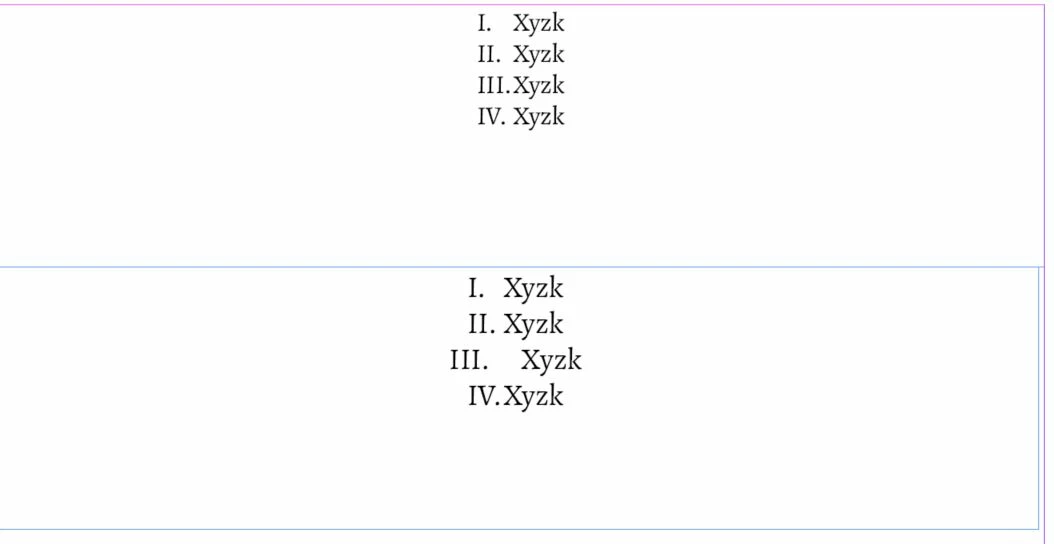
Look at the spacing after III.  The first screenshot is ok but when i increase the fontsize it goes wrong at some sizes you see wrong space at III. at others at II. and so on.


thanks
 

This topic has been closed for replies.
Correct answer Peter Kahrel

thank you but how to change the tab stops and not for the whole document but for just that list or paragraph?

thanks


Select the paragraphs and open the Tabs panel (Type > Tabs).

Maybe you should get yourself a good reference book on InDesign that explains the basics of text handling.

1 reply

Peter Kahrel
Community Expert
Community Expert
July 25, 2021

The tab stops in the first sample are so tight that when you increase the text size by a whisker the tab stops are wrong. Change the tab stops and you should be ok.

Participant
July 25, 2021

thanks for your reply 🙂

The strange thing is that it happens only with roman numeral lists, not normal numbers and I am using the pre-defined settings.

So please let me know if this is normal or something is wrong with my settings and also how to change the tab space only for one list, i mean not generally but just for the lists i want.


thank you very much 🙂

Peter Kahrel
Community Expert
Community Expert
July 25, 2021

Roman numerals vary in width much more than Arabic (that's probably what you mean by 'normal) numerals. You can see in your first sample that there's virtually no space between III. and Xyzk. A very slight increase in the text size will place the dot following III after the tab stop's position and cause the mess that you see.


Pre-defined settings are what they are, and usually need some adjustments. Play around with the tab stops and see what happens. Be adventurous.