
Participant
January 13, 2017
Answered

Disappearing text in Adobe CC 2017

  • January 13, 2017
  • 1 reply
  • 2007 views

I am using Adobe CC 2017 on a Windows machine, and the issue I am having is that my imported text from Word keeps disappearing.

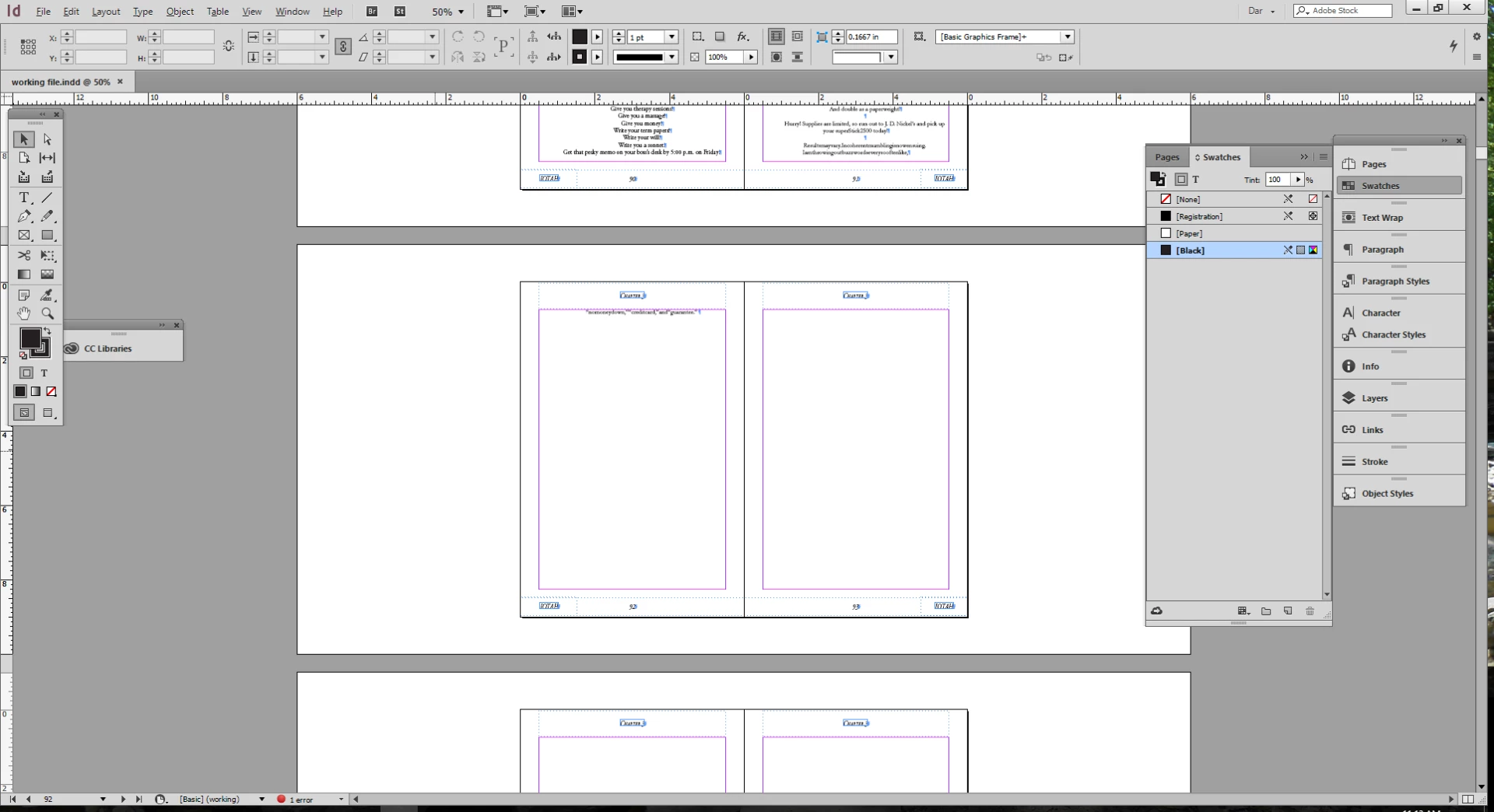
It is a 200 page word document, and when I import it, after chapter 3 the text disappears. I go to story editor and it shows it as overset text, and when I go back to the layout window it just has a bunch of blank pages, there is no section break or column break.

So I created a new document and it worked, but after I went back it did the same thing.

Any ideas?
[Moved from non-technical Forum Lounge to specific Program forum... Mod]

[Here is the list of all Adobe forums... https://forums.adobe.com/welcome]

    This topic has been closed for replies.
    Correct answer Randy Hagan

    Glad to try to help.

    I'm trying to interpret the "incoherentmumbling"... text before the bad break. That, as well as the "longlistofphonenumbersorrandomnumberswillnowbeinrapidsuccession"... line right after.

    Do you have any Keep Options built into your text paragraph style? That'd be a good thing, generally, for page formatting. But if the "longlist"... paragraph is bigger than the copy window for your page, it'd cause this result. Go to the last page of your InDesign file and see if you have a Red + sign in the last text frame. If you do, your "longlist" paragraph is likely the problem.

    If the Word import filter in InDesign hiccups, whole MSWord pages get filled with incoherent characters which define how MSWord should format the word processing file, but never appear in the word document.

    Just to check, for testing purposes, you may want to try importing the copy as plain text in another InDesign document without your paragraph and character styles and see what you get out of the imported file.

    1 reply

    Randy Hagan
    Community Expert
    Community Expert
    January 13, 2017

    There are a couple of reasons why that might be. But the first thing I'd double-check would be if the text frames are threaded throughout your InDesign document.

    First, select the View>Extras>Show Text Threads menu command. Then get your Selection tool and click on the left-hand page text frame of the last pages you see type in as you illustrated above. This should, if the text is threaded in the two pages of that last thread, show an arrow leading from the bottom-right text anchor of the text frame on the left-hand page to the top-left text anchor of the text frame on the right-hand page. And, if it's threaded further than the frame on the page, it'd let you know that too. I'd do that first, just to be sure. If there are threading problems, you can fix those first before going to the next step.

    You'll probably see that part is right. But it's good to confirm it before you go further.

    The next thing I see is that there's some funky syntax at the overset line break. It could be an odd embedded graphic that didn't translate cleanly into your InDesign layout, or it could be code from MSWord which has translated into text when it's imported into InDesign. That sometimes happens when there's a conflict between the version of MSWord used to generate the copy and the InDesign import filter which interprets it and lays it down in text frames. If that's the case, try re-saving the original MSWord file as a Rich Text Format (.rtf) file and place the RTF file in your InDesign document.

    If you have the same result with the RTF file, we may need to get copies of the text file and the InDesign layout to help you sleuth your problem.

    DarmouseAuthor
    Participant
    January 13, 2017

    Yes I tried that, and I went back to word to see what that was and it didn't show as a inline graphic. This happens a lot when I am working on books, and usually RTF does work, but this file is very strange, so not sure what is going on.

    Thank you for the response.

    DarmouseAuthor
    Participant
    January 13, 2017

    So, when you look at copy as plain text, do you see what "thelonglist"... actually is? Or is there no long list of random numbers?

    When you looked at the InDesign document, was there a Red + after the last text frame?

    When you checked the text threads, did they flow cleanly through every text frame in your document?

    I understand your frustrations, but it's very hard for me to help you if I don't know what's going on. I'm not a programmer, and don't speak for Adobe. I'm just another user with a lot of experience trying to help you.

    I'm not trying to change your author's copy either. But maybe if the job can lay out without the offending paragraph, you can use your existing layout and use InDesign to create the rest of the document, then cut/paste the offending text out of MSWord into a new Word document, and just insert that (or that with some judiciously added line returns) into your layout?

    It stinks, but sometimes workarounds are all we've got.


    As plain text, it is thelonglist actually it the copy, it is not a list of random numbers.

    Yes the last frame of the InDesign file did have the Red +, and when I clicked to reflow, it just was more blank pages.

    Yes the text threads did flow correctly in the document.

    Yes me too, I have been in the industry for over 35 years, and ever since I started formatting books, I get all this weird formatting issues, and I think a lot of it has to do with the authors, and they just put odd things and commands in the word document.

    I did try that too, taking out that copy till the end of formatting, but I did not put it in a new word document, but I did break up the word document into chapters and that seemed to work.