
Participating Frequently
April 22, 2025
Question

Display glitch when moving a block

  • April 22, 2025
  • 2 replies
  • 776 views

Hello everyone!
I've been having a rather annoying problem since I changed my PC. When I move a block (image, text, etc.), I get a display problem that completely hides the layer, preventing me from seeing or placing the block properly. I mostly work on templates that already have a grid layer on the page, which helps with positioning image and text blocks on the right place.


This problem does not occur when I move the block in normal view, but when I display the ‘complete’ view, this annoying display bug appears.


I have made a short video and a print screen to show the problem I am encountering :
Adobe InDesign / Display glitch
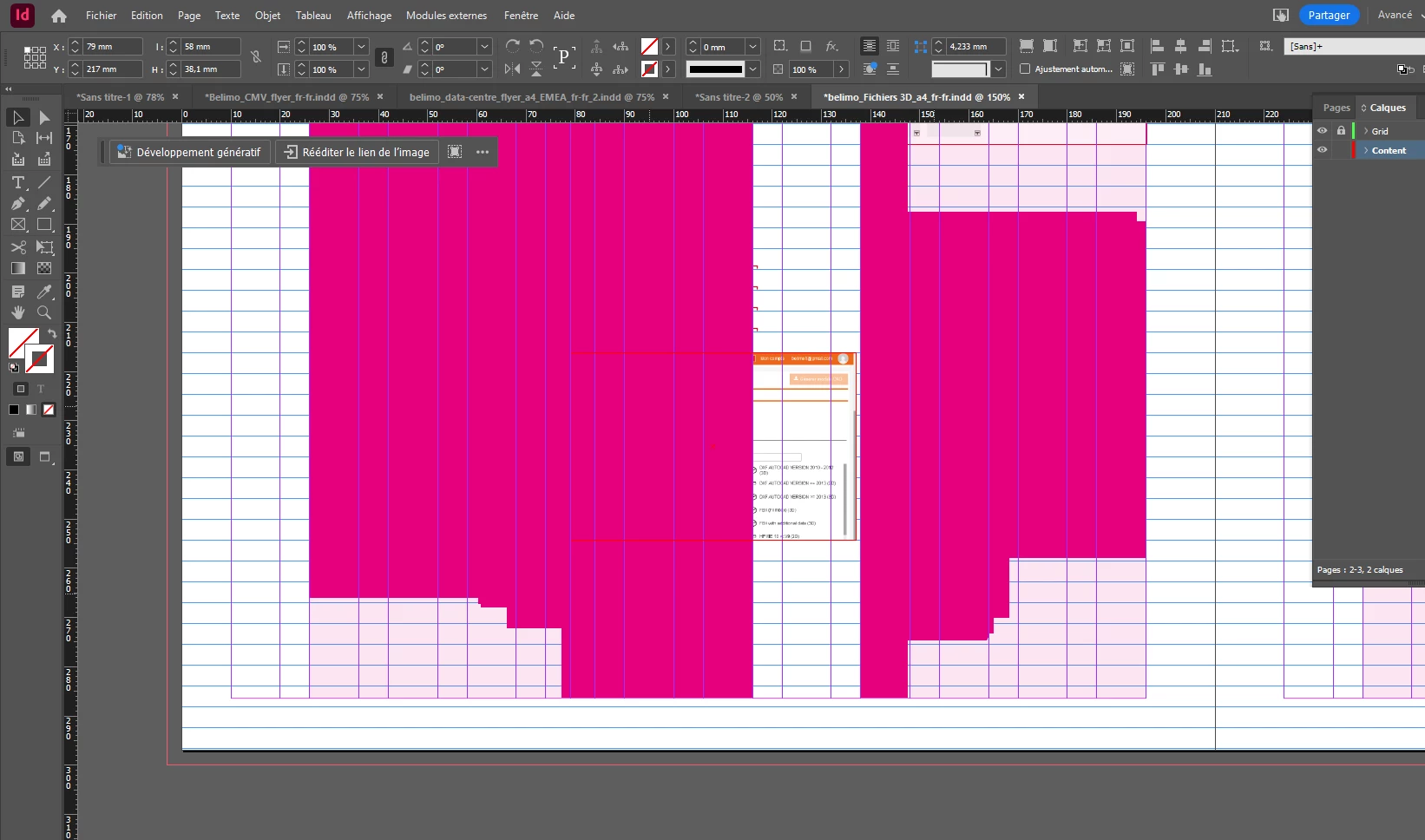
Any ideas? I am using InDesign 20.2 / Windows 10.


Thanks

2 replies

Mike Witherell
Community Expert
Community Expert
April 22, 2025

Can you tell us about your video card? Age of computer? 


There are up to 4 strategic ways to effect a reset of InDesign preferences (if you want to experiment with that):

https://community.adobe.com/t5/indesign-discussions/reset-indesign-preferences-and-other-troubleshooting/td-p/11990234

Mike Witherell
CedMikAuthor
Participating Frequently
April 22, 2025

Hard to tell, it's a computer made from my IT 

I can see Intel Arc Pro Graphics / NVIDIA RTX 1000 Ada

I got the computer from my IT in March.

Anubhav M
Community Manager
Community Manager
April 22, 2025

Hello @CedMik,

Thanks for sharing the details. Could you try performing a clean reinstallation of the GPU(s) drivers (Intel / NVIDIA / AMD) and setting the Graphics Preference to High-Performance for Illustrator (https://adobe.ly/44zjLGu) and checking if it helps?

Looking forward to hearing from you.
Anubhav

Abhishek Rao
Community Manager
Community Manager
April 22, 2025

Hi @CedMik,


Could you please let us know the full details of your operating system(build, RAM)? Also, is this display glitch only happening with a specific file, or are you noticing it across all your InDesign documents? Are you using an external monitor where this issue appears, or does it happen even on your primary screen?

It might also help to test the issue in Safe Mode, which can help isolate any third-party processes or software that might be interfering. Reference:
https://adobe.ly/3GlIkwC

If the issue persists, please try resetting your InDesign preferences. Just make sure to back up your current preferences before resetting:
https://adobe.ly/4lO9pJh


Looking forward to your update!

Abhishek

CedMikAuthor
Participating Frequently
April 22, 2025

Here some info :

Build
Édition Windows 10 Entreprise / Version 22H2 / Build du système d’exploitation 19045.5608 / 1000.19061.1000.0 / RAM 64 Go 


Is this display glitch only happening with a specific file, or across all your InDesign documents?

All documents


Are you using an external monitor where this issue appears, or does it happen even on your primary screen?

I'm using two external screens, but it happen when I use only my laptop screen.


It might also help to test the issue in Safe Mode

I can not go in Safe Mode by myself (work laptop). I'm using Office 365 dekstop verison (outlook, Teams,..) and Adobe software.


please try resetting your InDesign preferences

It's a brand new laptop, with a brand new installation of Adobe Tool. I didn't change or adapt preference, It's mostly all standard ones.


Robert at ID-Tasker
Legend
April 22, 2025

@CedMik


Can you confirm model number of your laptop? 


Check if you've InDesign 20.3 update available.