
Copy link to clipboard
Copied
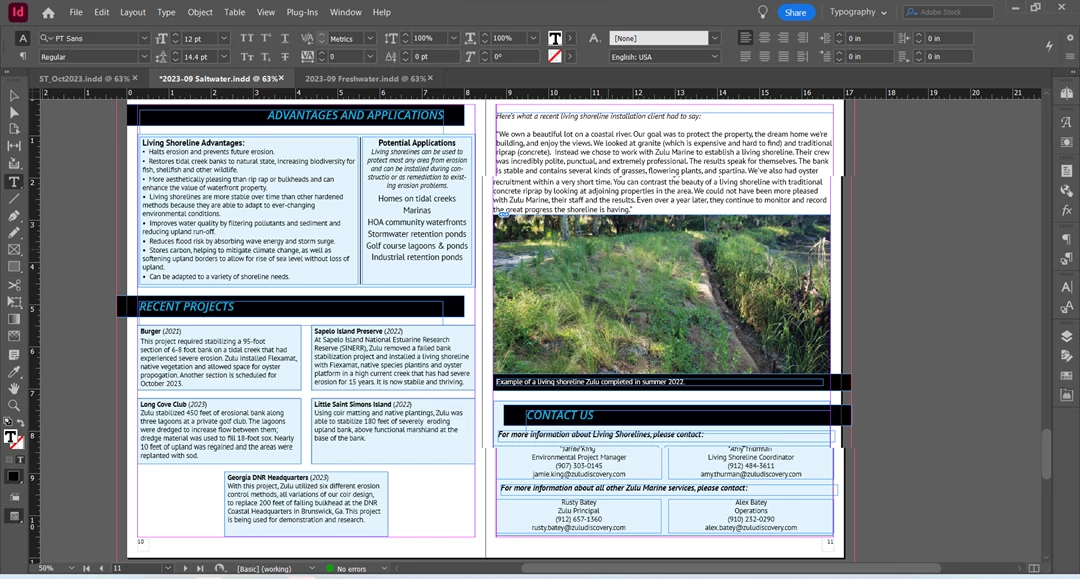
Not sure how to describe this. While working, part of the page will be offset, or split. Used to happen occasionally, but now it's constant. It goes away when I flip pages, or when I use print view, but the next time I do anything (add a text box, add an image, edit something existing, move something, etc.) it happens again. Which makes it VERY hard to align things, or even just type in a text box. See image - right hand page, in one spot a third of the way from top, and another spot third of the way from bottom.
I've done updates, uninstalled and reinstalled. This is the only program that does it. Other Adobe programs are fine, as are all other programs I use.
Copy link to clipboard
Copied
What ID Version?
What Os Version?
Try to disable GPU options in the ID settings...
Copy link to clipboard
Copied
@amy_stm is using Windows in the screen grab, so it can't be GPU. Might be video driver needs an update.
Copy link to clipboard
Copied
I've updated everything I can find to update, several times. This has been going on for over a year - I just reached a snapping point yesterday while on deadline and thought I'd post.
Where do I find video drivers to update them?
Copy link to clipboard
Copied
Try Windows update...
I'm on Win10 so not sure how 11 handles interface scaling, but this could also be a conflict between InDesign's own scaling and Windows scaling on a high resolution monitor.
You could try rolling back to version 18.4 and see if that helps, too, but I suspect it won't if this has been going on for more than a year.
Copy link to clipboard
Copied
The current version, whatever the latest Adobe Suite update makes it. 18.5 is what shows up when I mouse over it. OS is Windows Bloody 11.
I don't know what GPU is. Nor where to find settings. I am NOT a tech person.
Get ready! An upgraded Adobe Community experience is coming in January.
Learn more