Participant
July 23, 2018
Answered

Distance between a multiple-line entry and page number in TOC

  • July 23, 2018
  • 2 replies
  • 3420 views

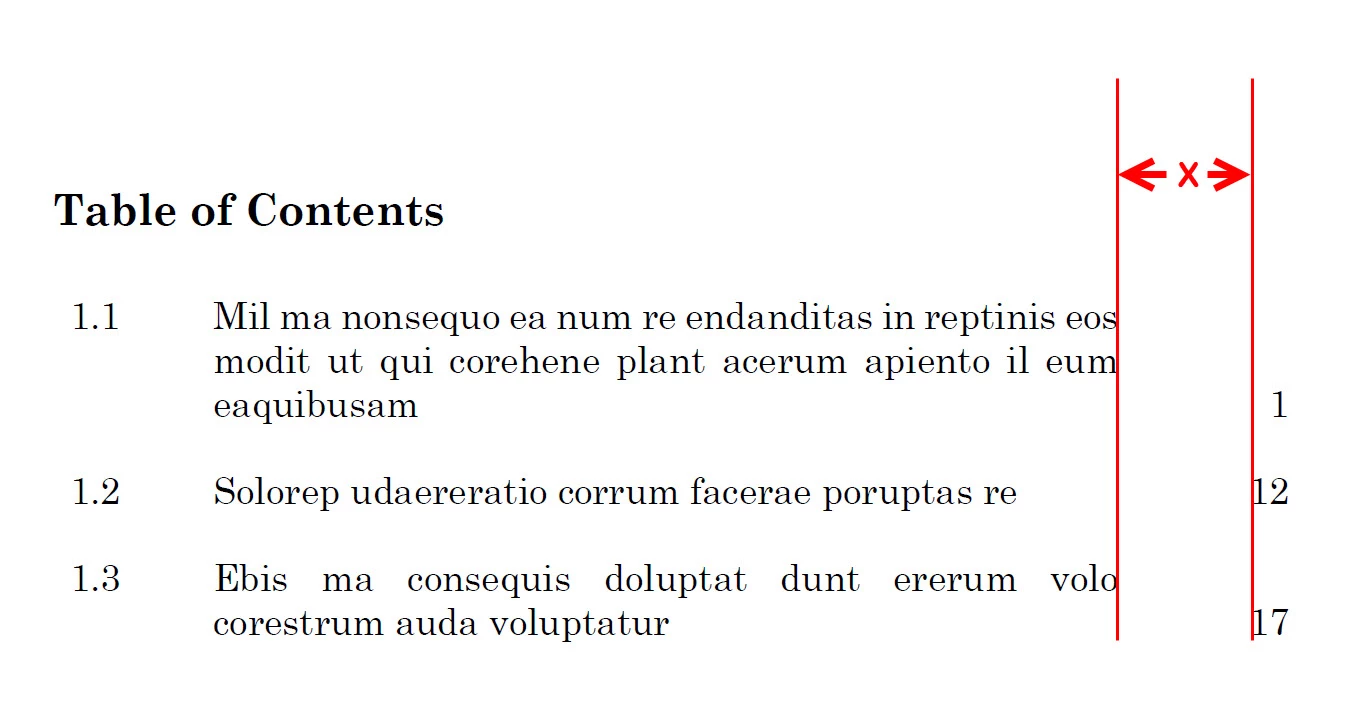
How can I define the distance between a multiple-line entry and page number in a table of contents, as shown in the image below?

This topic has been closed for replies.
Correct answer Barb Binder

Hi texzi:

Mike and Vinny are on totally track with their answers, and if you follow their steps closely you won't need to keep repeating the last two steps.

In the blog post that Vinny referenced, I'm using a right align tab, but had not yet encountered the issue with the line running over that you described—it was just a matter of time. I made it happen, below.

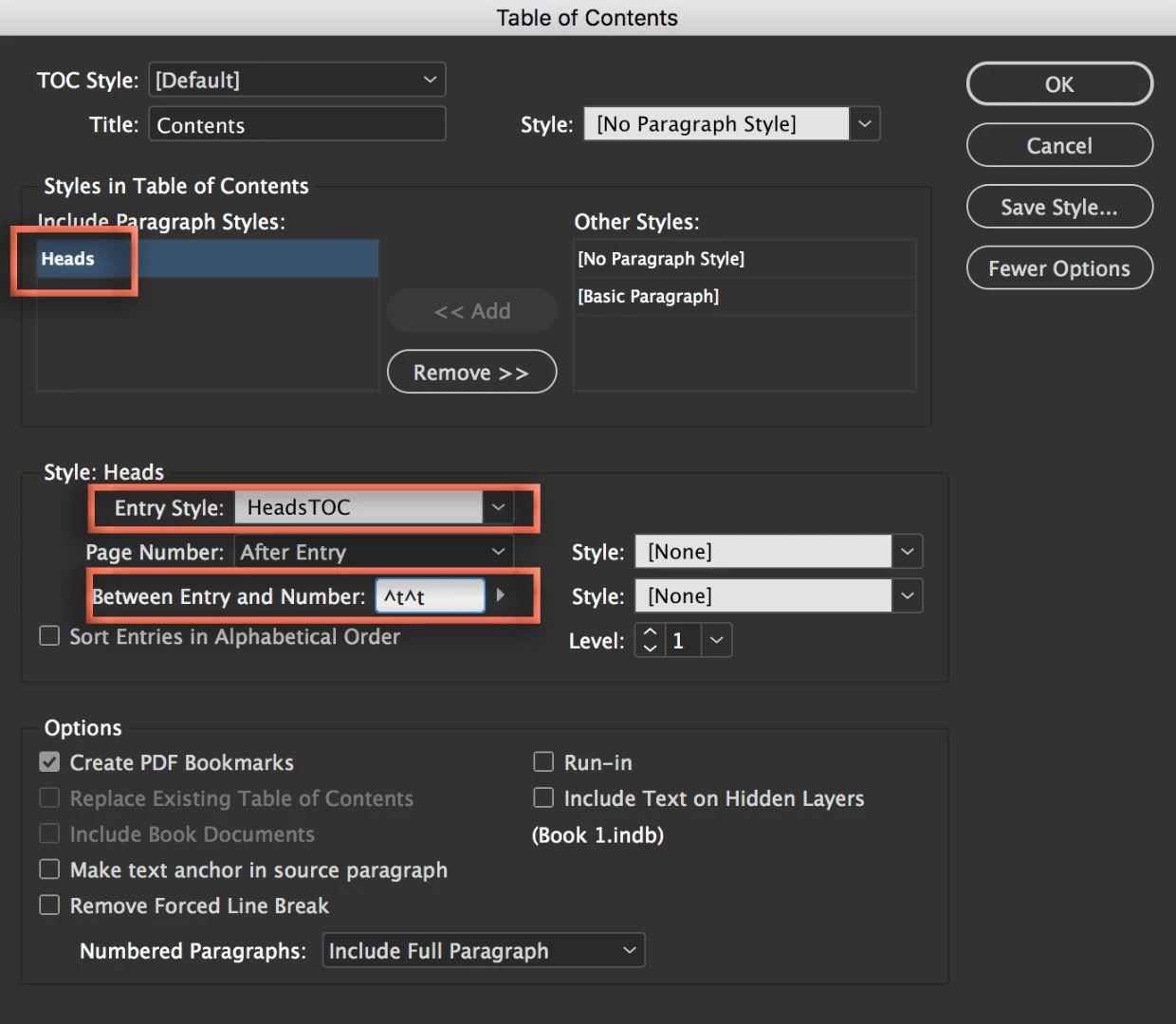
So, let's automate this for you. First of all, in the table of contents dialog box, be sure to assign a paragraph style to the Entry Style and change Between Number and Entry to ^t^t.
Then select paragraphs and set the hanging indent, and the right hanging indent as described above. Change the alignment to Justify with last line aligned left.

Now here's what it sounds like you are still missing:
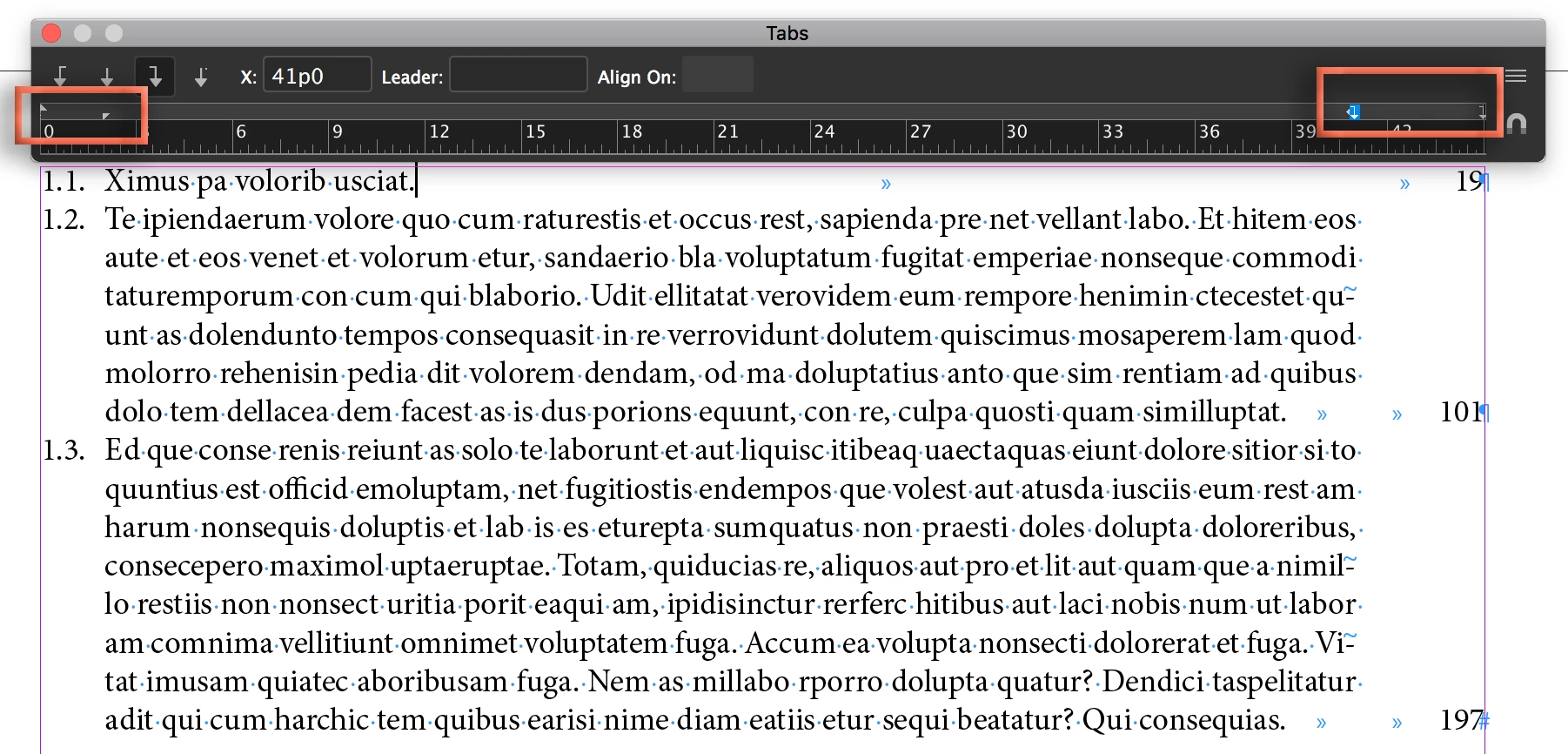
  1. Set two right align tabs: add one at the right indent position, and a second at the right margin.
  2. Then redefine the style so that you update the paragraph style definition with these two additional tab stops.

Now when you update your TOC, you won't have do any additional manual formatting.

~Barb

2 replies

texziAuthor
Participant
July 24, 2018

Thanks a lot for all your answers. I believe they solve the problem in some cases, but mine is a 6-page long TOC (in A4) with some lengthy entries. Also, I am not required to use tab leaders. Here are my outcomes:

  • The second answer worked fine for multiple-line entries, but single-line entries just a bit longer than the Right Indent did not wrap (even when I used "Left Justify" for the paragraph styles).
  • For the third answer, the page numbers did not align to the margin when I used two tab separators (as suggested in the link).

I settled with the following workaround which gave the desired results:

  • For each level in the TOC style, I used a Right Indent Tab (i.e., ^y) between the entries and the page numbers.
  • I used "Left" instead of "Left Justify" for the paragraph styles.
  • After generating the TOC, I selected the contents (with Ctrl+A) and manually applied "Justify with last line aligned left" from the paragraph panel.
  • Then I handled stubborn entries with the help of a ruler guide by manually inserting a line break (i.e., Shift+Enter) for some entries and doing some tracking for others.

Unfortunately, I had to repeat the last two steps each time the TOC was updated since I was unable to find an "update numbers only" option.

Barb Binder
Community Expert
Barb BinderCommunity ExpertCorrect answer
Community Expert
July 25, 2018

Hi texzi:

Mike and Vinny are on totally track with their answers, and if you follow their steps closely you won't need to keep repeating the last two steps.

In the blog post that Vinny referenced, I'm using a right align tab, but had not yet encountered the issue with the line running over that you described—it was just a matter of time. I made it happen, below.

So, let's automate this for you. First of all, in the table of contents dialog box, be sure to assign a paragraph style to the Entry Style and change Between Number and Entry to ^t^t.

Then select paragraphs and set the hanging indent, and the right hanging indent as described above. Change the alignment to Justify with last line aligned left.

Now here's what it sounds like you are still missing:

  1. Set two right align tabs: add one at the right indent position, and a second at the right margin.
  2. Then redefine the style so that you update the paragraph style definition with these two additional tab stops.

Now when you update your TOC, you won't have do any additional manual formatting.

~Barb

~Barb at Rocky Mountain Training
texziAuthor
Participant
July 25, 2018

Thanks a lot! Yes, I was missing the two right align tabs.

vinny38
Legend
July 23, 2018
Mike Witherell
Community Expert
Community Expert
July 23, 2018

I got it to work by making a paragraph style with:

A hanging indent (left indent and a negative-value first line indent)

A right indent and a negative value Last Line Indent

3 defined tabs: 1 left-aligned for the hang; 2 right-aligned for the justification to right margin and outdent past the right margin

and the Alignment for not Left; but rather Left-Justify.

Mike Witherell
vinny38
Legend
July 24, 2018

Yes Michael, definitely right to spot the possible issue of last line that could keep running.

Like this:

I remember the issue have been also raised here:

Re: Some TOC lines not wrapping