Known Participant
May 20, 2020
Answered

Distribute horizontal centers

  • May 20, 2020
  • 1 reply
  • 860 views

Hey


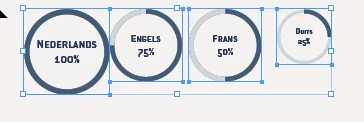
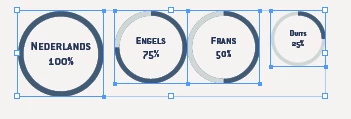
I have 4 graphics which differ in sizes and I want to evenly space them over a defined amount of space. The first image shows how the graphics are placed before I press the "Distribute horizontal centers" button. The second is after I pressed the button but as you can see the graphics are not evenly spaced from each other. Is there a way to evenly spaces the graphics?

EDIT: The graphics are made in Illustrator and are linked from the .ai  to the.indd file
This topic has been closed for replies.
Correct answer David Popham

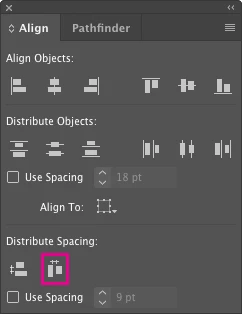
You'll need to open either the Alignment panel or the Properties panel to access Distribute Spacing. Select the objects, then click on the Distribute horizontal spacing button. You can also space them a specific amount apart by checking Use Spacing, entering the amount in the field to the right.

1 reply

David Popham
David PophamCorrect answer
Participating Frequently
May 20, 2020

You'll need to open either the Alignment panel or the Properties panel to access Distribute Spacing. Select the objects, then click on the Distribute horizontal spacing button. You can also space them a specific amount apart by checking Use Spacing, entering the amount in the field to the right.

apylyserAuthor
Known Participant
May 20, 2020

I don't know why I didn't looked further in the alignment panel...Up until now I always have been able to space items or objects by using the distribute horizontal centers. I learned something new today 🙂

Thank you for providing the solution!