Known Participant
October 20, 2020
Answered

Do Indesign links work with Adobe Cloud (multiple users)?

  • October 20, 2020
  • 3 replies
  • 10289 views

I work for a design team that produces magazines, there are 10+ creatives (artworkers and writers) all working off a shared on-site server. The magazine consists of loads of folders within folders containing links to product images, these images are often edited and the links updated. There's only one set of Indesign files (one for each page) and every creative takes 'their turn' when they need to work on that particular page.


So here's the issue - since covid-19 we've all been working from home via Cisco VPN. To say it's been slow is an understatement, and no it's nothing to do with our internet speeds (we've checked, most of us are getting very high speeds). We think it's the VPN, probably because it was designed for normal workers who use spreadsheets and word docs, not creatives working with very large files. Everything takes an age, even just opening a file. Freezes, crashes and restarts are frequent, it's very frustrating. Packaging and working from desktop is very time consuming, and relinking back to the server is a nightmare.


So my question is, is there another solution? VPN clearly isn't working, but we're not sure if saving documents in Adobe Cloud (or similar) would allow us to work the way we do, with multiple users sharing Indesign files, and hundreds of links in carefully structured folders that are frequently updated. Similarly we feel saving links in libraries won't work either, due to the sheer number of them and the complex folder structure.


Any suggestions welcome! Screenshot of server folder structure attached so you can see how we need to work. Is Adobe Cloud a solution? If so, how's best to implement it?

This topic has been closed for replies.
Correct answer rob day

It's the links I'm struggling with. I can see how to upload Indesign docs to the cloud


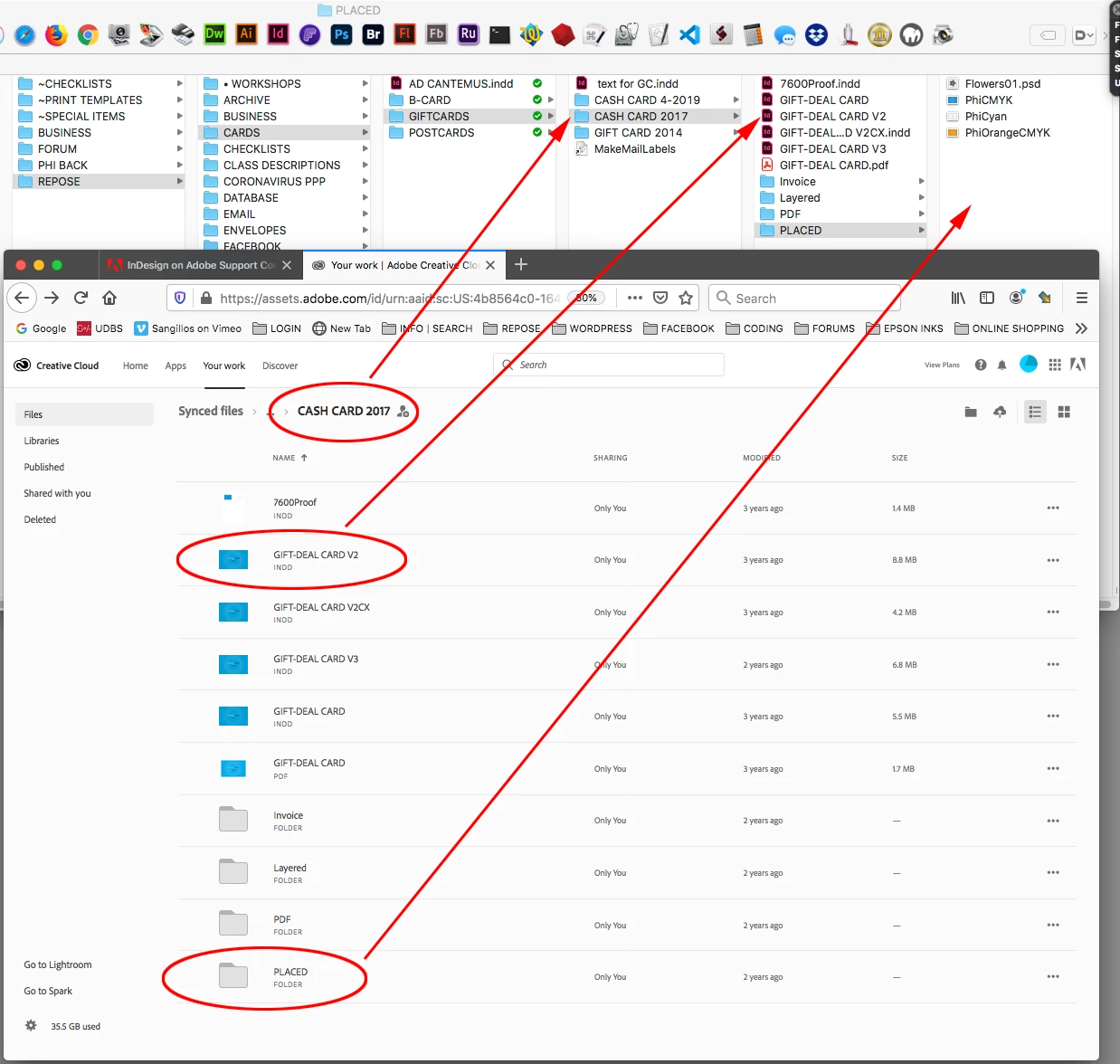
You don’t have to manually upload to the cloud server, any InDesign files and their assets put into the local user>Creative Cloud Files folder will sync to the cloud server—a modified file would get updated automatically to the cloud server and any invited user’s CCF folder. 


Here are the current folders I have sync’ing along with the web view of the Adobe server:


If I click the web folder’s share icon I can invite any number of CC users to also sync to the folder. In that case all of the collaborators would be linking to their local version of the asset.


You might not need a local server for a sync’d workflow, a project and its assets could be stored in the project leader’s Creative Cloud Files folder, and then invites would be sent to the collaborators. The ID files and assets would then automatically sync to all of the group’s CCF folders


3 replies

Participant
December 20, 2023

Our team is having the same issue as Jasmine outlined - Has anyone resolved this?

BobLevine
Community Expert
Community Expert
December 20, 2023

This is an old post and things have changed. It is doubtful you are having the same issue. Please start a new discussion with full system details and a description of your workflow.

rob day
Community Expert
Community Expert
October 20, 2020

Your CC account also has a Dropbox like sync’ing feature where a project folder can be moved into a user’s Creative Cloud Files folder, and it will automatically get sync’d to the cloud server and then to the CCF folders of user’s invited to the group. The speed of the internet connection wouldn’t matter because the group would be working on the sync’d local files—you just need to communicate so that users don’t try to work simultaneously on the same file, but it sounds like you already do that. The regular CC subscription includes 1TB of cloud space.


Known Participant
October 20, 2020

It's the links I'm struggling with. I can see how to upload Indesign docs to the cloud, but what about all the links? I need these as live folders that multiple people on different machines can access (indidually, not all together). How do I get the links on the cloud and syncing to the indesign files on the cloud? Or do the links have to stay on our existing server?

JonathanArias
Legend
October 20, 2020

you have to package the files. once you do that, indesign rememeber the location of the linked files. anybody who opens the file going forward will open indesign which goes to where the links are located. done. 

BobLevine
Community Expert
Community Expert
October 20, 2020
Dropbox and Onedrive work very, very well. I highly recommend both.

One caveat: Lock files don't sync so it's important that nobody open the same INDD files.
Known Participant
October 20, 2020

Would OneDrive work with shared folders? I thought one person had to be the 'owner' of the folder, and the rest could view it but not change it? I haven't really used OneDrive

BobLevine
Community Expert
Community Expert
October 20, 2020
You share the Onedrive folder and the recipients then add that folder to their Onedrive.

Everyone, by default has read/write access.

Again, works great, but Dropbox is also a very good choice.