
Participant
March 10, 2018
Answered

Document grid alignment to spread

  • March 10, 2018
  • 1 reply
  • 588 views

I want my document grid to align to the spine of the spread i.e. starting at the inside edge of each page. Though I have reset the ruler unit origin to 'spine' the document grid still reads across the spread from left to right, giving a different alignment on left and right pages. Any help on this would be most welcome
    This topic has been closed for replies.
    Correct answer Laubender

    Hi Will,

    it may sound counter intuitive, but change the ruler unit origin to spread and then move the zero point to top of spine.

    To move the zero point drag the cross hair at the left upper edge where the rulers meet to a new position.

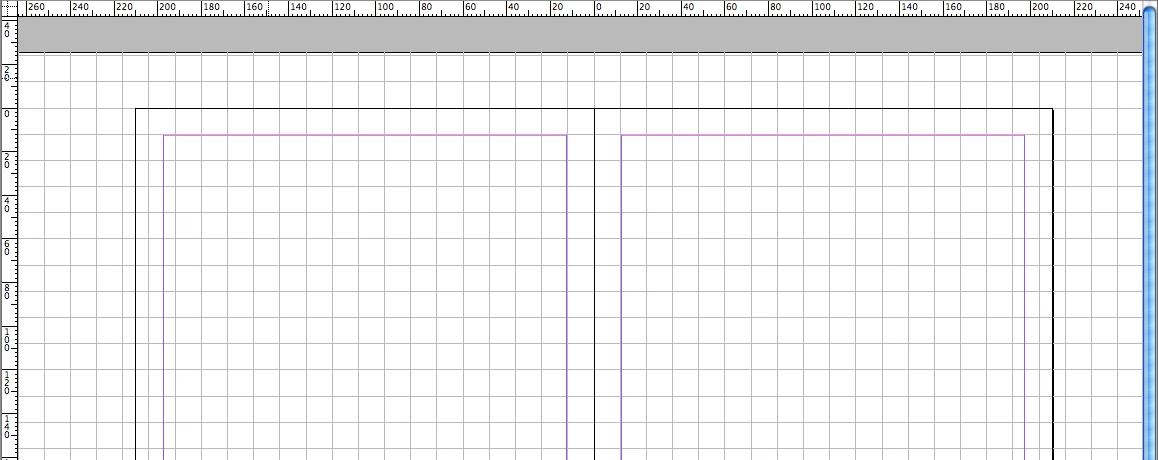
    The above screen shot is showing a double page spread with two A4 pages ( width 210 mm each ) and a document grid with 12 x 12 mm.

    Regards,
    Uwe

    1 reply

    LaubenderCommunity ExpertCorrect answer
    Community Expert
    March 10, 2018

    Hi Will,

    it may sound counter intuitive, but change the ruler unit origin to spread and then move the zero point to top of spine.

    To move the zero point drag the cross hair at the left upper edge where the rulers meet to a new position.

    The above screen shot is showing a double page spread with two A4 pages ( width 210 mm each ) and a document grid with 12 x 12 mm.

    Regards,
    Uwe

    Participant
    March 10, 2018

    Uwe, thank you so much! Best regards, Will