

jan99x
Inspiring
June 11, 2020
Answered

document preset ppi 72 or 300

  • June 11, 2020
  • 2 replies
  • 4542 views

Hi,

I make a document to be printed. Printer-man asks document with 300dpi.

Via Menu / File / Document Presets ... I view following panel:
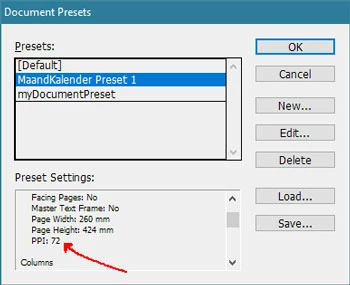
There I see -72 PPI-

Does that matter? Is that number related to screen-view 72 PPI? What does it mean for my print document for the printer ?

Is it neccecery to change that to 300 DPI? Where do I do that.


This topic has been closed for replies.
Correct answer rob day

InDesign has a Pixel measurement unit that isn’t related to image resolution. It is equal to 1/72"—1"=72ppi. The Pixel measurement unit is only useful for screen and web projects where you would need to export a page to an image format with a specific pixel dimension, and is not used for print projects.


The pages in a document are vector objects and have no resolution. Your printer wants any images placed in your document to have an output resolution of 300ppi. You can get that info by selecting a placed image and checking the Link Panel’s Link Info—the output resolution is listed as Effective Resolution. You can also use InDesign’s Preflight feature to flag images below a defined resolution.

2 replies

rob day
Community Expert
rob dayCommunity ExpertCorrect answer
Community Expert
June 11, 2020

InDesign has a Pixel measurement unit that isn’t related to image resolution. It is equal to 1/72"—1"=72ppi. The Pixel measurement unit is only useful for screen and web projects where you would need to export a page to an image format with a specific pixel dimension, and is not used for print projects.


The pages in a document are vector objects and have no resolution. Your printer wants any images placed in your document to have an output resolution of 300ppi. You can get that info by selecting a placed image and checking the Link Panel’s Link Info—the output resolution is listed as Effective Resolution. You can also use InDesign’s Preflight feature to flag images below a defined resolution.

Dave Creamer of IDEAS
Community Expert
Community Expert
June 11, 2020

As usual, Rob_Day's info is spot on. Just a slight clarification about InDesign's 72 ppi readout.


Pixels have no inherent size. Web and video only go by X (width) number of pixels by Y (height) number of pixels--it doesn't matter if the image is at 72, 300, or any other ppi. The ppi setting is only relavent for print. True web graphics programs do not even use the ppi setting. (Anyone remember ImageReady?)


The 72 ppi is just the default Adobe applies when a different ppi is not specified in the metadata of the file. (This "tradition" started way back with the first Mac screens being 72 ppi in the mid-80s.) Many other programs picked up this default, so it is commonly used as the "web setting." For example, if you open up an image in Photoshop that just came from a camera and assuming the camera does not pre-assign the ppi (some can), the image will open 72 ppi when it actually doesn't have a ppi (but may when you save it from Photoshop). 

David Creamer: Community Expert (ACI and ACE 1995-2023)
rob day
Community Expert
Community Expert
June 11, 2020

Just a slight clarification about InDesign's 72 ppi readout


I think it can be confusing if you are thinking in terms of print output, but the 72ppi listed in the Document Preset under Page information doesn’t refer to the print output resolution of the page, or its images. It’s just indicating that InDesign’s Pixel Ruler Unit always equals a static 1/72"—that value can’t be changed.


If I set my default Ruler Units to Pixels with no docs open, the Preset Settings list will look like this:


The PPI: 72 info is only useful if you are Exporting to an image format and want a specific pixel dimension—a JPEG or PNG Export Resolution of 72 ppi will export an image with a pixel dimension matching the listed 504px x 720px Page Width and Height.


jmlevy
Community Expert
Community Expert
June 11, 2020

Hi,

I never noticed this information which seems absolutely irrelevant. The important thing is that the resolution of the placed images matches with the printer requests