


- Home
- InDesign
- Discussions
- Re: High Sierra with CS4 [Branched from CS4 compa...
- Re: High Sierra with CS4 [Branched from CS4 compa...

Copy link to clipboard
Copied
InDesign CS4 worked on my Mac until macOS 10.12 Sierra after installation of the old Java 6.
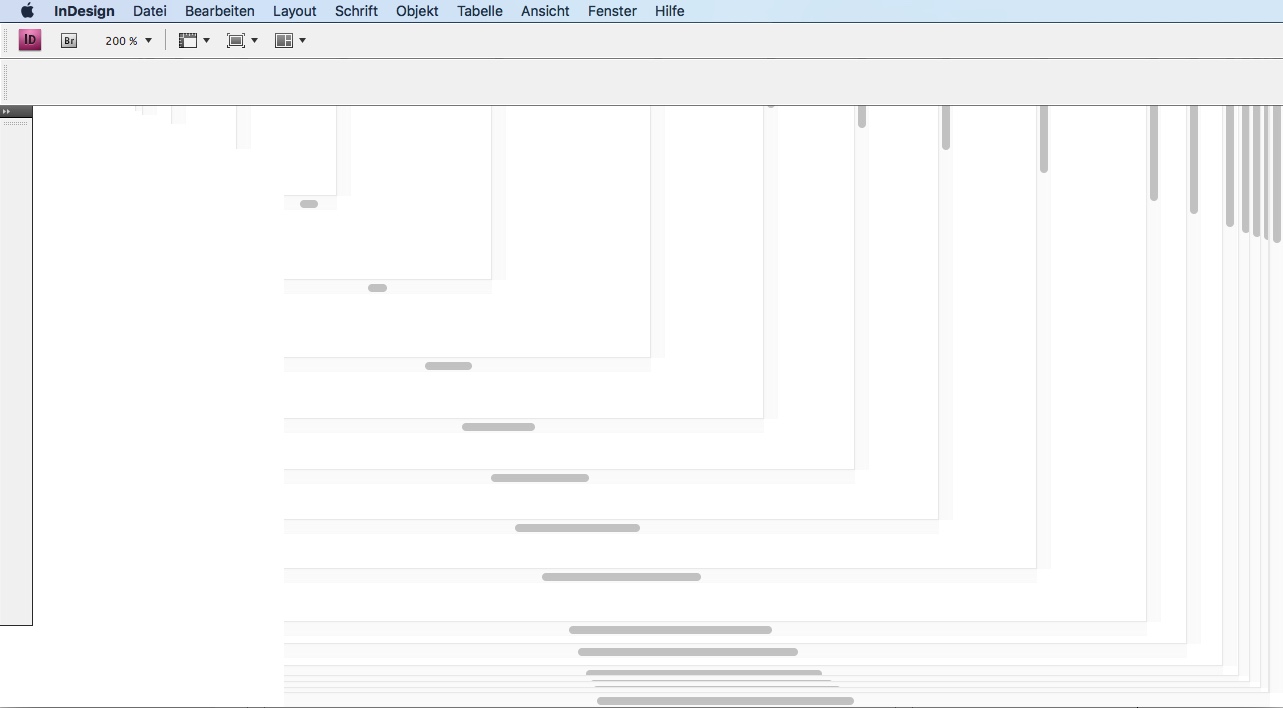
Today I upgraded to macOS 10.13 High Sierra and InDesign CS4 still starts but doesn't show the window contents anymore.
If someone knows a workaround I'll be happy to hear it. I just do dtp for private hobby things so updating to CC is no option for me.


 1 Correct answer


InDesign – up to InDesign CS6 – is not supported by Adobe running under El Capitan, Sierra or High Sierra.

 48
Replies
48
48
Replies
48


Copy link to clipboard
Copied
I think we've covered the basic points very well and are starting to swerve off topic so I'm going to lock this thread.

Copy link to clipboard
Copied
Prize was $399 which is less than what I would have to invest into an update to CS6....
Paid updates are a good business practice.
A Honda is cheaper than a BMW, is there something wrong with BMW's business practice?

Copy link to clipboard
Copied
I couldn’t agree less. If Adobe make free updates for old software when Apple break them, then Adobe are subsidising Apple. Is that even legal? No, free updates for new system compatibility are plain wrong.

Copy link to clipboard
Copied
Try Affinity Photo. The more I use it I wonder what kept me tethered to photoshop for so long. Much quicker and much more responsive. I missed upgrading to CS 6 so I'm using CS 5.5 on my MacBook Pro and have to run Yosemite or InDesign does crazy things. Shop were I work is PC and has the latest CC versions of Adobe software. No great shakes. Not much difference. Photoshop feels "clunky."
Yet, too each their own. For the first time in 15 years, I too bought QuarkXpress. Like it so far. Like that fact that I don't have to pay Adobe forever (spare me the reasoning that I can go month to month or that if I can't afford $50 a month then I should consider another business). At the end of the day, software is a tool. Nothing more. It doesn't make a crap designer a great one. I also understand the forward movement of operating systems and that software developers must move their programs forward accordingly. I don't buy a new power drill every month, or every year. I don't purchase a new refrigerator every month or every year. Being forced to do so in order to keep working with my files is scam. Imagine if Adobe offered the ability to purchase the software outright while also offering their CC subscription. Best of both worlds. True consumerism. Offering no choice forces us to make a choice and Adobe will loose more.
Once Affinity releases Publisher there will be a MASS exodus from Adobe. Just my opinion.

Copy link to clipboard
Copied
I've not heard of Affinity before. I'm going to check them out. I would love to ditch Adobe all together. I'm currently testing Capture One with the hope that I'll be able to abandon Lightroom. It's been getting slower and slower with the last update being the worst yet and the switch to "Lightroom Classic" isn't a good sign for its future. Capture One seems pretty nice and very noticeably faster. I'm not sure what to do about Premiere Pro and After Effects. DaVinci Resolve seems like it might cover a lot of it but I'm new to working with video and just don't know enough about it yet. Photoshop was the one app I didn't think could be replaced so it's nice to see there might be options after all.
Copy link to clipboard
Copied
After 20 + years of using Photoshop, it was a bit strange attempting to do the same work with a different program. With Affinity, there's a lot of familiarity (Palettes, many similar tools -though the way the function is slightly different in some cases, for the better), and I think the most frustrating part of acclimation is getting your bearings. Habit makes you seek the same functions under familiar menu headings, but what you're looking for isn't always in THAT location. Once you're comfortable navigating the program and feeling how the tools work (in my opinion, better), I think you'll find that Affinity Photo is as good if not better than Photoshop. They do offer a trial version and at $50 for the software, there's not much to lose.
I don't work for Affinity or Adobe or any software developer, nor am I beta tester. I was just looking for a replacement for Photoshop (actually the whole Adobe Creative Suite) and I literally stumbled upon Affinity. I'm a mostly Freelance Graphic Designer and don't feel I have to replace my tools every month, year, whatever. I still have the same T-Square and triangles that I bought when I was in Art School. I still have airbrushes I bought 35 years ago.
Copy link to clipboard
Copied
I still have the same T-Square and triangles that I bought when I was in Art School. I still have airbrushes I bought 35 years ago.
And someone would pay you to use them?
Copy link to clipboard
Copied
If the need arose, sure. Still use them to cut and score mock-ups when a client asks for one.

Copy link to clipboard
Copied
dannygarber
”…I’m a mostly Freelance Graphic Designer and don't feel I have to replace my tools every month, year, whatever. I still have the same T-Square and triangles that I bought when I was in Art School. I still have airbrushes I bought 35 years ago….I don't purchase a new refrigerator every month or every year. Being forced to do so in order to keep working with my files is scam. Imagine if Adobe offered the ability to purchase the software outright while also offering their CC subscription. Best of both worlds. True consumerism. Offering no choice forces us to make a choice and Adobe will loose more.”
rob day:
”This is hardly a new problem—it's just bad practice to upgrade an OS without first considering the cost of needed software upgrades. The idea that if I pay upfront for an application it should run on any future OS is silly—that's never been true. I was happy with Quark 4, paid $800 for it and still have the installation disks, but it wont install or run on any version of OSX.”
Just wait till Bob Levine gets his opinion on both yours revolutionary ideas.
Copy link to clipboard
Copied
My ideas are not revolutionary. Truncating my post in your re-post doesn't help. Affinity will make a larger dent in Adobe once they release their page layout program. The hesitation to drop Adobe products is because most will not re-adopt Quark and until there is a viable alternative they'll stay put. Many will never leave. Kudos to all. That's called choice. I've read where many on this forum use older versions (pre-dating CC) of Adobe CS running on older operating systems. Nothing wrong with that. For those trying to run somewhat incompatible versions on the latest OS (whether that be Mac or PC), good luck. If it works, great, if not, the square peg was not meant to go in the round hole. Perhaps I'd be inclined to keep up with Adobe products if they offered options for purchase in conjunction with their subscription service. I know many businesses and colleges that have NOT stepped up to CC because of costs. I've read the pros and cons and other posts regarding this and being belligerent or condescending with comments that amount to "grow up/this is the way of the future/you're not a professional/etc.," only serve to offend. Ivan Chermayeff passed away on December 2nd and he never used computers. To say if you don't accept Cloud-based subscription software then you're not a professional or serious designer is an insult, no matter what language or phrasing you write to espouse that point. I've had to use Publisher at various points in my life at places I've worked, and while I personally hate it, I managed to get what I wanted out of it. Having choices, whether it is which program you use or by what means you pay for it is the point. Not having a choice is shortsighted, and saying otherwise is pure Board Of Directors/Shareholders talk. Spare me the business talk because that is a hollow refrain and it's been said ad-nauseum on these forums. I don't know Bob Levine but I've read his comments. The helpful ones are brilliant. The common sense ones are just that. The posts that have the tone of sarcasm and derision about not using all things CC, I think, don't help those that come here with legitimate problems, (finance being one of them) seeking advice and possible solutions and not absolute black and white without grey areas.
Just my opinion. Happy Holidays to everyone.

Copy link to clipboard
Copied
I have had the same issue with my CS4 apps in High Sierra. For those of you that use Photoshop and Illustrator, there are 2 programs called Affinity Photo and Affinity Designer that are very comparable and are available in the macOS App Store for $50 each. They also support PSD and AI file import. Both of the apps are available for Mac and Windows, and Affinity Photo is available for iPad with Pencil support. I have found them to be great replacements for Photoshop and Illustrator. I haven't found a replacement for InDesign. Thankfully, my layout needs are not very extensive, so I am using Pages until I can find something better that's not pricey.

Copy link to clipboard
Copied
As far as I can tell, Affinity Photo is still not scriptable, which is essential for the jobs I do. Otherwise I'd give it a try. (AppleScript that is. Macros/actions are not the same thing.)


Copy link to clipboard
Copied
Moving to InDesign
Copy link to clipboard
Copied
@Bani This issue is not specific to InDesign, that was just an example, its happening in all the CS4 apps.
Copy link to clipboard
Copied
InDesign – up to InDesign CS6 – is not supported by Adobe running under El Capitan, Sierra or High Sierra.

Copy link to clipboard
Copied
Mine worked in El Capitan, not High Sierra
Copy link to clipboard
Copied
Mine works in Sierra upgraded from El Cap, but not clean installed.
Copy link to clipboard
Copied
What does "not clean installed" mean. I just need InDesign and will have to get it off the Adobe website. My installation disk is not working.
Copy link to clipboard
Copied
When I upgraded from El Capitan to Sierra, I just did an upgrade. I did not erase hard drive, installed Sierra, and then installed the apps.
Copy link to clipboard
Copied
Should I reinstall all of CS4 or just the damaged Indesign? Thank you for your help so far.

Copy link to clipboard
Copied
I simply installed the Java update for Mac OSX and restarted and I am up and running CS4 Indesign again - after being down for two weeks this seems to be the fix - running high sierra 10.13.1
Copy link to clipboard
Copied
EDIT: Sorry, I somehow didn't read HIGH Sierra. My instructions in the link are for vanilla Sierra. But I would be curious if the same technique of installing empty java folders works.
That old Java version supposedly has security issues. But you don't have to install Java to get CS4 working. See my posts (#12 and #13) and references here:
Copy link to clipboard
Copied
Sure, paid updates. CC2018 is the current one.

Copy link to clipboard
Copied
I work for a web hosting company and we have a client using Contribute and upgrade to High Sierra killed her FTP connectivity.
I tried so much via a chat session and in the end remote connected only to discover nothing I did would work. At one point I was able to get a server error and it showed the server name with
I cleared that out and we could then see a connection but always complained about username and password is invalid and it was not. I was swearing (client was in chat so they could not hear me at this point and I rarely get this rattled) I then tried to start from scratch, removed the connection and added a new one with a new username and password, username format was not something@domain.com, however, the logs on the server side were something
I then switched back to the account username that had no @domain and we them sat a valid connection and valid username. Password, however, would never work.
We had a ? in the password so I switched to an alphanumeric password and still no go. Went down to plain FTP so as to not complicate matters and still no luck.
I would be very careful if you consider upgrading, have a full backup and a means to roll back your MacOS.

-
- 1
- 2

Get ready! An upgraded Adobe Community experience is coming in January.
Learn more
 AdChoices